


03/12/18
Overview
The air traffic control (ATC) uses data from a Mode S (mode select) transponder system to monitor the location and identification for that aircraft. The transponder system transmits aircraft identification and altitude data in response to interrogation signals from the systems that follow:
- ATC radar-beacon system (ATCRBS) ground stations
- Aircraft that operate traffic alert and collision-avoidance systems (TCAS)
The ATC transponder system uses a traffic surveillance system (TSS) unit with transponder (ATC No. 1) and a Mode S transponder (ATC No. 2). The TSS unit has both the TCAS and transponder functionality. Only one transponder can operate at a time.
The transponder receives pulse-coded interrogation signals, at a frequency of 1,030 MHz, from ATCRBS ground stations or aircraft that have TCAS systems. The transponder transmits a pulse-coded reply signal, at a frequency of 1,090 MHz, that gives the aircraft identification and altitude.
The ATC transponder system is controlled through the display control panel (DCP) and the radio menus that show on the multi-function displays (MFDs). The system can also be controlled with the control display unit (CDU). The operating modes and status of the ATC transponder system show on the MFD and on the CDU.
01/25/16
Air Traffic Control (ATC) Transponder
The ATC transponders are installed in the ATC transponder trays in the LH and RH equipment racks. Each transponder has two 60-pin electrical connectors and two coaxial connectors at the rear of the unit. At the front, the ATC transponder has a handle to help remove the unit from its mounting tray. Each Mode S transponder weighs 8.5 lb (3.86 kg).
The Mode S transponders are solid-state components. Each transponder operates as a usual ATCRBS transponder, but it can also transmit identification code data for a specific aircraft. This also lets the transponder receive interrogation signals with identification codes from ground stations or from other aircraft that have TCAS systems.
The Mode S transponder operates in STBY (standby) mode, Mode A, Mode C, and Mode S. The transponder receives interrogation signals in all four modes, but it cannot transmit reply signals in standby mode. In Mode A, the transponder transmits reply signals that give the aircraft ATC identification code.
In Mode C, the transponder transmits reply signals that give the aircraft identification code and altitude data.
In Mode S, the transponder transmits reply signals to interrogations from ground stations and other aircraft that have TCAS systems. The Mode S reply signals have a four-bit preamble (for identification) and a data block of 56-bits or 112-bits.
The MFD radio menu and ATC/TCAS CONTROL submenu that show at the bottom of the MFD, are the primary transponder and TCAS controls. The pilot/copilot uses the display control panel (DCP) controls to change the ATC control functions and ATC identification code.
The Mode S transponders do continuous self-tests. The results of these self-tests automatically supply fault data to the maintenance diagnostic computer (MDC). The Mode S transponder sends this data to the MDC through the I/O concentrator (IOC) units installed in the integrated-avionics processor system (IAPS).
The 28 VDC power from the L ESS BUS energizes ATC No. 1, through circuit breaker CB1-A5. The 28 VDC power from the R MAIN BUS energizes ATC No. 2, through circuit breaker CB2-A5.
01/25/16
Air Traffic Control (ATC) Transponder Tray
The ATC transponder trays hold the ATC transponders in the equipment racks. ATC No. 1 is installed in the tray attached to the LH equipment rack. ATC No. 2 is installed in the tray attached to the RH equipment rack.
Each ATC transponder tray has two hold-down clamps that lock the transponder into the tray. The ATC transponder tray has receptacles at the rear that connects to the ATC transponder interface connectors.

03/13/18
Antenna
Each Mode S transponder connects to a top and bottom L-band omnidirectional antenna.
The top antennas are installed at FS397.50 (aft of the passenger door) 6 in (15.24 cm) on the left and right sides of the fuselage center line. The bottom antennas are installed at FS300.50 (forward of the passenger door) 6 in (15.24 cm) on the left and right sides of the fuselage center line.
The top left and bottom right antennas connect to the ATC No. 1. The top right and bottom left antennas connect to the ATC No. 2. All four of the antennas are 1/4-wave monopoles that are vertically polarized.
The dual diversity-antenna installation prevents blockage of the radiation pattern from other aircraft or the ground radar. The transponder uses the antenna (top or bottom antenna) that is in the best position to transmit. A switch in the transponder makes the antenna selection.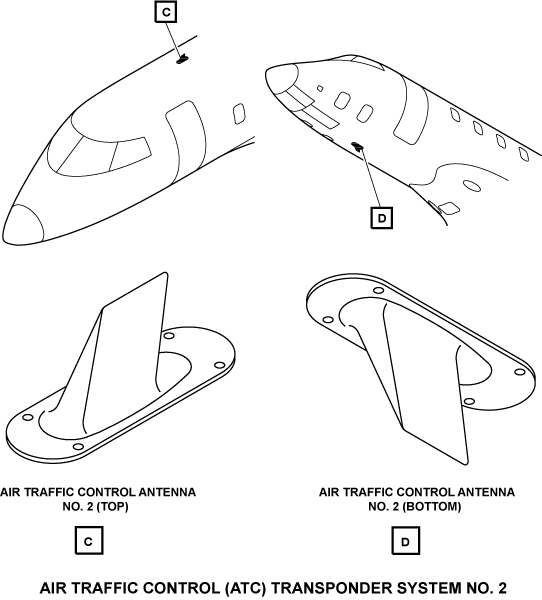
Transponder ID Switch
There are two ATC-transponder ID switches installed in the flight compartment: one in the pilot control wheel and the other in the copilot control wheel. The ATC transponder ID switch is used by the pilot/copilot to cause the ATC transponder to transmit the aircraft identification (ID) code.
The ATC-transponder ID switch is a momentary-action type pushbutton which has an adjacent ID label. When this ID pushbutton is pushed, the ATC transponder transmits the identification code and a related annunciation (a cyan ID display on the MFD radio menu and a cyan IDENT display on the CDU) shows to the flight crew, for approximately 18 seconds.

01/25/16
System Operation
ATC Transponder Functions
The ATCRBS is a ground-based surveillance system that shows the location and identification of aircraft in the airspace, on a plan-position-indicator (PPI). This indicator lets the ground controller monitor the position and altitude of aircraft that have Mode S transponder systems.
The ATCRBS includes a secondary surveillance radar (SSR) that operates in relation with the aircraft transponders. The SSR transmits and receives coded pulses to/from the aircraft transponders to know the aircraft identity and altitude. Aircraft that have TCAS systems use the data link function of Mode S transponders for air traffic control and aircraft separation assurance (ASA) functions.
To operate with the SSR and the TCAS systems, the ATC transponder:
- Receives the interrogation pulse signals from the SSR and other aircraft with a 1,030 MHz receiver system
- Transmits the reply pulse signals with a 1,090 MHz transmitter system
- Transmits the reply pulse signals with a 1,090 MHz extended squitter
- Controls (with a processor system ) the input/output interfaces and the routing of all the received and transmitted signals
- Changes the external power to different internal power levels and monitors power supply integrity to the transponder system
Transponder Modes
Standby Mode
In standby mode, the Mode S transponder receives interrogation signals but does not send reply signals. The transponder mode of operation automatically changes from ON to STBY during a landing. The proximity sensor electronic unit (PSEU) senses touchdown with the weight-on-wheels (WOW) switch in the landing gear compartment.
When touchdown occurs, the PSEU supplies a ground to the landing gear input of the transponder. This input is high when the aircraft is airborne.
Mode A
In Mode A, the Mode S transponder receives interrogation signals from ATCRBS ground stations and from other aircraft that have TCAS systems. The transponder transmits reply signals that give a four-digit ATC identification code. The ATC identification codes use only the digits 0 through 7. There are 4096 possible ATC identification codes in the 0000 through 7777 range. The emergency ATC codes are 7500, 7600, and 7700. The pilot/copilot must not use these codes unless there is an emergency.
Mode C
In Mode C, the transponder transmits reply signals that contain the ATC identification code and encoded altitude data.
Mode S
The transponder has more ATCRBS functions when it operates in Mode S. The Mode S operation lets ground controllers or aircraft that have TCAS systems send interrogation signals to specified aircraft. The Mode S transponder on the aircraft that receives the interrogation signal automatically sends a reply to the Mode S ATCRBS or TCAS interrogation. No pilot/copilot procedure is necessary.
The Mode S transponders continuously transmit an aircraft identification code at a 1 Hz rate. The local regulatory agency gives each aircraft an identification code that is specific to the aircraft registration number. The wiring of the Mode S strap inputs causes the Mode S transponders to transmit this code. When the Mode S transponder knows the identification code of an aircraft, the Mode S transponder can send an interrogation directly to that aircraft.
When the Mode S transponder receives an ATCRBS or Mode S interrogation, it sends a reply in Mode S format. This reply includes the aircraft identification code.
The Mode S automatic dependent surveillance-broadcast (ADS-B) capability gives extended squitter transmitting aircraft information to the ATC. The ADS-B gives accurate position reports using GPS provided latitude and longitude data with integrity every second.
When Mode S transponders receive a valid identification code in a reply, the aircraft identification code and location is added to a list. The ground stations and Mode S transponders use this list to monitor the aircraft in their airspace and to keep in communication with those aircraft.
Mode Selections
Operation mode selection for the ATC transponder and the TCAS are done with the same control on the MFD and on the CDU. The ATC/TCAS CONTROL submenu, on the MFD (together with applicable DCP controls), supplies the primary control for the selection of the ATC/TCAS operation mode. The ATC/TCAS CONTROL page supplies a secondary control for the same mode selection function.
For the ATC transponder operation, select one of the following:
- ATC transponder to standby (STBY)
- Altitude report function to off (ALT OFF)
- Altitude report function to on (ALT ON)
Software control of the transponder mode selection makes sure that only one transponder can be on at a time. The altitude report function of the ATC transponder is active, except when the ATC/TCAS mode selection is set to STBY or ALT OFF.
When the transponder mode selection is STBY, the transponder receives interrogations but cannot transmit replies. The transponder that is on, automatically changes to STBY mode when the proximity sensor electronic unit (PSEU) senses weight-on-wheels (the LANDING GEAR discrete goes low).
While the ATC transponder is in STBY mode, the pilot/copilot can use the MFD radio display (MFD radio menu or ATC/TCAS CONTROL submenu, together with applicable DCP controls) or the CDU (with the TUNE or ATC/TCAS CONTROL page), to change the ATC identification code.
When the transponder mode selection is ALT OFF, the transponder operates in Mode A. During Mode A operation, the transponder gives only the ATC identification code when it transmits a reply to an interrogation. When the transponder mode selection is ALT ON, the transponder operates in Mode C. During Mode C operation, the transponder gives the ATC identification code and aircraft altitude when it transmits a reply to an interrogation.
01/25/16
Controls and Displays
The pilot/copilot controls the ATC transponder system with the two possible procedures that follow:
- With the multifunction display (MFD) radio menus and the display control panel (DCP) controls
- With the control display unit (CDU)
MFD Controls and Displays
The ATC/TCAS primary controls and displays are supplied through the MFD radio menu and the ATC/TCAS CONTROL submenu. The RSP switches below must be set to the following positions for the radio menu to show on the MFD:
- TUNE—NORM, MFD ONLY, or COM1 121.50 position
- LEFT DISPLAYS—NORM position
- RIGHT DISPLAYS—NORM position
The AIR DATA, ATT/HDG and EICAS switches, on the RSP, have no effect for the MFD radio menu to show.
With the TUNE switch in the MFD ONLY or COM1 121.50 position, only the MFDs can tune the radios. With the TUNE switch in the NORM position, the MFDs are the primary radio controls, but the CDU can control the radios through the MFDs. In this mode of operation the MFDs use the tune data from the CDU to tune the radios.
If the LEFT DISPLAYS or RIGHT DISPLAYS switch is in a reversion position (MFD REV or PFD REV), the opposite-side MFD controls the transponder for that side. The same-side MFD does not show a radio menu when the opposite-side MFD controls the radios.
Note:
In the annunciation descriptions that follow, large cyan letters usually show active conditions or mode selections. The annunciations in small white letters usually show inactive conditions or mode selections. The annunciation colors that are not white or cyan are given in the annunciation description.
MFD Radio Menu
The MFD radio menu shows:
- Active ATC identification code
- Active ATC (ATC1 or ATC2) transponder
- Ident status annunciation (ID)
- Active mode
- Active TCAS surveillance altitude limits
Note:
The ATC/TCAS section of the radio menu controls the transponder and TCAS radios.
The DCP MENU button moves the menu selection box from function to function on the MFD radio menu. To change the value or contents of a function, the menu selection box must be around that function. With the menu selection box around a control function, the following DCP controls change the control function:
- TUNE button
- DATA button
- PUSH SELECT pushbutton
Changes to the control function must start in 20 sec or less. If the control function does not change (in 20 sec or less), the menu selection box moves back to the last-tuned VHF transceiver (COM1, COM2, or COM3) or HF transceiver (HF1).
The TUNE buttons change the ATC identification code. The coarse TUNE button changes the most significant digits of the code. The fine TUNE button changes the least significant digits of the code. The DATA button changes numeric values (but not the ATC identification code) or contents of the control function in the menu selection box. When the menu selection box is around a numeric value, pushing the< PUSH SELECT button sets the numeric value. If the menu selection box is around a nonnumeric function, the PUSH SELECT button changes the contents of the control function.
The ATC identification code changes from green to white as the pilot/copilot turns the TUNE buttons. The ATC identification code changes from white to green after the pilot/copilot pushes the DCP PUSH SELECT button to set the new code.
The ATC identification code is automatically set, if the TUNE buttons are inactive for 3 sec or more. The ATC identification code changes to yellow for the following conditions:
- Echo data word from the transponder shows that the ATC identification code is different from the code on the radio menu
- Echo data word shows that no computed data is available
- Transponder status bit in the echo data word is set to the fail condition
- Echo data word from the transponder stops
The ATC identification code also changes to white when the active transponder is set to standby (STBY) mode.
If a transponder (XPDR) fail condition occurs, a yellow XPDR FAIL annunciation replaces the active mode annunciation (but not STBY) on the MFD radio menu and on the ATC/TCAS CONTROL submenu. The ATC diagnostic word data gives the serviceable condition of the transponder.
The XPDR FAIL annunciation also shows on the radio menus if the MFD does not receive the ATC diagnostic word for 3 sec or more. A cyan ID annunciation shows on the radio menu immediately to the right of the ATC identification code. It shows when an ID pushbutton is pushed. This same annunciation also shows on the ATC/TCAS CONTROL submenu.
ATC/TCAS CONTROL Submenu
The ATC/TCAS CONTROL submenu contains more ATC and TCAS control functions than the MFD radio menu. To show the ATC/TCAS CONTROL submenu, the pilot/copilot must do the steps that follow:
- Move the menu selection box to an ATC/TCAS control function on the MFD radio menu
- Push the RADIO pushbutton on the DCP
The ATC/TCAS CONTROL submenu uses the DCP TUNE buttons, DATA button, and PUSH SELECT pushbutton to change the ATC and TCAS control functions. The procedures that change the control functions on the ATC/TCAS CONTROL submenu are the same as those that the MFD radio menu uses.
Note:
The ATC/TCAS CONTROL submenu controls the transponder and TCAS radios.
The ATC/TCAS CONTROL submenu automatically changes back to the MFD radio menu after 20 sec if no changes are made.
The ATC/TCAS CONTROL submenu changes back to the MFD radio menu immediately if the pilot/copilot pushes the DCP RADIO pushbutton.
The menu selection box automatically goes to the last-tuned VHF transceiver (COM1, COM2, COM3) or HF transceiver (HF1) when the ATC/TCAS CONTROL submenu changes to the MFD radio menu.
The ATC/TCAS CONTROL submenu includes two display areas: a narrow display area (ATC/TCAS) on the left side of the MFD display, and a wider display area (ATC/TCAS CONTROL) to the right side of the MFD display.
The ATC/TCAS display area shows the same data as the ATC/TCAS display area of the MFD radio menu. The ATC/TCAS CONTROL display area shows more data for the ATC transponder and TCAS systems.
Note:
In the annunciation descriptions that follow, large cyan letters usually show active conditions or mode selections. The annunciations in small white letters usually show inactive conditions or mode selections. The annunciation colors that are not white or cyan are given in the annunciation description.
The ATC/TCAS CONTROL submenu shows the following displays/selections:
- TRAFFIC legend with REL/ABS selection
- Other traffic symbol (open diamond) with ON/OF selection
- ADC1 (or ADC2) ALT legend with an altitude indication
- ATC1/ATC2 selection
- REPLY legend with an adjacent box
- TEST display
- MODE displays
- ABV, NORM, and BLW selections
The TRAFFIC legend and REL/ABS selection displays show the status of the TCAS intruder traffic altitude mode:
- REL (relative) mode shows the intruder traffic altitude as relative altitude
- ABS (absolute) mode shows the intruder traffic altitude as absolute altitude
The cyan open diamond is a symbol for the TCAS other traffic (OT) (always shown adjacent to the ON legend). The adjacent ON and OFF legends show the status of OT traffic display.
When ON selection is active (ON large and cyan and OFF small and white), other traffic is shown on the TCAS display. When OFF selection is active (ON small and white and OFF large and cyan), other traffic is not shown on the TCAS display.
The ADC1 (or ADC2) and ALT (altitude) displays identify the air data source that supplies altitude data to the active transponder. This annunciation shows only on the ATC/TCAS CONTROL submenu.
The transponder altitude indication data shows only on the ATC/TCAS CONTROL submenu. The altitude data is green for all ATC/TCAS modes but ALT OFF. When the transponder operates in ALT OFF mode, four white dashes show in the altitude data field. The white dashes also show in the altitude data field if the altitude data becomes invalid while the transponder operates in the modes that follow:
- TA/RA
- TA ONLY
- ALT ON
The ATC1/ATC2 shows the active ATC transponder. The active selection shows in cyan and in large size. The other annunciation shows in white and in smaller size.
The REPLY legend on the ATC/TCAS CONTROL submenu is white. A white box is immediately to the right side of the REPLY legend. The REPLY box is filled with green when the transponder transmits a reply to an interrogation.
The TEST display gives the status of the ATC/TCAS self-test function. The TEST display shows only on the ATC/TCAS CONTROL submenu. Test mode is active when the TEST display is cyan and inactive when it is white.
The MODE displays show the ATC/TCAS operation modes that follow:
- STBY
- TA/RA
- TA ONLY
- ALT ON
- ALT OFF
The STBY (standby) annunciation shows that the active transponder and TCAS are in standby mode at the same time. TA/RA (traffic and resolution advisories) and TA ONLY (traffic advisory only) are TCAS mode annunciations. ALT ON and ALT OFF are transponder mode annunciations.
The ABV (above), NORM (normal), and BLW (below) displays give the status of the TCAS other traffic (OT) altitude limits selection. The altitude limits are related to the ABV, NORM, and BLW selections as follows:
- NORM—2,700 ft above and below the aircraft
- ABV—9,900 ft above and 2,700 ft below the aircraft
- BLW—2,700 ft above and 9,900 ft below the aircraft
- ABV and BLW—9,900 ft above and below the aircraft


CDU Controls and Displays
The ATC/TCAS secondary controls and displays are supplied through the CDU TUNE and ATC/TCAS CONTROL pages.
When the TUNE switch on the RSP is set to the NORM position, the CDU can control the transponder with the MFD radio control function. When the TUNE switch on the RSP is set to the CDU ONLY position, only the CDU can control the transponder. The radio menus do not show on the MFDs when the TUNE switch on the RSP is set to the CDU ONLY position.
TUNE Page
The TUN key on the CDU keyboard, when pushed, shows the radio TUNE page on the CDU display. From the CDU TUNE page, the pilot/copilot can change the ATC identification code or go to the ATC/TCAS CONTROL page.
The white ATC legend adjacent to the ATC line-select key (fifth key from top, on the left side of the TUNE page) shows the active transponder (ATC1 or ATC2). The digit to the right of the ATC legend (1 or 2) shows which transponder is in operation. A cyan ALT OFF annunciation will show immediately to the right of the ATC legend field (on the TUNE page) if the altitude report mode is set to off. No annunciation is shown when the altitude report mode is set to on.
The ATC identification code shows below the ATC1 (or ATC2). REPLY or STBY annunciation shows to the right of the beacon code that is in operation. STBY shows when ATC operation mode is set to standby (STBY) mode. REPLY shows when the transponder sends a signal back to an interrogation. To change the ATC identification code from the CDU TUNE page, the entry of a new code in the scratchpad display is necessary. Valid ATC identification codes include all 4-digit numbers in the range of 0000 through 7777 that do not use the digits 8 or 9. After entry of the code, the pilot/copilot pushes the ATC line-select key (the fifth line-select key on the left side of the CDU TUNE page) to move the new code to the ATC identification code field. If the ATC identification code is not valid, the ATC identification field will not set the code. An invalid ATC identification code will cause the message INVALID CODE to show in the scratchpad display for 1 sec.
The annunciations that follow can show immediately to the right of the ATC identification code, on the TUNE page:
- A cyan IDENT annunciation shows when the IDENT function is active. The IDENT function stays active for approximately 18 sec after the pilot/copilot pushes one of the ID pushbuttons. The IDENT annunciation is white when the IDENT function is inactive.
- A green REPLY annunciation shows when the transponder sends a reply to an interrogation while the IDENT function is inactive. If the transponder sends a reply to an interrogation while the IDENT function is active, only the cyan IDENT annunciation shows.
- A yellow XPDR FAIL annunciation shows when the ATC diagnostic word gives a transponder fail-condition indication. This annunciation also shows if the CDU does not receive an ATC diagnostic word for more than 3 sec.
The ATC/TCAS control line-select key, when pushed, changes the ATC/TCAS mode selection to the next mode selection (STBY, TA/RA, TA, ALT ON, or ALT OFF).
If the scratchpad on the TUNE page is empty, and the ATC line-select key is pushed, the ATC/TCAS CONTROL page will show. Also, the ATC/TCAS CONTROL line-select key, when pushed twice, gives access to the ATC/TCAS CONTROL page.

ATC/TCAS CONTROL Page
The ATC/TCAS CONTROL page of the CDU controls the transponder and TCAS radios. Only the CDU control and operation of the transducer is given in this section.
From the ATC/TCAS CONTROL page, the pilot/copilot can control or change the ATC functions that follow:
- ATC identification code selection
- Identification code transmit function
- Flight identification (FLIGHT ID) code selection
- Mode selection (STBY/TA/RA)
- Altitude report selection (ALT ON/OFF)
- Start TEST mode
The ATC transponder in operation is set on the ATC/TCAS CONTROL page. The white ATC legend, above the ATC identification code on the ATC/TCAS CONTROL page, shows the active transponder (ATC1 or ATC2). The ATC1 source annunciation shows that the CDU controls the No. 1 (left side) transponder. Only one transponder is in operation at one time.
The active transponder is controlled through the different line-select lines on the left side and right side of the ATC/TCAS CONTROL page. The ATC ident-code line-select key, on the left side of the ATC/TCAS CONTROL page, moves the contents of the scratchpad display to the ATC identification code field.
The IDENT-transmit line-select key, on the left side of the ATC/TCAS CONTROL page, is an internal ID switch (it does the same function as the pilot or copilot ID pushbutton). The ATC1/ATC2 line-select key, on the left side of the ATC/TCAS CONTROL page, controls selection of ATC1 or ATC2 as the active transponder.
The FLIGHT ID line-select key, on the left side of the ATC/TCAS CONTROL page, lets the pilot/copilot enter/change the flight identification code (option). The FLIGHT ID display is green when the code entry and the related radio-echo code are the same. It changes to yellow when the code entry and the related radio-echo code are different.
The altitude display-mode line-select key controls if the ALT TAG display shows relative (REL) altitude or absolute (ABS) altitude. When the ALT TAG is REL, the altitude difference between the intruder aircraft and the interrogation aircraft shows from -99 to +99 hundred feet. When the ALT TAG is ABS, the altitude of the intruder aircraft above sea level shows from 000 to 999 hundred feet. The OT traffic display line-select key controls if other traffic shows on the TCAS traffic display. When the OT TRAFFIC function is OFF, the TCAS removes all OT traffic targets from the display. When the OT TRAFFIC function is ON, all types of traffic targets show on the display. The ATC/TCAS control line-select key sets the ATC/TCAS operation mode in the sequence that follows:
- STBY
- TA/RA
- TA
- ALT ON
- ALT OFF
In STBY mode, the following TCAS functions occur:
- TCAS does not identify intruder aircraft in the surveillance area
- Resolution advisories do not show on the vertical speed display of the PFD
- TCAS transceiver does not reply to interrogations from other aircraft with TCAS equipment
The TCAS automatically goes to standby mode if the Mode S transponders are off, in standby mode, or in altitude mode.
In the TA/RA mode, the TCAS identifies the TA and RA traffic targets. For RA traffic targets, the TCAS gives visual and aural message warnings together with vertical guidance commands. In the TA mode, the TCAS identifies only the TA traffic. The TCAS gives visual and aural message warnings when TA traffic is in the surveillance area.
The ALT ON and ALT OFF modes are for the transponder altitude-report function. The altitude report mode is in operation in TA/RA, TA, and ALT ON. It is not in operation when mode selection is STBY or ALT OFF.
The ATC/TCAS TEST line select key, starts the ATC/TCAS self-test. TEST operation stops after approximately 10 sec. The TEST operation does a check of the units and data that follow:
- TSS and transponder unit
- Mode S transponder
- Radio altimeter
- Heading data
- TCAS displays
The extended test line select key sets the EXT TEST mode to ON or OFF. The aircraft must be on the ground to use the extended test mode. When EXT TEST is set to ON, the extended test mode starts and continues operation until EXT TEST is set to OFF. The extended test mode also stops if the TUN key on the CDU is pushed to change the CDU display back to the TUNE page.
The OT traffic altitude limits line select keys, on the right side of the ATC/TCAS CONTROL page, set the following altitude limits for the TCAS surveillance area:
- NORM—2,700 ft above and below the aircraft
- ABOVE—9,900 ft above and 2,700 ft below the aircraft
- BELOW—2,700 ft above and 9,900 ft below the aircraft
- ABOVE and BELOW—9,900 ft above and below the aircraft
The different displays on the ATC/TCAS CONTROL page, show operational status and the active selections for the ATC transponder and the TCAS systems.
Note:
The annunciation related to the ATC transponder system (and to the TCAS) show in different colors, and in different size to show status and selection conditions. Large cyan annunciations usually show active conditions or mode selections. Small white annunciations usually show inactive conditions or mode selections. The annunciation colors that are not white or cyan are given in the applicable annunciation/display description.
In the display area adjacent to the left side line-select keys, the CDU display shows (from top to bottom):
- ATC identification code
- IDENT transmit status
- Active transponder selection (ATC1/ATC2)
- Flight identification (FLIGHT ID) number
- Altitude mode selection (REL/ABS)
- Traffic display mode selection (ON/OFF)
The ATC identification code (adjacent to the top left line-select key) is usually green. The ATC identification code changes to yellow if the echo data from the transponder stops or does not agree with the ATC identification code entry (on the TUNE page and on the ATC/TCAS CONTROL page). The ATC identification code is white when the transponder is in standby (STBY) mode. The annunciations that follow can show immediately to the right of the ATC identification code on the ATC/TCAS CONTROL page:
- IDENT
- REPLY
- XPDR FAIL
The applicable annunciation shows for the conditions that follow:
- A cyan IDENT annunciation shows when the IDENT function is active. The IDENT function stays active for approximately 18 sec after the pilot/copilot pushes one of the ID pushbuttons. The IDENT annunciation is white when the IDENT function is inactive.
- A green REPLY annunciation shows when the transponder sends a reply to an interrogation while the IDENT function is inactive. If the transponder sends a reply to an interrogation while the IDENT function is active, only the cyan IDENT annunciation shows.
- A yellow XPDR FAIL annunciation shows when the ATC diagnostic word gives a transponder fail-condition indication. This annunciation also shows if the CDU does not receive an ATC diagnostic word for more than 3 sec.
In the top-center display area, the CDU display shows:
- The air-data source selection
- The altitude (ALT) data
A cyan ADC1 or ADC2 annunciation shows on the ATC/TCAS CONTROL page between the IDENT and TEST displays. This annunciation shows the altitude data source that the active transponder uses.
When the transponder operates in Mode C, green altitude data shows on the ATC/TCAS CONTROL page immediately above the ADC1 or ADC2 source annunciation. If the echo data from the transponder stops or no-computed-data is available, white dashes replace the green altitude data. In the display area adjacent to the right side line-select keys, the CDU display shows (from top to bottom):
- ATC/TCAS mode and altitude report selections
- TEST mode status
- EXT TEST ON/OFF status
- ABOVE/NORM/BELOW selections
ATC/TCAS mode selection can be STBY, TA/RA, TA, ALT ON, or ALT OFF. The transponder is in standby mode when selection is STBY. For the other mode selections the transponder is on. The transponder altitude report mode is on in TA/RA, TA, an ALT ON. It is off when mode selection is STBY or ALT OFF.
When the transponder self-test is on, TEST annunciation is large and cyan. When the transponder test is started, the TCAS is also put in test operation.
The large and cyan OFF annunciation below the EXT TEST legend, shows that the extended test of the TCAS is off. When the extended test of the TCAS is on, the ON annunciation becomes large and cyan, and the OFF annunciation is small and white.
The ABOVE, NORM, and/or BELOW annunciations that show in large cyan letters give the altitude range selection for the TCAS surveillance area.

01/25/16
System Interface
The ATC transponder system has discrete and digital interfaces with other aircraft systems for the functions/controls that follow:
Transponder Selection
The ATC/TCAS CONTROL submenu on the MFD controls the selection of the transponder (TCAS/ATC No. 1 or ATC No. 2).
TDR XSD IN and TDR XSD OUT are discrete input and output signals that are cross-connected between the transponders. This configuration causes one transponder to go to standby mode when the other is set to on.
When a given transponder is on, the TDR XSD OUT signal is low and the TDR XSD IN signal is high. When the transponder is in standby mode, the TDR XSD OUT signal is low and the TDR XSD IN signal is high.
Each RIU receives opposite-side data from the other RIU through the TSS-XSD or R-TDR-XSD data bus. This makes it possible to supply opposite-side data to the TSS unit or to the ATC No. 2.
Air Data Source Selection
The AIR DATA switch, on the reversion select panel (RSP), controls selection of the air data source for TSS unit and ATC No. 2.
With the AIR DATA switch in the NORM position, each transponder receives air data from the same-side air-data computer (ADC), through the IOCs and the RIUs. In this configuration, air data goes through the same-side IOC and RIU to get to the port B input of the transponder.
Air data is sent to the ATC transponders, on aeronautical radio inc. (ARINC) 429 low-speed data busses, as follows:
- Air data goes from ADC No. 1 to IOC No. 1 (on L-ADC-1), then to RIU No. 1 (on L-GPBUS-1), and then to the TSS unit No. 1 (on LB-RIU-8)
- Air data goes from ADC No. 2 to IOC No. 2 (on R-ADC-1), then to RIU No. 2 (on R-GPBUS-1), and then to the ATC No. 2 (on RB-RIU-8)
When one of the air data sources has a fault condition, The AIR DATA switch on the RSP is set by the pilot/copilot to position 1 or to position 2 for reversion operation.
If a fault occurs in ADC No. 2, the AIR DATA switch is set to position 1 to de-energize ADC No. 2.
ADC No. 1 then supplies altitude data to ATC No. 1 and ATC No. 2. ATC No. 1 receives the altitude data at its PORT B input through the usual data path. ATC No. 2 receives opposite-side altitude data at its PORT A input through RIU No. 2 from RIU No. 1 (through the IOCs). If a fault occurs in ADC No. 1, the AIR DATA switch is set to position 2 to de-energize ADC No. 1.
ADC No. 2 then supplies altitude data to ATC No. 2 and ATC No. 1. ATC No. 2 receives the altitude data at its PORT B input through the usual data path. ATC No. 1 receives opposite-side altitude data at its PORT A input through RIU No. 1 from RIU No. 2 (through the IOCs).
Transponder Operation Control
The ATC/TCAS CONTROL submenu on the MFD or the CDU TUNE and ATC/TCAS CONTROL pages controls the operation of the ATC transponders.
The CDU control of the ATC transponders is done through the ARINC 429 low-speed data busses that follow:
- L-CDU-6 for the control of the TSS unit
- R-CDU-6 (or L-CDU-7 if a second CDU (optional) is not installed) for the transponder No. 2 (ATC No. 2)
The MFD control is through the radio interface units (RIUs). The RIUs send the control data to the ATC transponders as follows:
- RIU No. 1 sends the data to the TSS on the LA-RIU-8 and LB-RIU-8 busses
- RIU No. 2 sends the data to ATC No. 2 on the RA-RIU-8 and RB-RIU-8 busses
The ATC transponder data is supplied for display on the MFD and the CDU pages, through ARINC 429 data busses, as follows:
- The RIU No. 1 receives the data from TSS on the L-TSS-1 bus. This data is then sent to MFD No. 1 and CDU No. 1 on the LB-RIU-6 bus
- The RIU No. 2 receives the data from ATC No. 2 on the R-TDR 1 bus. This data is then sent to MFD No. 2 and CDU No. 2 on the RB-RIU-6 bus
ATC/TCAS Coordination
The ATC transponders send pressure altitude data and control data to the TCAS on the ARINC 429 high-speed data busses that follow:
- The TSS sends the data on the L-TSS-XT bus
- The ATC No. 2 sends the data on the R-TDR-XT bus
The ATC transponders receive collision-avoidance maneuver data from the TCAS on ARINC 429 high-speed data busses.
The ATC transponders receive the collision-avoidance maneuver data on the busses that follow:
- The TSS receives the data on the TTR-TX-1 bus
- The ATC No. 2 receives the data on the TTR-TX-2 bus
The TCAS automatically goes to standby mode if the Mode S transponders are off, in standby mode, or in altitude mode.
WOW Condition
The PSEU supplies a discrete input to the ATC transponder. This input is high when the aircraft is airborne.
Radio Suppression
When one of the L-band transceivers (DME, Mode S transponders, or TCAS/TSS) is in the transmit mode, it sends a suppression discrete to the other transceivers.
The suppression function prevents damage to the receiver sections of the transceivers during high-power emission.
Global Positioning System
The GPS No. 1 receiver supplies a latitude and longitude position and time mark to the TSS. The GPS No. 2 receiver supplies a latitude and longitude position and time mark to the ATC No. 2.

System Monitoring
The ATC transponder supplies diagnostic word data that gives the serviceable condition of the transponder.
If a transponder has a fail condition, the following conditions occur:
- Yellow XPDR FAIL annunciation replaces the active mode annunciation (but not STBY) on the MFD radio menu and ATC/TCAS CONTROL submenu
- Yellow XPDR FAIL annunciation shows on the CDU ATC/TCAS CONTROL page on the display line to the right of the ATC identification code
- Yellow XPDR FAIL annunciation shows on the CDU TUNE page to the right of the ATC identification code
If the MFD and/or CDU does not receive the ATC diagnostic word for 3 sec or more, a XPDR FAIL annunciation shows on the MFD radio menu and ATC/TCAS CONTROL submenu, and also on the CDU TUNE and ATC/TCAS CONTROL pages.
System Test
The ATC transponder system includes a self-test function that can be started from the ATC/TCAS CONTROL submenu or from the ATC/TCAS CONTROL page of the CDU. The ATC test function is set on together with the TCAS self-test function.
With the MFD menu procedure, the MENU button on the DCP moves the menu selection box to the TEST indication on the ATC/TCAS CONTROL submenu. The PUSH SELECT button on the DCP sets the ATC/TCAS self-test. When the test function is on, the dimension of the TEST indication increases and becomes cyan. If the test is not satisfactory, error messages show on the PFD.
With the CDU procedure, test is selected on the ATC/TCAS CONTROL page, with the ATC/TCAS TEST line select key. When the test function is not on, TEST indication shows in white. When the test function is on, the dimension of the TEST indication increases and becomes cyan.
If the test is not satisfactory, error messages show in white in the scratchpad area. Also, the third line select key from the top on the right side sets the EXT TEST function to ON or OFF. The aircraft must be on the ground to use the extended test function. When EXT TEST is set to ON, the extended test mode starts and continues unless EXT TEST is set to OFF. The extended test mode also stops if the TUN key on the CDU is pushed to change the CDU display back to the TUNE page.
Access to the ATC/TCAS TEST results is possible through the maintenance diagnostic computer (MDC).
10/21/20
Component Location Index
| Component Location Index | |||
|---|---|---|---|
| IDENT | DESCRIPTION | LOCATION | IPC REF |
| A30 | AIR TRAFFIC CONTROL (ATC) TRANSPONDER NO. 2 (RH) | ZONE(S) 222 | 34-54-01 |
| - | AIR TRAFFIC CONTROL (ATC) TRANSPONDER TRAY NO. 2 (RH) | ZONE(S) 222 | 34-54-05 |
| E4 | AIR TRAFFIC CONTROL (ATC) ANTENNA NO. 1 | FS300.50,RBL6.00 ZONE(S) 142 |
34-54-09 |
| E5 | AIR TRAFFIC CONTROL (ATC) ANTENNA NO. 1 | FS397.50,LBL6.00 ZONE(S) 221 |
34-54-09 |
| E6 | AIR TRAFFIC CONTROL (ATC) ANTENNA NO. 2 | FS397.50,RBL6.00 ZONE(S) 222 |
34-54-09 |
| E7 | AIR TRAFFIC CONTROL (ATC) ANTENNA NO. 2 | FS300.50,LBL6.00 ZONE(S) 141 |
34-54-09 |