


05/01/25
Message Overview:
Message Description:
The cyan 'PACK COOL AIR FAIL' advisory CAS message indicates the ram air regulating valve supplying cooling air to the pack heat exchanger has failed.
Possible Causes:
- Ram-Air Regulating Valve (RARV) (MPE9)
Troubleshooting Tips:
Advisory Wire/Service Bulletin: None
Full Throttle Blog/Forum Articles/Infoservice/Newsletter: None
Flight Operation Notifications Manual (FONM): None
NOTES:
- The valve can be deactivated IAW AMM TASK 21-53-05-040-801, then re-activated IAW TASK 21-53-05-440-801.
System Logic:
- The cyan 'PACK COOL AIR FAIL' advisory CAS message indicates the ram air regulating valve supplying cooling air to the pack heat exchanger has failed.
- IASC #2 controls and monitors MPE9 Ram Air Regulating valve.
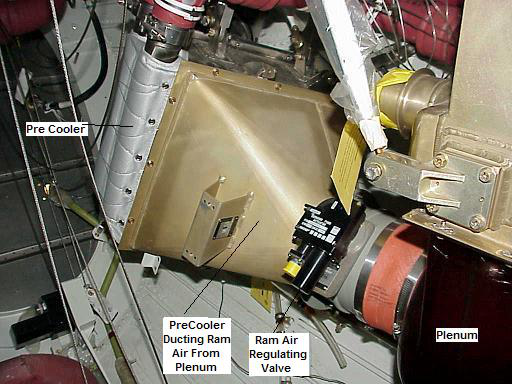
- The IASC sends a command signal to the electrical actuator of the RARV to change the position of the butterfly valve. In normal operation, the IASC adjusts the RARV to get a pack inlet and trim inlet temperature between 100°C and 170°C.
- When the RARV fails in the closed or open position, and the Hot Air Temperature Sensor (HATS) or Pack Inlet Temperature Sensor (PITS) senses a temperature of less than 90°C (with a confirmation time of 150 seconds), a cyan 'PACK COOL AIR FAIL' EICAS message comes on. The fault is recorded in the IASC Non-Volatile Memory (NVM) and sent to the Maintenance Diagnostic Computer (MDC).
- The valve modulates depending on the Pack Inlet Temperature Sensor (PITS) and Hot Air Temperature Sensor (HATS), typically the valve should be in the open position on ground or low altitudes, and closed at high altitude and cooler ambient conditions.
- Mechanical locks at the open, intermediate and closed positions are available on the valve, the intermediate position can be used for dispatch capability if the valve were to fail.

Quick Links:
| Removal of the Ram-Air Regulating-Valve | AMM 21-53-05-000-801 |
| Installation of the Ram-Air Regulating-Valve | AMM 21-53-05-400-801 |
| Deactivation of the Ram-Air Regulating Valve | AMM 21-53-05-040-801 |
| Activation of the Ram-Air Regulating Valve | AMM 21-53-05-440-801 |
| Wiring - Maintenance Practices - ALL | SPM 20-12-00-02 |
| Wire Repair - Maintenance Practices - ALL | SPM 20-12-10-02 |
Troubleshooting Recommendations:
Visually inspect RARV position using table 201.

Table 201 RARV Visual Position
| Air Source Position | Valve arm position | Cockpit/Cabin Temp Selector Position | RARV Position Observed During PBIT |
|---|---|---|---|
| Off | Dispatch | Full Cold | Dispatch → Half open (halfway between Dispatch and Full Open) → Full Closed → Slightly Open → Full Closed → Full Open |
| Full Hot | Dispatch → Half open (halfway between Dispatch and Full Open) → Full Closed → Slightly Open → Full Closed → Full Open | ||
| Norm | Dispatch | Full Cold | Dispatch → Full Closed → Back a few degrees → Full Closed |
| Full Hot | Dispatch → Full Closed → Back a few degrees → Full Closed | ||
| Pack Only | Dispatch | Full Cold | Dispatch → Full Closed → Back a few degrees → Full Closed |
| Full Hot | Dispatch → Full Closed → Back a few degrees → Full Closed | ||
| Trim Air Only | Dispatch | Full Cold | Full Closed → then slowly going back to Full Open (by ≈ 5 degrees steps, ≈ 1 second between each step) |
| Full Hot | Dispatch → Full Closed → Back a few degrees → Full Closed |
- Visually inspect RARV position using table 201
- Interrogate the MDC as follows:
- On the cursor control panel, ensure the toggle switch is to the right and select Anti-Ice, ECS and Fuel buttons simultaneously. The MDC main menu should now be displayed on Display Unit #3.
- Using the joystick, select Current Faults (if the fault is active) or Aircraft History to research stored faults. From Aircraft History you can then select Fault Message History and locate the fault. Going into advanced diagnostics will provide an equation ID for the fault identified.
- Select the MDC fault or equation from the drop down below to provide additional information to assist in troubleshooting.