


03/28/22
Wiring & Connections Troubleshooting Tips
WIRING - CONNECTORS - RELAYS - SWITCHES-JUNCTION BOXES Troubleshooting Tips:
Aircraft troubleshooting sometimes involve electrical wiring, connectors, relays, switches or Junction Boxes. History has shown that, in many cases, the verifications related to the previous items are not conducted as they should be, causing extra cost and down time to the operators.
Bombardier has created the following standard practices and guidelines to validate the integrity of electrical wiring, connectors, relays, switches and Junction Boxes.
Tools and Equipment:
- Digital Ohmmeter
- Mega Ohmmeter (Megger)
- Jumper wires with the correct pin/socket crimped at one end and an alligator clip at the other end
- Jumper wires with the correct pin/socket crimped at both ends
- Jumper wires with alligator clips crimped at both ends
Setup:
- Identify the wires to be tested.
- Identify the bundles where these wires are routed.
- Identify all the interfaces and connections to electrical wires/ components to be tested.
- Disconnect or remove all electrical components connected to the wires to be tested as required.
1. CONNECTORS NOT PROPERLY LOCKED / SECURED
Failure conditions are sometimes due to connectors that are not properly locked/secured.
Connectors not properly locked or secured can cause system failures.
Do a quick validation of the suspect connector before opening it and confirm if it was correctly locked/secured.
For in-service aircraft, a review of the aircraft journey log or technical log is a good source of maintenance activity performed on the aircraft. This is a good starting point to identify connector issues if a failure happened after maintenance was performed.
2. CONNECTOR DAMAGES AND CONTAMINATION
Failure conditions are sometimes due to contamination located in connectors.
Contamination can cause an electrical circuit to be either shorted or opened.
Short circuit can be located either between adjacent contacts within a connector or between contact and ground.
Inspect closely the connectors at both ends of the wire plus any intermediate connectors for damage and contamination. Pay attention to signs of:
- Corrosion
- Mechanical damage
- Water ingress or any other liquid in the pin/socket area
- Burned pin/socket or arcing damages
- Bent pins
- Loose connector parts
Replace corroded, burnt or damaged connector parts.
Replace individual burnt or bent contacts.
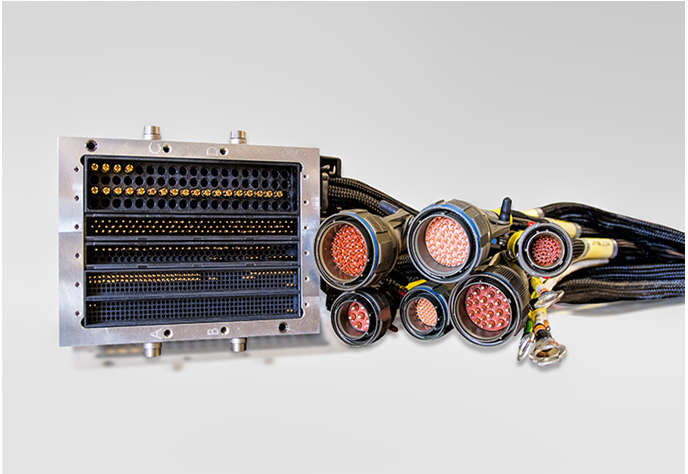
If contamination is found, clean or repair connector as per AMP chapter 20.
3. LRU SITTING IN A TRAY
Failure conditions are sometimes due to an LRU that is not properly seated into its tray/connector.
Therefore, if the affected wire(s) to be verified is (are) directly connected to an LRU mounted on a tray with an ARINC connector, make sure the LRU is properly seated.
4. RETENTION BETWEEN PIN/SOCKET AND CONNECTOR
Failure conditions are sometimes due to contact(s) not being properly locked in connectors which could cause an open electrical circuit.
Please note that crimping should be done in accordance with the contacts supplier crimping instructions or AMP chapter 20.
To make sure your contacts are properly locked (good retention in connector), do as follows:
- Disconnect the power source of equipment that contains the connector to be verified.
- If applicable, disassemble the connector backshell.
- Slightly pull the wire, where they hook to the connectors, to make sure that the pin or socket is firmly attached (locked) into the connector. This will also validate that the contact is properly crimped to the wire. In case of any doubt, it is recommended that the Pin/ Socket is extracted from the connector and visually inspected.
- If applicable inspect the shield termination.
- Correct any deficiency by replacing the contacts or repairing shield termination.
- Reassemble the connector backshell.
When it is not possible to do a pull test, do an individual contact push test.
Retention between Pin/ Socket and connector can be verified using GSE as follows:
These tools are for checking the retention of pins and sockets in regard to electrical connectors.
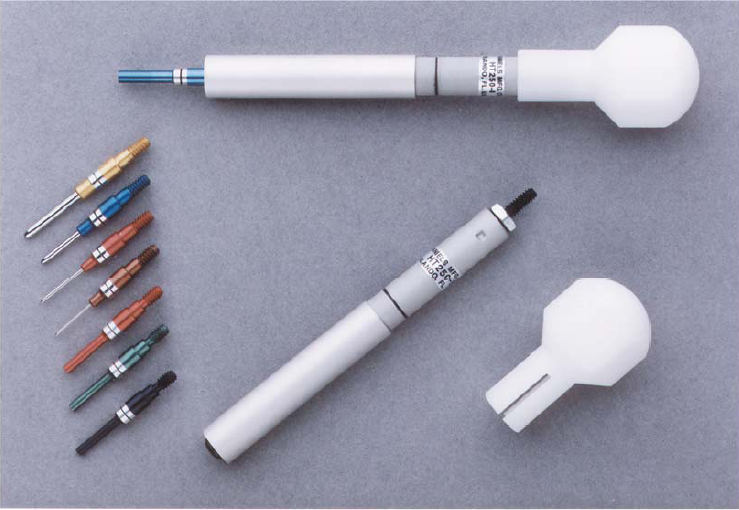
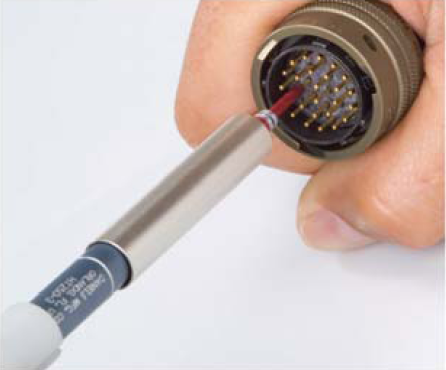
Insert tool into or over the contact to be tested so that the tool and contact are in a straight line. Hold in this position throughout the test. Use pin end with a socket contact and the socket end with a pin contact. Apply pressure to tester until the indicator band is covered by the slide. If contact is still firmly retained, the retention is satisfactory.
5. RETENTION BETWEEN PIN AND SOCKET
Failure conditions are sometimes due to contacts not having an adequate retention between pin and socket causing a poor continuity.
This is due to either a pin being too small for the associated socket or the socket being to large compare to the pin size.
It is important to have a good contact (retention) between the pin and the socket to allow a good electrical contact (low resistance).
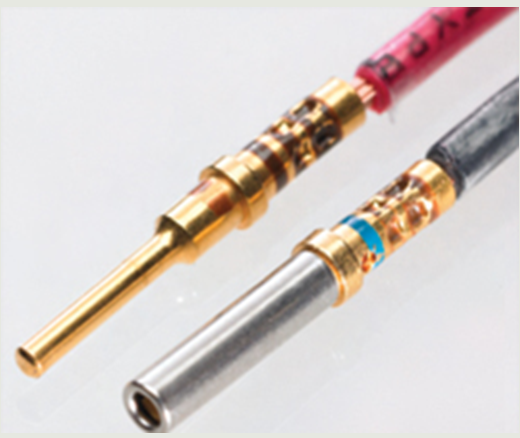
It is important that the verification is done on both side (Pin and Socket side).
Open connectors that contain Pin / Socket to be verified.
Identify the Pin / Socket size (of the wire to be verified).
- When verifying the Socket retention, insert a spare pin into the socket contact (both of the same size) and make sure that you feel a restriction as it is moved in and out of the socket. If no retention is felt, replace the Socket from the connector.
- Same verification applies to validate the pin retention.
NOTE: To do this verification, you do not have to extract the pin / socket from the connectors.
6. CONTINUITY CHECK (Using MULTIMETER)
To verify the continuity of individual wires or shields, do the steps that follow:
- Set multimeter to the lowest range on the Ohm scale.
- Connect the multimeter negative lead (-) to one end of the wire and the positive lead (+) to the other end of the wire.
- You should read continuity or very low resistance (close to 0 ohms).
As an example, continuity check of the wire below can be done by connecting the multimeter leads between:
- A40CP1-4 and A513P1-4
- A40CP1-10 and A513P1-5
- A40CP1 backshell and A513P1 backshell (shield integrity).

NOTE: To verify the shield integrity, you must ensure that the connectors A40CP1 and A513P1 are disconnected.
Tips
Sometimes, you will not be able to reach each ends of a long wire with the multimeter leads due to the test lead being too short. In that case, you can use a jumper wire to chassis ground and then connect the multimeter probes (-) to the chassis ground and the other probe (+) to the other end of the wire to check for continuity.
This method can be used to validate continuity between either contact to contact or shield continuity to ground as shown below:

7. INSULATION CHECK (using a MEGGER)
To confirm that the center conductor of an electrical wire is not shorted to the shield, to the ground or shorted to another wire, perform the megger check by measuring the insulation resistance between:
- The center conductor and the shield (for shielded wire).
- The center conductor and ground (for non-shielded wire).
- Between wires within the same connector (wire to wire).
To perform an insulation check, set the Megger to 500 VDC.
Insulation check results should always read high resistance (resistance greater than 3 Mega ohms).
CAUTION: S applying to all Insulation checks
- Always disconnect all electrical equipment from the wire(s), i.e. Leak Detection elements (Loops), to be tested/meggered, before doing an insulation check with a Megger. If electrical equipments are not disconnected from the wire(s) to be verified, damage can occur to electrical equipment.
- Contamination in connectors may cause the insulation check to fail. Visually inspect connectors before performing Megger check.
- Always disconnect the Leak Detection elements and Fire Loops from the wires to be verified. If not disconnected, permanent damage can occur to the loops.
A. INSULATION CHECK OF SHIELDED WIRES (using a MEGGER)
Shielded wires
- Set the MEGGER to 500 VDC.
- Connect the MEGGER negative lead (-) to the backshell and the positive lead (+) to the wire to be verified.
- Push on the MEGGER test button.
- Make sure display result shows high resistance (resistance greater than 3 Mega ohms).
As an example, to validate the insulation resistance between the wire connected on pin 2 and the shield, the megger must be connected as follows:
If the value obtained show low insulation resistance (less than 3 Mega ohms), replace or repair wiring as per AMP. Also make sure the shield terminations are installed as per WM (20-15-00).
NOTE: In some cases, the shields are connected to contacts within a connector instead of the backshell. In the example below, the shield is connected to pin P/J408-26.

Under this scenario, the insulation check would be performed between P408-43 and P408-26.
B. INSULATION CHECK OF NON-SHIELDED WIRES (Using a Megger)
- Set the MEGGER to 500 VDC.
- Connect the MEGGER negative lead (-) to the ground (aircraft structure) and the positive lead (+) to the wire to be verified.
- Push on the MEGGER test button.
- Make sure result shows high resistance (resistance greater than 3 Mega ohms).
Example: to validate the insulation resistance of the wire connected to A160P7-37, the megger negative lead (-) would be connected to the ground (aircraft structure) and the positive lead (+) to A160P7-37.

C. INSULATION CHECK BETWEEN WIRES (wire to wire) Using a Megger
To verify the isolation of individual wires (from pin to pin), connect the Megger negative lead (-) to one of the wires to be verified and the positive lead (+) to the other wire. You should read high resistance (resistance greater than 3 Mega ohms).
As an example, insulation check of the wire below can be done by connecting the Megger leads between pin 1 and 2. The megger must be adjusted to 500 VDC.
The verification can then be performed for all remaining combination of wires within the connector, therefore between 1-3 and 2-3.

8. INTERMEDIATE CONNECTORS
It is recommended that the wiring check is performed by verifying the circuit from end to end; meaning from LRU to LRU when practical. If anomaly is identified, then the intermediate electrical connector(s) on the circuit can be accessed to isolate the defective segment.
Please make sure that all intermediate connectors are inspected as per the WIRING & CONNECTORS Troubleshooting Tip.
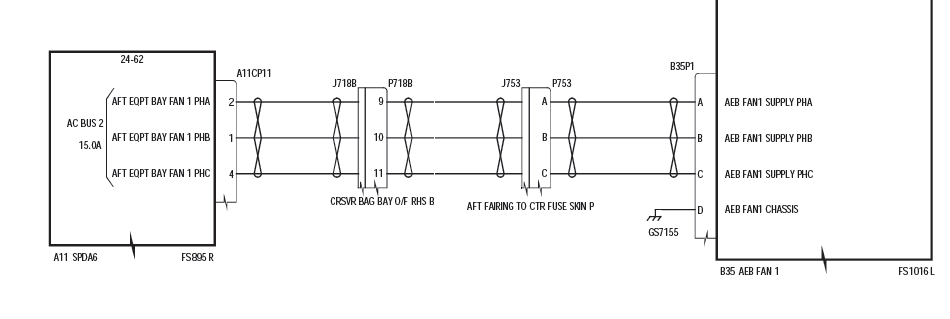
As an example, and general rule, if wiring check needs to be performed between SPDA 6 and AEB Fan, before accessing intermediate connectors P7188 and P753, the wiring check must be performed between SPDA6 (A11CP11) and AEB Fan (B35P1). If anomalies are discovered, then connectors P7188 and P753 will be accessed to isolate the fault.
9. JUNCTION BOXES
Junction Boxes are used to connect many electrical circuits together.
There are four (4) Junction Boxes installed. JB1, JB2, JB3, JB4. Each Junction Box contains five (5) daughter boards that are accessible once the Junction Box front panel is removed. DB1, DB2, DB3, DB4, DB5.
Refer to the CMM 24-63-01 Electronic Junction Box.
10. SWITCHES VERIFICATION
There is different kinds of switches.
On a drawing, they are always shown at rest or at the not activated position.
In the example below, the switch is normally open (N/O) on both sets of contacts, meaning the switch will make contact only on activation (on either side).
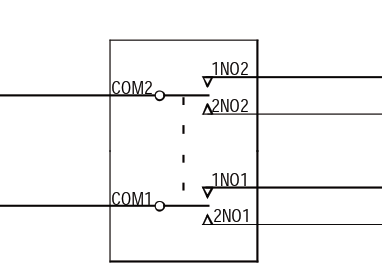
Switches are tested by doing a continuity check between the common contact (COM) and the normally open (N/O) / normally closed (N/C) contacts as applicable.
As an example, the above switch would be tested by doing a continuity check between its sets of contacts as follows:
With the switch not selected (rest position), read continuity as follows:
| FROM | TO | Expected Result | ||||
| Access | LRU | Connector/Contacts | Access | LRU | Connector/ Contacts | Value, Unit, Tolerance |
| None | switch | COM1 | None | switch | 1NO1 | Open |
| 2NO1 | Open | |||||
| COM2 | 1NO2 | Open | ||||
| 2NO2 | Open | |||||
With the switch moved to the #1 side, read the continuity as follows:
| FROM | TO | Expected Result | ||||
| Access | LRU | Connector/Contacts | Access | LRU | Connector/ Contacts | Value, Unit, Tolerance |
| None | switch | COM1 | None | switch | 1NO1 | Continuity |
| 2NO1 | Open | |||||
| COM2 | 1NO2 | Continuity | ||||
| 2NO2 | Open | |||||
With the switch moved to the #2 side, read the continuity as follows:
| FROM | TO | Expected Result | ||||
| Access | LRU | Connector/Contacts | Access | LRU | Connector/ Contacts | Value, Unit, Tolerance |
| None | switch | COM1 | None | switch | 1NO1 | Open |
| 2NO1 | Continuity | |||||
| COM2 | 1NO2 | Open | ||||
| 2NO2 | Continuity | |||||
If the continuity check is not correct for any one of the above verifications, replace the switch.
Please note that there are different kinds of switches on the aircraft, however, the same concept applies to all switches verification.
11. RELAYS VERIFICATION
Relays are switches that are electrically controlled by applying a power source to a coil.
In the example below, applying power to the relay coil between contacts X1 (+) and X2 (-) will make the relay contacts move away from the normally closed position (N/C).
They are represented as follows on a wiring diagram:
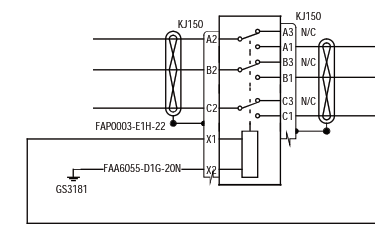
To validate the integrity of a relay, the relay must be removed from the aircraft and be bench tested.
A relay is tested by doing two different verifications:
- Continuity check between its sets of contacts
- Relay coil resistance measurement
Example:
With the relay unpowered, read continuity as follows:
| FROM | TO | Expected Result | ||||
| Access | LRU | Connector/Contacts | Access | LRU | Connector/ Contacts | Value, Unit, Tolerance |
| None | Relay | A2 | None | Relay | A1 | Open |
| B2 | B1 | Open | ||||
| C2 | C1 | Open | ||||
| A2 | A3 | Continuity | ||||
| B2 | B3 | Continuity | ||||
| C2 | C3 | Continuity | ||||
With the relay powered (28 VDC), read the continuity as follows:
| FROM | TO | Expected Result | ||||
| Access | LRU | Connector/Contacts | Access | LRU | Connector/ Contacts | Value, Unit, Tolerance |
| None | Relay | A2 | None | Relay | A1 | Continuity |
| B2 | B1 | Continuity | ||||
| C2 | C1 | Continuity | ||||
| A2 | A3 | Open | ||||
| B2 | B3 | Open | ||||
| C2 | C3 | Open | ||||
If the continuity check is not correct, replace the relay.
Refer to the relay specifications to obtain the coil resistance.