02/12/26
Message Overview:
Message Name:
WAVEJET MICROWAVE TROUBLESHOOTING
| Identifier: | 253OBS001 |
| Effectivity: | All |
| System: | Galley |
| Supplemental System Description: | 25-30-00 - DC Microwave Oven |
| Vendor Manuals (CMM) | 25-30-43 - Wavejet Microwave Oven 28 Volts DC |
| Schematic Diagram: | None |
| Supplemental Wiring Diagram: | Refer to Supplemental Wiring Manual |
Observation Description:
This Observed Fault is to re-enforce some important in-service maintenance and troubleshooting tasks to the users of Wavejet Microwave Ovens (Part Numbers 400-1338-XX, 400-1409-XX, 400-1746-XX from vendor Safran, former Zodiac) in effort to improve reliability and reduce unnecessary removals resulting with "No Fault Found (NFF)" findings when inspected by the vendor.
Troubleshooting Tips:
Advisory Wire/Service Bulletin: None
Full Throttle Blog/Forum Articles/Infoservice/Newsletter: None
Flight Operation Notifications Manual (FONM): None
NOTES:
- It is important that the Wavejet Microwave Ovens are operated and maintained as per instructions in the relevant CMM or User Manual and proper troubleshooting is conducted prior to removal.
- When a unit is removed from service, the operators need to provide details pertinent to the noted fault and what troubleshooting actions have been performed per CMM.
- The report of "INOP" and or "Unserviceable" lacks sufficient detail but could still be used if troubleshooting details are also provided.
- Using metal dishes or dishes covered with an aluminum foil cause arcing damage.
- When a flight crew reports that a fault is present and the fault is not confirmed and documented by the maintenance provider can result in "Could not confirm/No Fault Found (NFF)" findings during a repair event.
Quick Links:
| General Setup for Maintenance | |
|---|---|
| Standard Aircraft Configuration for Maintenance | AMM 12-00-00-867-803 |
| Electrical/Electronic Safety Precautions | AMM 24-00-00-910-801 |
| Electrostatic Discharge Safety Precautions | AMM 24-00-00-910-802 |
| Connect Electrical Power to the Aircraft | AMM 24-00-00-861-801 |
| Remove Electrical Power from the Aircraft | AMM 24-00-00-861-802 |
| Maintenance Tasks | |
| Cabin Power System Adjustment/Test | SMM 24-03-00 |
| Galley Adjustment/Test | SMM 25-30-00 |
| Galley Equipment Removal/Installation | SMM 25-30-03 |
Troubleshooting Recommendations:
Liner Thermostat Tripped:
- If the Liner Thermostat trips that could be indicated if the display numbers are not illuminated, it will automatically reset when the cooking chamber cools, refer to Figure 2 for additional information.
Figure 2 Symptom Possible Cause Action The display numbers are not illuminated. No or low input voltage. Measure input voltage. Expected voltage 28 VDC Load shed circuit failure. Check load shed circuit on aircraft. Noise filter failure. Check noise filters. Power Supply failure Verify output of power supply accessory power. Controller card failure. Check controller card. Liner overheat thermostat failure Check liner overheat thermostat.
Magnetron Thermostat Tripped:
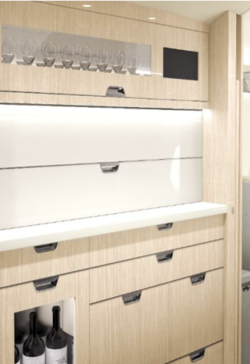
- Ensure, Doors (Hinged, Tambour, Bi-Fold) covering the compartment where the Microwave Ovens are installed are open when the unit is in use (cooking cycle). Refer to Figure 1 for example of doors.
NOTE: By design, the microwave should only operate if the door in front of it is fully open.
Troubleshoot per applicable Wiring Diagram if condition is not met. -
Figure 1 350 3500 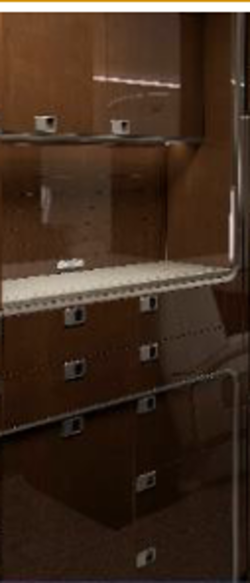
- If the Magnetron Thermostat trips that could be indicated if Turntable doesn't turn and microwave doesn't heat, check the troubleshooting information in section 3.10 FAULT ISOLATION (Figure 3) and 8.7 MAGNETRON THERMOSTAT - (MANUAL) RESET PROCEDURE in the related unit's CMM.
- The unit will need to be removed from the galley enclosure as the outer cover needs to be removed to gain access to the Thermostat.
NOTE: If PoleAir sticker is present (as seen in picture below), Do not open the outer cover to perform a manual reset of the Magnetron Thermostat, as this may void the warranty for units by PoleAir.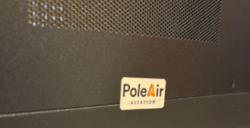
- A distinctive "click" will be felt if Thermostat has in fact tripped. Refer to Figure 4 for example of thermostat location.
Figure 3 Symptom Possible Cause Action Display is active, keypad buttons respond, counts down when "Start" is pressed. Turntable does not turn and microwave does not heat. Magnetron thermostat has opened. Check magnetron thermostat. Altitude switch activated. Verify cabin altitude is less than 9,000 feet. Altitude switch failure. Check altitude switch. Controller card failure. Check controller card.
Figure 4 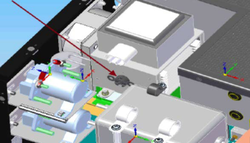

The Report From The Flight Crew That A Fault Is Present, Is Not Confirmed:
- Prior to removal from service and shipping the unit for repair, an aircraft maintenance technician should confirm the report from the flight crew that a fault is present performing unit examination per section 7.0 CHECK,
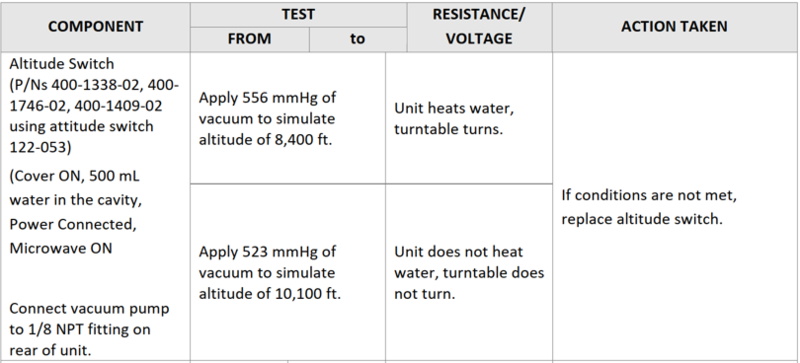
- Review section 3.10 FAULT ISOLATION) in the related unit CMM as seen in the example in Figure 5 to try further identifying the fault and see what is the possible actions that can be performed in service.
Figure 5 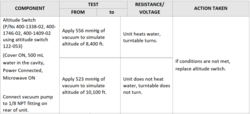
Contamination:
- Daily cleaning per section 6.3 DAILY CLEANING of the CMM or after each use is also recommended. Cleaning will remove food residue and keep the internal cooking cavity grids clear for air flow.
Microwave Operation:
- Operating a Microwave with metal dishes or dishes covered with metal foil cause arcing damage.
- Metallic items must not be put inside the unit during cooking mode.
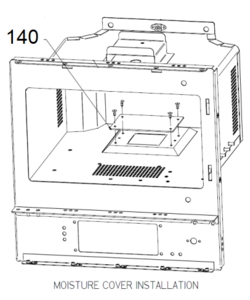
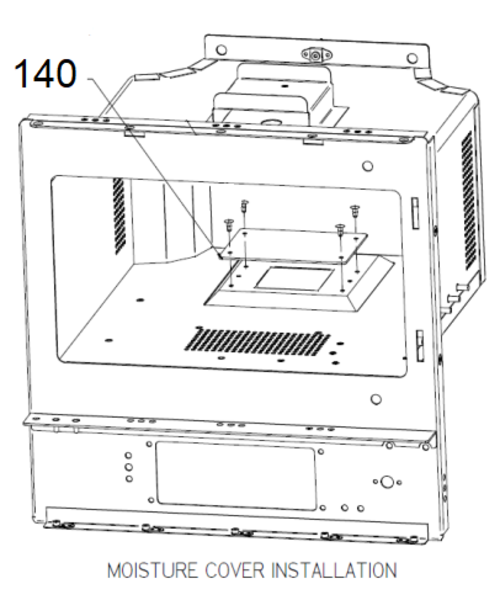
- Examine the waveguide moisture cover (140 IPL Fig 1 or 1A) for burn marks caused by arcing, at intervals of 1500 hours or 6 months. Refer to Figure 6.
Figure 6