11/06/24
Message Overview:
Message Description:
The CAS message is set if the FCU detects a critical failure, not resettable in flight. Such failures are:
- System runaway/uncommanded movement/overspeed/speed differential
- Panel Asymmetry
- Major electric/electronic hardware failures (FCU, sensors)
- Failure of Pressure Off Brake test
- FPU major hydraulic leakage
- FTB check (Brake Holding Check) failed
The CAS message is set by a discrete bit on an ARINC 429 label and by a discrete signal (FLAP SYSTEM VALID) which is in its not active state (indicating the flap system is invalid) when the electric power is switched off.
Possible Causes:
- Flap Power Unit (FPU) (A123)
- Flap Control Unit (FCU) (A124)
- LH Flap Position Sensor (MPE77)
- Flap Transmission Transmitter
- Flap Transmission Brake (FTB) (A203 LH)
- Flap Transmission Brake (FTB) (A204 RH)
- Pressure Transducer
- Mechanical Jam between the FPU and the LH INBD Actuator
- Associated Wiring
Troubleshooting Tips:
Advisory Wire/Service Bulletin: None
Forum Articles/Infoservice/Newsletter: None
NOTES:
- Flap Control Unit (FCU) (A124) & Flap Position Indication Unit (FPIU) are powered by the Electrical Bus, as shown in Table 1-1.
Table 1-1 Flap PWR Source Left FPIU FCU Right FPIU L ESS Bus L ESS Bus R ESS Bus - If the DCPC receives the Flight signal from the PSEU with the aircraft on the ground and the engine driven generators are not producing power the Auto load shed will happen. This scenario could cause the Flap system to post CAS messages and MDC Faults associated with the Flap system. Refer to the Observed Fault 246OBS002 - AUX BUS LOAD SHED ON GND.
- The alternate flaps is powered by the left hydraulic system, while the normal flaps are powered by the right hydraulic system.
- The flaps physically move very slow in the alternate mode. The Flaps Lever command with zero hydraulic power can cause a FLAPS failure.
FLAP RESET Procedure:
-With flaps stuck at 0 and handle at 0, turn left and right DCMP to On.
-Select 'Altn Flaps' button on the Hydraulic Control Panel.
-Select Flap Handle to 10.
-Engage the flap critical reset switch on the PMAT panel by the entry door.
-Move the handle back to 0 degrees. If it works the flaps on the synoptic page should turn green.
-Move the handle back to 10 and allow the flaps to move and stop at 10.
-Move the handle back to 0 and allow the flaps to move and stop at 0.
-If no further issues, push the 'Altn Flaps' button to switch back to normal mode and run the flaps to verify fault is still cleared.
Quick Links:
| Operational Test of the Elevator Control System | AMM 27-31-00-710-801 |
| Removal of the Flap Control Unit (FCU) | AMM 27-51-05-000-801 |
| Installation of the Flap Control Unit (FCU) | AMM 27-51-05-400-801 |
| Operational Test of the Flap Control Unit (FCU) | AMM 27-51-05-710-801 |
| Removal of the Flap Transmission Brake | AMM 27-52-19-000-801 |
| Installation of the Flap Transmission Brake | AMM 27-52-19-400-801 |
| Operational Test of the Flap Transmission Brake | AMM 27-52-19-710-801 |
| General Visual Inspection of the Flap Transmission Brake | AMM 27-52-19-210-801 |
| Removal of the Flap Power Unit (FPU) | AMM 27-52-33-000-801 |
| Installation of the Flap Power Unit (FPU) | AMM 27-52-33-400-801 |
| General Visual Inspection of the Flap Power Unit (FPU) | AMM 27-52-33-210-801 |
| Wiring - Maintenance Practices - ALL | SPM 20-12-00-02 |
| Wire Repair - Maintenance Practices - ALL | SPM 20-12-10-02 |
Troubleshooting Recommendations:
- Reset FLAPS.
- Set the switch to FLAP RESET.
- Push and hold the switch for 2 seconds to reset the flap system.
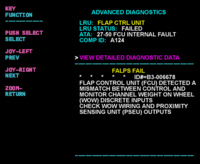
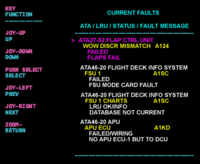
- Interrogate the MDC as follows:
- On the cursor control panel, ensure the toggle switch is to the right and select Anti-Ice, ECS and Fuel buttons simultaneously. The MDC main menu should now be displayed on Display Unit #3.
- Using the joystick, select Current Faults (if the fault is active) or Aircraft History to research stored faults. From Aircraft History you can then select Fault Message History and locate the air condition fault logged.
- Select the MDC fault from the drop down below to provide additional information to assist in troubleshooting.