


02/11/21
Message Overview:
Message Description:
A few failures do not prevent continuation of flap movement during the current flight but would need a maintenance action to clear the fault before next flight. These failures are indicated by the FLAPS FAULT (Advisory).
Possible Causes:
- FPU Pressure Transducer
- Flap Control Unit (FCU)
- Discrepancy in the status of duplex available discrete inputs (WOW, CRITICAL FAILURE RESET, ALTERNATE SUPPLY SELECTED)
- Loss of ARINC 429 data from L or R-IOC
- Failure of Solenoid Valve leakage test
- Failure of alternate system test
- EDP2 Pressure Switch fails off
- EDP2 Pressure Switch indicates that the engine driven pump of the main system is not working
- FTB brake holding check not performed for 23 flight cycles
Troubleshooting Tips:
Advisory Wire/Service Bulletin:
- AW300-29-0079 - Hydraulic Pressure Transducer Failure
- AW300-29-0251 - Recent failures of the Engine Driven Pump (EDP)
Forum Articles/Infoservice/Newsletter: None
Cyan EICAS (FLAPS FAULT), (STAB TRIM FAULT) and (SPOILERS FAULT) all posted at the same time. Switch to Flight Control synoptic page and check for any abnormal indications.
- If either the left side flap indication is Magenta dashes or the right Magenta dashes. The flaps will work normally and on touchdown the EICAS messages will change to an amber (FLAPS FAIL). Flaps will reset with rotary flaps reset or cycling pilot's CBs B13 (L IND) or B12 (R IND).
Cyan EICAS (FLAPS FAULT), (BRAKE FAULT) and (SPOILERS FAULT) all posted at the same time. Switch to Hydraulic synoptic page and check for any abnormal indications.
- Look for the left hydraulic system indications to be magenta dashes. Additional troubleshooting on this condition, refer to AW300-29-0079.
FLAP RESET Procedure:
- With flaps stuck at 0 and handle at 0, turn left and right DCMP to On.
- Select 'Altn Flaps' button on the Hydraulic Control Panel.
- Select Flap Handle to 10.
- Move switch to FLAP RESET. Momentarily press switch (PTT) to engage the flap critical reset switch on the PMAT panel by the entry door.
- Move the handle back to 0 degrees. If it works the flaps on the synoptic page should turn green.
- Move the handle back to 10 and allow the flaps to move and stop at 10.
- Move the handle back to 0 and allow the flaps to move and stop at 0.
- If no further issues, push the 'Altn Flaps' button to switch back to normal mode and run the flaps to verify fault is still cleared.
- Return switch to OFF position from the FLAP RESET position on the PMAT panel by the entry door.
Quick Links:
| Flap System - Component Location | AMM 27-52-00-992-801 |
| Operational Test of the Flap System | AMM 27-52-00-710-802 |
Troubleshooting Recommendations:
- Perform an initiated built-in test (IBIT) with the rotary test switch on the MAINTENANCE TEST forward control panel (PL42). The switch is set to the FLAP RESET position. Is the CAS message still present?
- If YES, continue with next step.
- If NO, do close out.
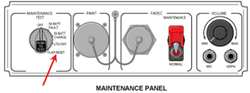
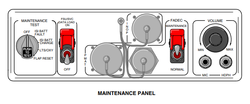
- Interrogate the MDC as follows:
- On the cursor control panel, ensure the toggle switch is to the right and select Anti-Ice, ECS and Fuel buttons simultaneously. The MDC main menu should now be displayed on Display Unit #3.
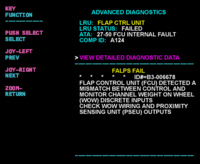
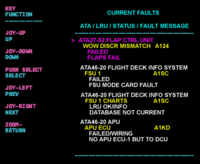
- Using the joystick, select Current Faults (if the fault is active) or Aircraft History to research stored faults. From Aircraft History you can then select Fault Message History and locate the fault. Going into advanced diagnostics will provide an equation id for the fault identified.
- Select the MDC fault or equation from the drop down below to provide additional information to assist in troubleshooting.
- Do close out.


