01/28/21
Message Overview:
Message Description:
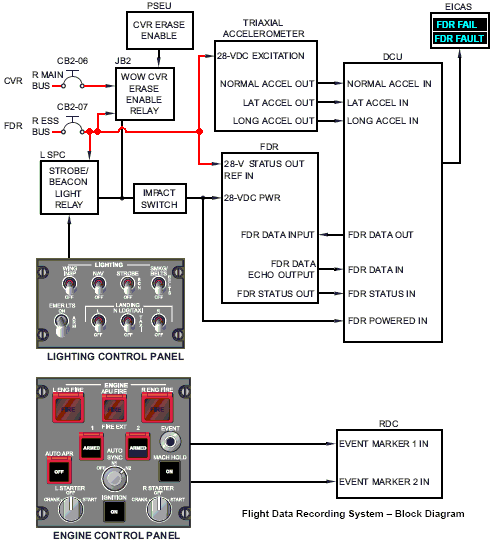
The cyan 'FDR FAIL' advisory CAS message indicates the flight data recorder has failed. Voltage is monitored by the DCU A14BP1 pin 2G. When there is a loss of this voltage, the 'FDR FAIL' message is posted. This is indicated as FDR status out on the block drawing.
Possible Causes:
- Impact Switch (S81)
- Flight Data Recorder (FDR) (A145)
- Data Concentrator Unit (DCU) (A14)
- Associated Wiring
Troubleshooting Tips:
Advisory Wire/Service Bulletin:
- AW300-31-0286 - FDR FAIL CAS clearing procedure
Forum Articles/Infoservice/Newsletter: None
Quick Links:
| Removal of the Flight Data Recorder (FDR) | AMM 31-31-01-000-801 |
| Installation of the Flight Data Recorder (FDR) | AMM 31-31-01-400-801 |
| Operational Test of the Flight Data Recorder (FDR) | AMM 31-31-01-710-801 |
| Reset of the Flight-Data-Recorder (FDR) Impact Switch | AMM 31-31-17-440-801 |
| Removal of the Flight Data Recorder (FDR) Impact Switch | AMM 31-31-17-000-801 |
| Installation of the Flight Data Recorder (FDR) Impact Switch | AMM 31-31-17-400-801 |
| Removal of the Data Concentrator Unit (DCU) | AMM 31-41-01-000-802 |
| Installation of the Data Concentrator Unit (DCU) | AMM 31-41-01-400-802 |
| Wiring - Maintenance Practices - ALL | SPM 20-12-00-02 |
| Wire Repair - Maintenance Practices - ALL | SPM 20-12-10-02 |
| Electrical Connectors - Maintenance Practice - ALL | SPM 20-20-00-02 |
Troubleshooting Recommendations:
- Power interruptions through Impact Switch (S81) and power control relays is most likely the suspect.
- Check or reset the Impact Switch for the FDR system. Check the Impact Switch is receiving 28 VDC power from CB2-D7.
NOTE: If repeat issue of having to reset Impact Switch, replace Impact Switch. - If the Impact Switch has power, check for continuity between the Impact Switch and the DCU A14BP1 pin 9G. There should be continuity with no short to ground.
- Remove the FDR and the DCU. Perform a continuity check of the FDR FAIL input as follows:
From To Expected Result Result A145P1-21 A14BP1-2G Continuity A145P1-21 Ground Open - If continuity is results are as per the table above, continue with next step.
- If results are not as per the table above, repair defective wiring as required.
- Replace the FDR.
- Do close out.