02/07/20
Message Overview:
Fault Description:
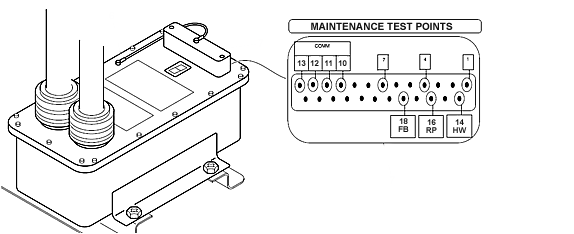
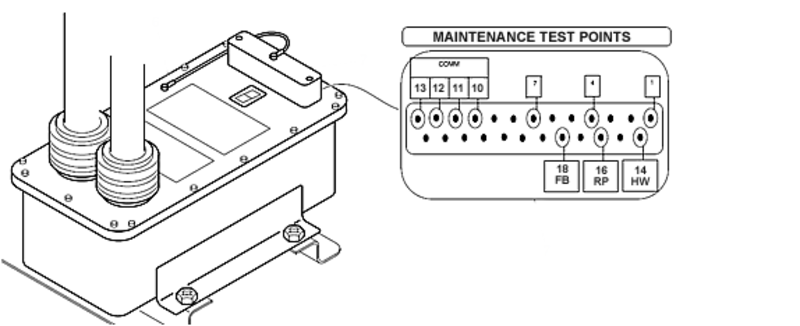
A flashing SCU Fault Code 'A' on the 7-segment display indicates rigging is in progress
A solid SCU Fault Code 'A' on the 7-segment display indicates that the SCU is in Maintenance mode.
Possible Causes:
- Jumper wire installed between pins 4 and 7 on the SCU DB25 connector
- Steering Control Unit (SCU) (A73)
Troubleshooting Tips:
Advisory Wire/Service Bulletin: None
Forum Articles/Infoservice/Newsletter: None
Troubleshooting Tips:
Quick Links:
| Automatic Download of the Steering Control Unit (SCU) Non-Volatile Memory (NVM) | AMM 32-51-01-970-801 |
| Manual Download of the Steering Control Unit (SCU) Non-Volatile Memory (NVM) | AMM 32-51-01-970-802 |
| Removal of the Steering Control Unit | AMM 32-51-01-000-801 |
| Installation of the Steering Control Unit | AMM 32-51-01-400-801 |
| Pressurize the Left and Right Hydraulic Systems | AMM 29-10-00-862-802 |
| Release Hydraulic Pressure - Left and Right Hydraulic Systems | AMM 29-10-00-862-802 |
| Standard Practices - Continuity and Insulation Check | SPM 20-12-01-05 |
| Wiring - Maintenance Practices - ALL | SPM 20-12-00-02 |
| Wire Repair - Maintenance Practices - ALL | SPM 20-12-10-02 |
| Electrical Connectors - Maintenance Practice - ALL | SPM 20-20-00-02 |
Troubleshooting Recommendations:
Fault Isolation Procedure:
- If installed, disconnect the breakout box from the SCU.
- Make sure that the jumper wire between pins 4 and 7 on the DB25 connector is removed.
- Select the NWS PBA to 'OFF' (OFF legend is lighted)
- Make sure the Handwheel, Rudder Pedals, and Nosewheel are in their neutral position (0°).
- Pressurize the Left Hydraulic System (AMM TASK 29-10-00-862-801).
NOTE: Always establish Left Hydraulic System pressure before switching the NWS System to 'ON' as it may trigger and record a false 'NWS FAIL' CAS message if any NWSS component is out of neutral position. - Set the Steering Control Unit (SCU) PBA to 'ON' (OFF legend is extinguished).
- Wait 120 seconds.
- If SCU Fault Code 'A' is still showing on the 7-segment display, replace the SCU.
- Depressurize the Left Hydraulic System per AMM TASK 29-10-00-862-802.