


04/26/21
Message Overview:
Message Description:
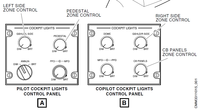
Adaptive Flight Display intermittent - PFD/MFD flickers, dims, or goes black when MFD intensity knob is touched, brushed, or wiggled.
Possible Causes:
- LH Crew Lighting Panel (PL3)
- LH Potentiometer (R7)
- RH Crew Lighting Panel (PL4)
- RH Potentiometer (R6)
- Primary Flight Display (PFD) 1 (A27)
- Primary Flight Display (PFD) 2 (A26)
- Multi-Function Display (MFD) 1 (A29)
- Multi-Function Display (MFD) 2 (A28)
- Associated Wiring
Troubleshooting Tips:
Advisory Wire/Service Bulletins: None
Forum Articles/Infoservice/Newsletter: None
Quick Links:
| Component Location | AMM 31-61-00-992-801 |
| Removal of the Adaptive Flight-Display Unit | AMM 31-61-01-000-801 |
| Installation of the Adaptive Flight-Display Unit | AMM 31-61-01-400-801 |
| Operational Test of the Adaptive Flight-Display Unit | AMM 31-61-01-710-801 |
| Removal of the Integral Lighting Controller | AMM 33-11-01-000-801 |
| Installation of the Integral Lighting Controller | AMM 33-11-01-400-801 |
| Operational Test of the Integral Lighting Controller | AMM 33-11-01-710-801 |
| Wiring - Maintenance Practices - ALL | SPM 20-12-00-02 |
| Wire Repair - Maintenance Practices - ALL | SPM 20-12-10-02 |
| Electrical Connectors - Maintenance Practice - ALL | SPM 20-20-00-02 |
Troubleshooting Recommendations:
- Replace respective Crew Lighting Panel or Potentiometer.
- If the issue is not caused by the intensity knob movement, swap the affected PFD or MFD with another Adaptive Flight Display (AFD). Did the fault follow the suspect display?
- If YES, replace defective AFD.
- If NO, continue with next step.
- Perform a power and wiring check at the affected AFD. Repair defective wiring as required.
- Do close out.
