10/06/23
Message Overview:
Message Description:
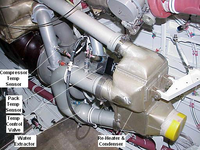
The amber 'PACK TEMP HIGH' caution CAS message indicates an overheat has been detected in the pack.
- The compressor discharge temperature of the pack has been detected over its maximum allowed limit of 232°C (450°F) (confirmation time 30 seconds) or above 260°C (500°F) (confirmation time 1 second) or the Pack Temp Discharge Temp Sensor is possibly defective.

Possible Causes:
- Pack Discharge Temperature Sensor (PDTS) (MT33)
- Compressor Discharge Temperature Sensor (CDTS) (MT29)
- Air Cycle Machine (ACM)
Troubleshooting Tips:
Advisory Wire/Service Bulletin:
- AW300-21-0264 - ACM Failures Caused by Ram Air Circuit Blockage
- AW300-21-0413 - Air Cycle Machine (ACM) - Investigation of Failures Causing Smoke/Smell Events
Forum Articles/Infoservice/Newsletter: None
- SIL LS3471-21-01 - Failure of Air Cycle Machine PN 3471A020000 potentially causing smoke/smell event
Quick Links:
| Removal of the Covers and Plugs | AMM 10-12-00-020-802 |
| Standard Aircraft Configuration for Maintenance | AMM 12-00-00-867-803 |
| Operational Test of the Cabin Pressure Control System | AMM 21-31-00-710-801 |
| Component Location | AMM 21-31-00-992-801 |
| Removal of the Integrated Air System (IAS) Controller | AMM 21-31-01-000-801 |
| Installation of the Integrated Air System (IAS) Controller | AMM 21-31-01-400-801 |
| Removal of the Outflow Valve | AMM 21-31-05-000-801 |
| General Visual Inspection of the Outflow Valve | AMM 21-31-05-210-801 |
| Installation of the Outflow Valve | AMM 21-31-05-400-801 |
| Removal of the Air Cycle Machine | AMM 21-52-13-000-801 |
| Installation of the Air Cycle Machine | AMM 21-52-13-400-801 |
| Removal of the Compressor Discharge Temperature-Sensor | AMM 21-52-17-000-801 |
| Installation of the Compressor Discharge Temperature-Sensor | AMM 21-52-17-400-801 |
| Removal of the Pack Discharge Temperature-Sensor | AMM 21-52-37-000-801 |
| Installation of the Pack Discharge Temperature-Sensor | AMM 21-52-37-400-801 |
| Connect Electrical Power to the Aircraft | AMM 24-00-00-861-801 |
| Remove the Electrical Power from the Aircraft | AMM 24-00-00-861-802 |
| Electrical/Electronic Safety Precautions | AMM 24-00-00-910-801 |
| Electrostatic-Discharge Safety Precautions | AMM 24-00-00-910-802 |
Troubleshooting Recommendations:
NOTE 1: Make sure that you do not set the AIR SOURCE switch to TRIM AIR ONLY during ground operation. Ref AMM TASK 21-00-00-910-801 Air Conditioning/Pressurization Safety Precautions.
NOTE 2: The amber 'PACK TEMP HIGH' caution CAS message is associated with the PACK box shown in AMBER in the ECS page.
- Run APU and select AIR SOURCE switch to NORM.
- Take note if the air conditioning is putting out cold air. If so, most likely this is a problem with the Compressor Discharge Temperature Sensor (CDTS, MT29). The PACK TEMP HIGH caution message is posted either by the IASC 2A or by the IASC 1A when a compressor discharge overheat is detected. The fault code in the MDC (V6 or higher) is B3-007409. Follow steps from 2 to 13.
- If the air conditioning is not putting out cold air, the Air Cycle Machine (ACM), the ducting, the precooler or the dual heat exchanger may be the cause. A failure of a FCV would cause an overheat condition to the ACM compressor outlet, see step 14 for a failed FCV. The other failures (ACM, ducting, precooler and exchanger) need other troubleshooting as generally when the ACM fails we have an amber 'PACK TEMP HIGH' caution CAS message and/or 'PACK FAIL' amber.
NOTE: Typically when the ACM seizes an amber 'AIR COND TEMP HIGH' caution CAS message posts. If the pilot does not shut it off, an amber 'PACK FAIL' caution CAS message will post and warm/hot air will be coming from the ducts.
- From the MDC main menu enter the LRU Test menu and select IASC 1 test A.
- Test will be displayed in magenta. Press the enter button on Cursor Control Panel 2. Four categories will appear on the IAS CONTROLLER 1 CHANNEL A menu.
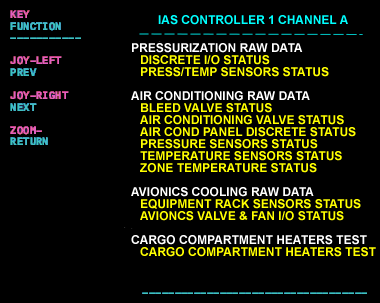
- Use the joystick and move the cursor to the section AIR CONDITIONING RAW DATA.
- Select Temperature Sensors Status.
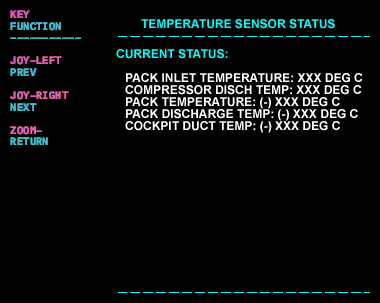
- Observe the status of the CDTS (Compressor Discharge Temp Sensor, MT 29).
- Take note if the temperature is stable and under 232°C.
- If the temperature is erratic or if FAIL is displayed, suspect the 1A channel of the CDTS, wiring to the IASC 1, or IASC 1. The fault could be displayed in the MDC with the code B3-006408 when the channel A of the CDTS fails and the cyan 'AIR COND FAULT' advisory EICAS will be displayed. (The resistance of the channel A may be out of range and causing an overheat condition).
- If the temperature is stable, use the TR/WX button to back up in the test menu and select IASC 2 test A.
- Proceed to the Air Conditioning Raw Data and the Temp Sensor Status menu.
- Take note of the CDTS.
- Take note if the temperature is stable and under 232°C.
- If the temperature is erratic or if FAIL is displayed, suspect the 2A channel of the CDTS, wiring to the IASC 2, or IASC 2. The fault could be displayed in the MDC with the code B3-006409 when the channel A of the CDTS fails and the AIR COND FAULT EICAS will be displayed. (The resistance of the channel B may be out of range and causing an overheat condition).
- If there is no failure with the CDTS, verify the operation of the Flow Control Valves. In case of high temperature (> 220°C), the FCV is commanded towards its closed position, thus reducing the bleed flow and the ACU inlet, Trim inlet, and ACU compressor outlet temperatures, down to 220°C. A FCV failed open will give a fault in the MDC B3-006701 for and an amber 'L BLEED FAIL' caution EICAS the left FCV (B3-006706 and an amber 'R BLEED FAIL' caution EICAS for the right).