01/28/21
Message Overview:
Message Description:
The amber 'R INBD BRAKE FAIL' caution CAS message indicates the right inboard normal system brake has failed. The respective normal brake system has failed, either from a BCV fail, wheel speed transducer fail, hydraulic fuse or shuttle valve.
Possible Causes:
- Right Inboard Brake Control Valve MPE23 (BCV)
- Failed the Pressure Pulse Test at power-up or at gear down
- Right Inboard Wheel Speed Transducer MT90
- Right Pilot and Right Co-pilot Brake LVDT
- Right Inboard Hydraulic Fuse
- Right Inboard Shuttle Valve
Troubleshooting Tips:
Advisory Wire/Service Bulletin: None
Forum Articles/Infoservice/Newsletter: None
- One failure of the following components on the Right Inboard Brake will trigger an "R INBD BRAKE FAIL" CAS message.
- Brake Control Valve
- Wheel Speed Transducer
- Right Pilot and Right Copilot Brake Linear Variable Differential Transducers (LVDT)
- Hydraulic Fuse
- Shuttle Valve
Download the MDC for fault isolation.
Download the BCU NVM for the Inboard and Outboard Channel.
Quick Links:
| Data Download from the Maintenance Diagnostic Computer (MDC) | AMM 45-45-01-970-802 |
| Removal of the Brake Control Valve | AMM 32-43-09-000-801 |
| Installation of the Brake Control Valve | AMM 32-43-09-400-801 |
| Removal of the Wheel Speed Transducer | AMM 32-43-49-000-801 |
| Installation of the Wheel Speed Transducer | AMM 32-43-49-400-801 |
| Removal of the Brake Pedal Position Transducer | AMM 32-43-05-000-801 |
| Installation of the Brake Pedal Position Transducer | AMM 32-43-05-401-801 |
| Removal of Hydraulic Fuse | AMM 32-43-33-000-801 |
| Installation of Hydraulic Fuse | AMM 32-43-33-400-801 |
| Removal of Shuttle Valve | AMM 32-43-21-000-801 |
| Installation of Shuttle Valve | AMM 32-43-21-400-801 |
Troubleshooting Recommendations:
- Verify MDC faults for following messages.
- If MDC faults from step 1 are showing, use drop down menu and troubleshoot according to specific B3 code.
- If MDC faults from step 1 are not showing, continue with next step.
- Pressurize the hydraulic system.
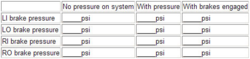
- Enter MDC main menu and select system parameters and record pressure using Fig. 1.
- Check the Right Inboard brake pressure.
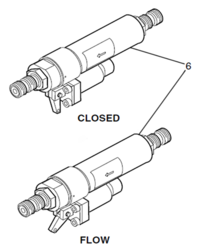
- Reset the Right Inboard hydraulic fuse and hold the reset lever at the flow position (Fig 2).
- Press the pedal to the fully compressed position.
- If the Right Inboard brake pressure is higher than 2640 psi, go to step 8.
- If the Right Inboard brake pressure is lower than 2640 psi continue with next step.
- Replace the Right Inboard BCV (MPE23), do close out.
- Check for external leakage from the Right Inboard hydraulic fuse down to the Right Inboard brake.
- If there is no leakage, go to step 10.
- If there is leakage, continue with next step.
- Replace/Repair the leaking parts, do close out.
- Release the Right Inboard hydraulic fuse lever and keep the pedals pressed.
- If the R Inbd Brake Fail CAS message reappeared, continue with next step.
- If the R Inbd Brake Fail CAS message did not reappear, do close out.
- Replace the Right Inboard Shuttle Valve and repeat test from step 4.
- If the R Inbd Brake Fail CAS message reappeared, continue with next step.
- If the R Inbd Brake Fail CAS message did not reappear, do close out.
- Replace the Right Inboard Brake hydraulic Fuse and repeat test from step 4.