04/07/21
Message Overview:
Message Description:
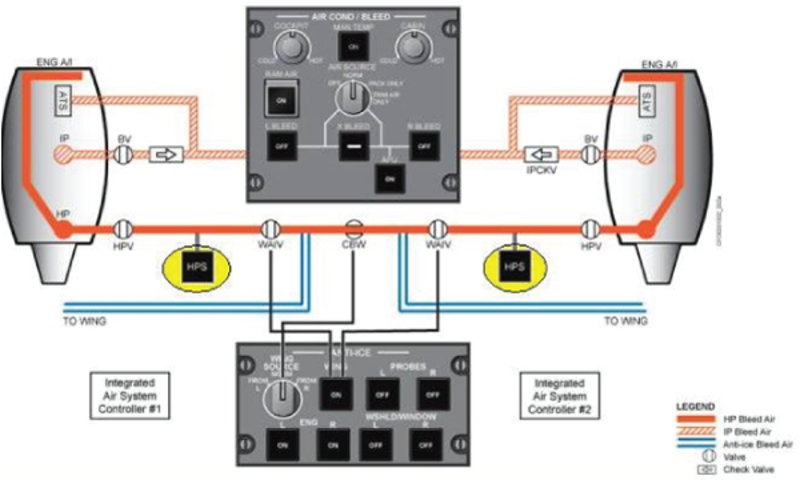
Pressure over 42 psig has been sensed downstream of the Right High Pressure Valve (RHPV). The pressure was higher than 42 psig, but lower than 46 psig for 15 seconds duration.
Possible Causes:
- R High Pressure Valve 2 (HPV) (V6)
- R High Pressure Sensor 2 (HPS) (MT20)
- Integrated Air System Controller 2 (IASC) (A56)
- Associated Wiring
Troubleshooting Tips:
Advisory Wire/Service Bulletin: None
Forum Articles/Infoservice/Newsletter: None
- Integrated Air System Controller 1 (IASC1) sends a 28 VDC signal out to the Right High Pressure Sensor (RHPS) MT20. If the Voltage received back is <0.5 VDC, or >9.5 VDC then the IASC1 reports a faulty sensor.
- The RHPS is found in the aft equipment compartment, downstream of the Right High Pressure Valve (V6). The sensor is a pressure transducer that can measure pressure from 0 to 75 psig (0 to 517.11 kPa). It uses a single channel to monitor the Right HPV output pressure, and sends this information to IASC1.
- Normal regulated pressure is set at 36 (± 3) psi. This pressure is controlled pneumatically by the HPVs whenever the fire system is not activated.
The high pressure bleed system is extremely hot when operating or leak checking. This makes it dangerous to leak check, or troubleshoot an operating system. Use a ribbon, or light string on a bendable stick to find leaks, without having to move your hands close to the hot pieces.
Reference CMM 36-11-55 for the internal workings of the HPS. Take note of the CMM Description and Operation below, paying particular attention to the "NOTE" below.
Description and Operation
- Description
The Bleed Pressure Transducer is a pressure transducer designed to convert the pressure to an electrical signal, by a semiconductor sensor installed at the pressure port and hermetically sealed within the enclosure. The electronics, DC to DC converter, amplifier, and filters are interfaced between the sensor and the electrical connector. Electron beam welds are used to hermetically seal the components within the stainless steel enclosure. - Operation
The transducer has been designed to provide a linear output voltage as an analog of the input pressure. The output voltage is 0.5 volts DC at 0.00 psig and 9.5 volts DC at full scale pressure (75 psig). The relationship of voltage as a function of pressure is set by specification and confirmed at the same time of manufacture. The operational temperature of the transducer is -20°C (4°F) to 80°C (176°F). There are no adjustment associated with the transducer and no moving parts.
NOTE: The three 0.052 diameter holes on the side wall of the transducer must not be blocked at installation or during test.
Quick Links:
| Removal of the Integrated Air System (IAS) Controller | AMM 21-31-01-000-801 |
| Installation of the Integrated Air System (IAS) Controller | AMM 21-31-01-400-801 |
| Leak Test of the High Pressure Bleed Air System | AMM 36-15-00-790-801 |
| Removal of the High Pressure Valve | AMM 36-15-01-000-801 |
| Installation of the High Pressure Valve | AMM 36-15-01-400-801 |
| Removal of the High Pressure Sensors | AMM 36-15-03-000-801 |
| Installation of the High Pressure Sensors | AMM 36-15-03-400-801 |
| Operational Test of the Maintenance Diagnostic System | AMM 45-45-00-710-801 |
| Wiring - Maintenance Practices - ALL | SPM 20-12-00-02 |
| Wire Repair - Maintenance Practices - ALL | SPM 20-12-10-02 |
Troubleshooting Recommendations:
- Determine if the system is regulating the pressure correctly or if the indication is faulty.
NOTE: The valve pressure can be checked by looking at the EICAS display Anti-Ice synoptic page. A more detailed indication is available by going to the system diagnostics, LRU test to IASC Channel A menu. Selecting the wing ANTI-ICE sensor status will display the system pressure. If the pressure indication is erratic or high with air off, suspect the RHPS. If the pressure indication is high with the air on, suspect the RHPS or the RHPV. - Ensure CB2-E10 (R MAIN BUS) is closed. If found tripped investigate cause before resetting.
- If you are experiencing other cascading faults at this point, ensure JB2 is operational.
- Verify connector MT20P1 is clean and secured to the RHPS (MT20).
- Inspect RHPS connector MT20P1, and ensure it is clean and free of damage. Check pins and sockets for proper drag. Clean it and re-install again.
- If system checks are good, do close out.
- If fault remains, continue with next step.
- Inspect RHPS, MT20 and ensure proper mounting, clamp condition, and sense line condition. Ensure reference holes in sensor are not blocked by clamps or debris.
- If system checks are good, do close out.
- If fault remains, continue with next step.
- Swap HPVs. Ensure HPV sense tube is free of obstruction, and not damaged at both ends.
- If system checks are good, do close out.
- If fault remains, continue with next step.
- Swap HPSs.
- If system checks are good, do close out.
- If fault remains, continue with next step.
- Verify a good ground at RHPS connector, Pin "B", and good shield on black and white wires at Pins "C", and "D".
- If system checks are good, do close out.
- If fault remains, continue with next step.
- Verify 28 VDC at RHPS connector MT20P1, Pin "A".
- If system checks are good, do close out.
- If fault remains, continue with next step.
- Verify 28 VDC at RHPV connector V6P1 Pin 1.
- If system checks are good, do close out.
- If fault remains, continue with next step.
- Verify good ground at RHPV connector V6P1 Pin "B".
- If system checks are good, do close out.
- If fault remains, continue with next step.
- Verify power/ all grounds/ at IASC2.
- If system checks are good, do close out.
- If fault remains, continue with next step.
- Inspect Connectors A56P3, and A56P4 (signal reference ground) for condition and security.
- If system checks are good, do close out.
- If fault remains, continue with next step.
- Complete wiring check between RHPS (MT20) and IASC2 (A56). Ensure wires close to MT20P1 do not open or short when harness is moved. Use a Megger meter for best results but ensure all LRUs attached to the wire run are removed first.
- If system checks are good, do close out.
- If fault remains, continue with next step.
- Swap IASCs.
- Do close out.