


04/26/21
Message Overview:
Message Description:
The red 'HDG' warning flag indicates invalid heading source.
- A loss of all heading data from the selected IRS, most likely caused by an IRS fault or failure.
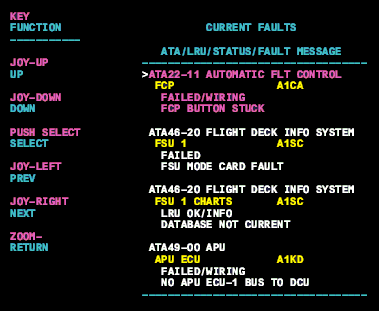
- Verification of system failure, or data bus loss can be checked on the MDC current fault page for further system details.
Possible Causes:
- Flux Valve
- Magnetic Field Disruption around the Flux Valve.
- Inertial Reference System (IRS) Calibration
- Input/Output Concentrator (IOC) (A4-IOC)
- Inertial Reference Unit 1 (IRS 1) (A233)
- Inertial Reference Unit 2 (IRS 2) (A232)
- Data Bus Failure
- Associated Wiring
Troubleshooting Tips:
Advisory Wire/Service Bulletin: None
Forum Articles/Infoservice/Newsletter: None
- A loss of all heading data from the selected IRS, most likely caused by an IRS fault or failure.
- Verification of system failure, or data bus loss can be checked on the MDC current fault page for further system details.
Quick Links:
| Removal of the Input/Output Concentrator Unit (IOC) | AMM 31-45-05-000-801 |
| Installation of the Input/Output Concentrator Unit (IOC) | AMM 31-45-05-400-801 |
| Operational Test of the Input/Output Concentrator Unit (IOC) | AMM 31-45-05-710-801 |
| Operational Test of the Inertial Reference System (IRS) | AMM 34-45-00-710-801 |
| Removal of the Inertial Reference Unit (IRU) | AMM 34-45-01-000-801 |
| Installation of the Inertial Reference Unit (IRU) | AMM 34-45-01-400-801 |
| Wiring - Maintenance Practices - ALL | SPM 20-12-00-02 |
| Wire Repair - Maintenance Practices - ALL | SPM 20-12-10-02 |
Troubleshooting Recommendations:
- Access the MDC fault messages. Look for failures associated to the Inertial Reference System (IRS) or databus faults between the Input Output Concentrator (IOC) and the IRS.
- If related faults are displayed, troubleshoot them first.
- If no related faults are present, continue with next step.
- Swap the affected side IRU with the opposite side IRU. Is the fault still present?
- If YES, continue with next step.
- If NO, replace defective IRU and do close out.
- Perform a wiring check between the affected IRS and the IOC. Repair defective wiring if required.
- Do close out.