01/28/21
Message Overview:
Message Description:
The amber 'OUTBD BRAKES FAIL' caution CAS message indicates both outboard normal system brakes have failed. This message is posted during or shortly after the brake pressure pulse test. The pressure pulse test is initiated 3 ways:
- At power up when hydraulic supply reaches above 1850 psi
- Every time the landing gear is selected down
- Can be initiated through the MDC LRU test page
The outboard normal brake system is inoperative, either from a BCU fault, pressure loss to the outboard brakes, or dual component failure in the outboard brake system.

Possible Causes:
- Brake Control Unit (BCU) (A67)
- Brake Control Unit (BCU) (A67) Connectors
- Brake Shut-off Valve (BSOV) (MPE27)
- Brake Control Valve (BCV) (MPE23)
- Wheel Speed Transducer
- Pressure Transducer
- Brake Pedal LVDT
- Hydraulic Leak
- Associated Wiring
Troubleshooting Tips:
Advisory Wire/Service Bulletin:
- AW300-32-0136 - Parking Brake Pressure Depletion
Forum Articles/Infoservice/Newsletter: None
- Any combination of two failures of the following components on the outboard brakes will trigger an "OUTBD BRAKES FAIL" CAS message.
- Wheel Speed Transducer
- Both Outboard Pilot and Copilot LVDT
- Hydraulic Fuse
- Shuttle Valves
- If only one of the two failures is rectified, one of the following CAS messages will be displayed; "L OUTBD BRAKE FAIL" or "R OUTBD BRAKE FAIL".
Download the MDC for fault isolation.
Download the BCU NVM for the Outboard Channel.
Quick Links:
| Data Download from the Maintenance Diagnostic Computer (MDC) | AMM 45-45-01-970-802 |
| Removal of the Brake Control Unit | AMM 32-43-01-000-801 |
| Installation of the Brake Control Unit | AMM 32-43-01-400-801 |
| Removal of the Brake Control Valve | AMM 32-43-09-000-801 |
| Installation of the Brake Control Valve | AMM 32-43-09-400-801 |
| Removal of the Brake Shutoff Valve | AMM 32-43-25-000-801 |
| Installation of the Brake Shutoff Valve | AMM 32-43-25-400-801 |
| Removal of Wheel Speed Transducer | AMM 32-43-49-000-801 |
| Installation of Wheel Speed Transducer | AMM 32-43-49-400-801 |
| Removal of Hydraulic Fuse | AMM 32-43-33-000-801 |
| Installation of Hydraulic Fuse | AMM 32-43-33-400-801 |
| Removal of Shuttle Valve | AMM 32-43-21-000-801 |
| Installation of Shuttle Valve | AMM 32-43-21-400-801 |
Troubleshooting Recommendations:
- Verify if "OUTBD BRAKE PRESS LO" is also displayed on the EICAS.
- If message is displayed, troubleshoot this message first.
NOTE: It is normal to have an 'OUTBD BRAKE FAIL' CAS message when the brake accumulator pressure is below 1400 PSI. - If message is not associated with CAS from step 1, continue with next step.
- If message is displayed, troubleshoot this message first.
- Access the MDC to view fault messages. Select displayed message from menu below:
- If none of these fault messages are displayed, continue with next step.
- Verify MDC faults for any combination of two of the following messages:
- If messages are present, select from dropdown menu and troubleshoot accordingly.
- If no messages are present, continue with next step.
- Pressurize the hydraulic system.
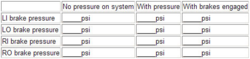
- Enter MDC main menu and select system parameters and record pressure. Check the outboard brake pressure.
- If at least one outboard brake pressure is higher than 130 psi, go to step 12.
- If outboard brake pressure is below 130 psi, continue with next step.
- Apply full brake pedal deflection.
- Verify that pressure at the outboard brakes is higher than 2640 psi.
- If the brake pressure is higher than 2640 psi, do close out.
- If the brake pressure is lower than 2640 psi, continue with next step.
- Release the brakes.
- Verify that pressure at the outboard brakes is lower than 130 psi.
- If the brake pressure is higher than 130 psi, go to step 12.
- If the brake pressure is lower than 130 psi, continue with next step.
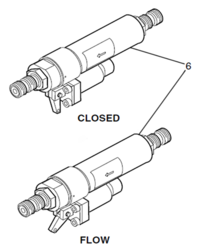
- Verify if both hydraulic fuses on the outboard brakes are set at the flow position.
- If both hydraulic fuses are tripped (closed), reset them and redo the procedure starting at step 5.
- If both hydraulic fuses are not tripped, continue with next step.
- Replace the Outboard Brake SOV and do close out.
- Replace the BCV.
- Do close out.