


10/02/20
Message Overview:
Fault Message:
ACPC GTC 4/GTC5 CONTACTOR-K12 FAIL
Fault Code:
2451351ACP
Associated CAS:
| Reporting LRU: | AC Power Center (ACPC) |
| System Description: | 24-50-00 |
| Schematic Diagram: | 24-51-00 [ Global Express ] [ G5000 ] [ Global XRS ] |
| Wiring Diagram: | 24-51-01 [ Global Express ] [ G5000 ] [ Global XRS ] |
Fault Description:
The AC Power Center (ACPC) Primary Logic Cards (PLC) detects a discrepancy between the coil drive status and the auxiliary contact status of the contactor K12.
Possible Causes:
- AC Power Center (ACPC) Contactor (K12)
- AC Power Center (ACPC) (A54)
- AC Power Center (ACPC) TB601
- AC Power Center (ACPC) TB402
- AC Power Center (ACPC) TB401
- Electronic Module 2 (EM2)
- Primary Logic Card (PLC) 1
- Primary Logic Card (PLC) 2
- Primary Logic Card (PLC) 3
- Associated Wiring
Troubleshooting Tips:
Advisory Wire/Service Bulletin: None
Forum Articles/Infoservice/Newsletter: None
Quick Links:
| Removal of the AC Power Center (ACPC) | AMM 24-51-00-000-801 [ Global Express ] [ G5000 ] [ Global XRS ] |
| Installation of the AC Power Center (ACPC) | AMM 24-51-00-400-801 [ Global Express ] [ G5000 ] [ Global XRS ] |
| Removal of the AC Power Center (ACPC) Primary Logic | AMM 24-51-09-000-801 [ Global Express ] [ G5000 ] [ Global XRS ] |
| Installation of the AC Power Center (ACPC) Primary Logic | AMM 24-51-09-400-801 [ Global Express ] [ G5000 ] [ Global XRS ] |
| Removal of the AC Power Center (ACPC)LC-Series Contactors (K4, K6, K9, K12) | AMM 24-51-37-000-801 [ Global Express ] [ G5000 ] [ Global XRS ] |
| Installation of the AC Power Center (ACPC)LC-Series Contactors (K4, K6, K9, K12) | AMM 24-51-37-400-801 [ Global Express ] [ G5000 ] [ Global XRS ] |
| Removal of the AC Power Center (ACPC) Electronic Modules | AMM 24-51-81-000-801 [ Global Express ] [ G5000 ] [ Global XRS ] |
| Installation of the AC Power Center (ACPC) Electronic Modules | AMM 24-51-81-400-801 [ Global Express ] [ G5000 ] [ Global XRS ] |
| Wire Repair - Maintenance Practices - ALL | SPM 20-12-10-02 [ Global Express ] [ G5000 ] [ Global XRS ] |
| AC Power Center Component Maintenance Manual | CMM 24-51-02 [ Global Express ] [ G5000 ] [ Global XRS ] |
Troubleshooting Recommendations:
- Disconnect contactor K12 connector P404 in the ACPC.
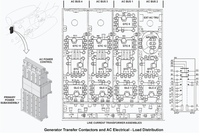
- Turn the BATT MSTR SW to ON.
- Perform a check for 28 Volts DC between contactor K12 to ground as follow:
From To Result P404-1 Ground P404-2 Ground - If there is 28 Volts DC, go to step 5.
- If there is no 28 Volts DC, continue with next step.
- Perform wiring checks between EM2, TB401 and TB402 as follow:
From To Result P206 TB402-2 TB401-1 TB402-2 - If wiring checks are not good, repair defective wiring as required and do close out.
- If wiring checks are good, continue with next step.
- Turn the BATT MSTR SW to OFF.
- Perform a continuity check between contactor K12 to ground as follows:
From To Result P404-13 Ground P404-11 Ground - If there is continuity, go to step 8.
- If there is no continuity, continue with next step.
- Perform wiring checks TB601 and TB401 as follow:
From To Result TB601-1 TB401-3 - If wiring checks are not good, repair defective wiring as required and do close out.
- If wiring checks are good, continue with next step.
- Remove PLC 1, PLC 2 and PLC 3.
- Perform a continuity check with the connections as follows:
From To Result P404-14 Ground P404-12 Ground P404-22 Ground P404-3 Ground - If there is continuity, go to step 14.
- If there is no continuity, continue with next step.
- Replace contactor K12.
- If system checks are good, do close out.
- If fault remains, continue with next step.
- Re-install PLC 2 and PLC 3.
- If system checks is good, replace PLC 1 and do close out.
- If fault remains, continue with next step.
- Remove PLC 2 and reinstall PLC 1.
- If system checks is good, replace PLC 2 and do close out.
- If fault remains, continue with next step.
- Remove PLC 3 and reinstall PLC 2.
- If system checks is good, replace PLC 3 and do close out.
- If fault remains, continue with next step.
- Replace ACPC.
- Do close out.

