


05/22/24
Message Overview:
Message Name:
CDU 2/ACPC RIGHT FTM-A10/WRG
Message Code:
2451371ACP
| Reporting LRU: | Electrical Management System Control-and-Display Unit (EMS CDU) 2 |
| Associated CAS: | ELEC SYS FAULT (Advisory) |
| System Description: | 24-50-00 - AC Electrical Load Distribution |
| Schematic Diagram: | [ Global Express ] [ G5000 ] [ Global XRS ] 24-51-00 |
| Wiring Diagram: | [ Global Express ] [ G5000 ] [ Global XRS ] 24-51-02 |
Message Description:
ARINC 429 communication between the AC Power Center (ACPC) and the Electrical Management System Control-and-Display Unit (EMS CDU) is faulty.
The LRU transmits on periodic basis a test label that is turned around by the receiving LRU.
Possible Causes:
- Electrical Management System Control-and-Display Unit (EMS CDU) 2 (A91)
- AC Power Center (ACPC) Microprocessor Card
- AC Power Center (ACPC) Supervisor Card
- AC Power Center (ACPC) (A54)
- Junction Box (JB4)/PCB2
- Associated Wiring
Troubleshooting Tips:
Advisory Wire/Service Bulletin: None
Forum Articles/Infoservice/Newsletter: None
Flight Operation Notifications Manual (FONM): None
NOTES:
- Make sure the Junction Box #4 is racked properly. Field experience revealed many cases of Junctions Boxes not installed properly.
- Flight Deck Effect:
- AC synoptic page is all magenta.
- DC synoptic page has magenta APU battery related info.
- On the EMS CDU, ACPC electrical loads are dashed.
- Alternative Fault Confirmation:
Quick Links:
| Removal of the AC Power Center (ACPC) | AMM 24-51-00-000-801 [ Global Express ] [ G5000 ] [ Global XRS ] |
| Installation of the AC Power Center (ACPC) | AMM 24-51-00-400-801 [ Global Express ] [ G5000 ] [ Global XRS ] |
| Removal of the AC Power Center (ACPC) Fault-Tolerant Supervisor | AMM 24-51-01-000-801 [ Global Express ] [ G5000 ] [ Global XRS ] |
| Installation of the AC Power Center (ACPC) Fault-Tolerant Supervisor | AMM 24-51-01-400-801 [ Global Express ] [ G5000 ] [ Global XRS ] |
| Removal of the AC Power Center (ACPC) Fault-Tolerant Microprocessor | AMM 24-51-05-000-801 [ Global Express ] [ G5000 ] [ Global XRS ] |
| Installation of the AC Power Center (ACPC) Fault-Tolerant Microprocessor | AMM 24-51-05-400-801 [ Global Express ] [ G5000 ] [ Global XRS ] |
| Removal of the Electrical Management System Control-and-Display Units (EMS CDU) | AMM 24-70-01-000-801 [ Global Express ] [ G5000 ] [ Global XRS ] |
| Installation of the Electrical Management System Control-and-Display Units (EMS CDU) | AMM 24-70-01-400-801 [ Global Express ] [ G5000 ] [ Global XRS ] |
| Wire Repair - Maintenance Practices - ALL | SPM 20-12-10-02 [ Global Express ] [ G5000 ] [ Global XRS ] |
Troubleshooting Recommendations:
- Interchange EMS CDU 2 with EMS CDU 1. Is the fault still present?
- If YES, continue with next step.
- If NO, replace the EMS CDU 2 and do close out.
- Interchange ACPC microprocessor cards. is the fault still present?
- If YES, continue with next step.
- If NO, replace the defective ACPC microprocessor card and do close out.
- Disconnect EMS CDU 2 connector A91P1. Remove both ACPC Microprocessor cards.
EMS CDU To ACPC Schematic 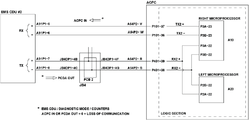
- Do Wiring checks as follows:
From To Expected Result Result A91P1-5 Ground Open A91P1-6 Ground Open A91P1-7 Ground Open A91P1-8 Ground Open - Are results satisfactory?
- If YES, go to step 8.
- If NO, continue with the next step.
- Disconnect ACPC connector A54P2. Do wiring checks as follows:
From To Expected Result Result A91P1-5 Ground Open A91P1-6 Ground Open A91P1-7 Ground Open A91P1-8 Ground Open - Are results satisfactory?
- If YES, continue with the next step
- If NO, repair defective wiring as required and do close out.
- Do wiring checks between the EMS CDU and the ACPC Microprocessor cards as follows:
From To Result A91P1-5 P3A-23 A91P1-6 P3B-23 A91P1-7 P3A-22 A91P1-8 P3B-22 A91P1-7 P2A-22 A91P1-8 P2B-22 - If there is continuity, replace ACPC Supervisor Card.
- If there is no continuity, continue with the next step.
- Disconnect ACPC connector A54P2. Do a continuity check as follows:
From To Result A91P1-5 A54P2-V A91P1-6 A54P2-W A91P1-7 A54P2-R A91P1-8 A54P2-S - If there is continuity, continue with the next step.
- If there is no continuity, repair defective wiring.
- Replace ACPC.
- Do close out.
