


06/23/21
Message Overview:
Message Name:
Air Conditioning Synoptic Pack Boxed White
| Identifier: | 215OBS021 |
| Effectivity: | ALL |
| System: | AIR CONDITIONING SYSTEM |
| Associated CAS: | None |
| System Description: | 21-51-00 |
| Schematic Diagram: | 21-51-00 [ Global Express ] [ G5000 ] [ Global XRS ] |
| Wiring Diagram: | 21-51-00 Left [ Global Express ] [ G5000 ] [ Global XRS ] 21-51-00 Right [ Global Express ] [ G5000 ] [ Global XRS ] 21-52-00 Left [ Global Express ] (S/N 9002) 21-52-00 Right [ Global Express ] (S/N 9002) 21-52-00 Left [ Global Express ] (S/N 9004-9010) 21-52-00 Right [ Global Express ] (S/N 9004-9010) 21-52-00 Left [ Global Express ] (S/N 9003, 9011-9089) 21-52-00 Right [ Global Express ] (S/N 9003, 9011-9089) 21-52-00 Left [ Global Express ] (S/N 9090-9158) 21-52-00 Right [ Global Express ] (S/N 9090-9158) 21-52-01 Left [ G5000 ] [ Global XRS ] 21-52-02 Right [ G5000 ] [ Global XRS ] |
Message Description:
The Air Conditioning Synoptic page displays a white outline around the Pack and the Pack is not selected off.
Possible Causes:
- Left Pack Inlet Flow Sensor (PIFS) (MT66)
- Right Pack Inlet Flow Sensor (PIFS) (MT109)
- Left Pack Inlet Pressure Sensor (PIPS) (MT65)
- Right Pack Inlet Pressure Sensor (PIPS) (MT108)
- Left Pack Inlet Temperature Sensor (PITS) (E23)
- Right Pack Inlet Temperature Sensor (PITS) (E29)
- Left Flow Control Valve (FCV) (L24)
- Right Flow Control Valve (FCV) (L30)
- Associated Wiring
Troubleshooting Tips:
Advisory Wire/Service Bulletin: None
Forum Articles/Infoservice/Newsletter: None
Flight Operation Notifications Manual (FONM): None
NOTE: This troubleshooting scenario may not have a CAS message or CAIMS Fault code posted.
Quick Links:
| CAIMS PMAT General Instructions | AMM 45-45-00-970-801 [ Global Express ] [ G5000 ] [ Global XRS ] |
| Access to Active Faults | AMM 45-45-00-970-802 [ Global Express ] [ G5000 ] [ Global XRS ] |
| Access to System Diagnostics | AMM 45-45-00-970-804 [ Global Express ] [ G5000 ] [ Global XRS ] |
| PMAT Shutdown | AMM 45-45-01-840-801 [ Global Express ] [ G5000 ] [ Global XRS ] |
| Operational Test of the Flow Control System | AMM 21-51-00-710-801 [ Global Express ] [ G5000 ] [ Global XRS ] |
| Removal of the Pack Inlet Flow-Sensors | AMM 21-51-13-000-801 [ Global Express ] [ G5000 ] [ Global XRS ] |
| Installation of the Pack Inlet Flow-Sensors | AMM 21-51-13-400-801 [ Global Express ] [ G5000 ] [ Global XRS ] |
| Operational Test of the Pack Inlet Flow-Sensors | AMM 21-51-13-710-801 [ Global Express ] [ G5000 ] [ Global XRS ] |
| Removal of the Pack Inlet Pressure-Sensors | AMM 21-51-17-000-801 [ Global Express ] [ G5000 ] [ Global XRS ] |
| Installation of the Pack Inlet Pressure-Sensors | AMM 21-51-17-400-801 [ Global Express ] [ G5000 ] [ Global XRS ] |
| Removal of the Pack Inlet Temperature-Sensors | AMM 21-51-21-000-801 [ Global Express ] [ G5000 ] [ Global XRS ] |
| Installation of the Pack Inlet Temperature-Sensors | AMM 21-51-21-400-801 [ Global Express ] [ G5000 ] [ Global XRS ] |
Troubleshooting Recommendations:
- Confirm that no active CAS message or CAIMS Fault code is posted, troubleshoot active CAS message or CAIMS Fault code first.
- Is the Air Conditioning synoptic page showing left or right Pack outlined in White and the Pack is not selected off?
- If YES, continue next step.
- If NO, do close out.
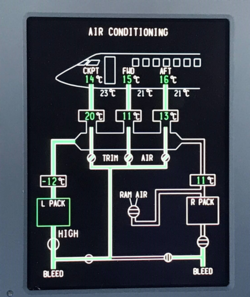
- Select the left & right Pack on then off and visually confirm that the Flow Control Valve is cycling with Pack switch command. Visually confirm that the Air Conditioning synoptic changes with the selection. Are the results satisfactory?
- If YES, step 6.
- If NO, continue next step.
- Manually open the Flow Control Valve in the equipment bay. Did this resolve the issue?
- If YES, step 6.
- If NO, continue next step.
- Close Flow Control Valve on side with the issue and perform wiring checks. Ensure that the terminations at the ground studs are properly torqued and will carry a load. Are results satisfactory?
- If NO, perform wire repairs.
- If YES, continue next step.
Left Flow Control Valve Right Flow Control Valve From To Expected Results Results L24P1-8 GS249 Continuity L24P1-5 GS250 Continuity L24P1-7 L24P1-8 Continuity From To Expected Results Results L30P1-8 GS290 Continuity L30P1-5 GS289 Continuity L30P1-7 L30P1-8 Continuity - When packs are cooled (OFF for approximately 1 hr ), complete the attached ECS Data Table using the PMAT (with packs and bleed OFF) and submit to CRC via email.
- To access this data:
- Open CAIMS
- Click on SYSTEM DIAG (at the bottom)
- Click on ATA 21
- Click on AIR COND. SYST. CNTR. 1-A
- Click on LRU TEST
- Click on L ACSC CH.A PACK TEMP. SENSOR DATA
- Record data on spreadsheet
- Click on RETURN
- Click on L ACSC CH.A PACK PRESSURE XDCR DATA
- Record data on ECS Data Table
- Click on EXIT SUBSYS
- Repeat steps 4 to 11 for AIR COND. SYST. CNTR. 1-B, 2-A and 2-B
- Click on RETURN MAIN (back to the first page of CAIMS)
- Click on SYSTEM DIAG (at the bottom)
- Click on ATA 36
- Click on BLEED MANAGEMENT CNTR. 1
- Click on LRU TEST
- Click on L BMC DISCRETE & ANALOG INPUT DATA
- Record data (at the bottom) for the LH INTERMEDIATE PRESS.
- Click on EXIT SUBSYS
- Repeat steps 16 to 19 for the BLEED MANAGEMENT CNTR. 2
- Open CAIMS
- Review the data recorded in the ECS Data Table, does the data for the Pack inlet Pressure sensor (PIPS) align side to side and is the data within tolerance?
- If YES, continue with step 10.
- If NO, continue with next step.
- Interchange the Pack inlet Pressure sensor (PIPS). Did issue move to other PACK?
- If YES, replace defective Pack Inlet Pressure Sensor (PIPS).
- If NO, interchange Pack Inlet Pressure Sensor (PIPS) to original location.
- Review the data recorded in the ECS Data Table, does the data for the Pack inlet flow sensor (PIFS) align side to side?
- If YES, continue with step 12.
- If NO, continue with next step.
- Interchange the PIFS. Did issue move to other PACK?
- If YES, replace defective Pack Inlet Flow Sensor (PIFS).
- If NO, interchange Pack Inlet Flow Sensor (PIFS) to original location.
- Review the data recorded in the ECS Data Table, does the data for the Pack Inlet Temperature sensor (PITS) align side to side?
- If YES, continue with step 14.
- If NO, continue with next step.
- Interchange the Pack Inlet Temperature Sensor (PITS). Did issue move to other PACK?
- If YES, replace defective Pack Inlet Temperature Sensor (PITS).
- If NO, interchange PITS to original location.
- If the data recorded in the ECS Data Table did not reveal any abnormal indications and you have not interchanged the three (3) sensors at this point in the troubleshooting. Continue with next step.
- Interchange the PIPS. Did issue move to other PACK?
- If YES, replace defective Pack Inlet Pressure Sensor (PIPS).
- If NO, interchange Pack Inlet Pressure Sensor (PIPS) to original location.
- Has the issue been resolved?
- If YES, do close out.
- If NO, continue with next step.
- Interchange the Pack Inlet Flow Sensor (PIFS). Did issue move to other PACK?
- If YES, replace defective Pack Inlet Flow Sensor (PIFS).
- If NO, interchange Pack Inlet Flow Sensor (PIFS) to original location.
- Has the issue been resolved?
- If YES, do close out.
- If NO, continue with next step.
- Interchange the PITS. Did issue move to other PACK?
- If YES, replace defective Pack Inlet Temperature Sensor (PITS).
- If NO, interchange Pack Inlet Temperature Sensor (PITS) to original location.
- Do close out.
