


03/29/21
Message Overview:
| DDG Reference: | None |
| Pilot Action (QRH): | ADVISORY 6-2 |
| System Description: | 24-50-00 24-60-00 |
| Schematic Diagram: | 24-51-00 [ Global Express ] [ G5000 ] [ Global XRS ] |
| Wiring Diagram: | 24-51-01 [ Global Express ] [ G5000 ] [ Global XRS ] |
Message Description:
Message displayed if AC BUS 1, 2 or 3 Feeder is faulty or if AC Cabin Feeder 1, 2, 3, or 4 thermal breakers has tripped.
Possible Causes:
- AC Power Center (ACPC) (A54)
- ACPC Secondary Logic Card (SLC) 1
- ACPC Secondary Logic Card (SLC) 2
- ACPC Secondary Logic Card (SLC) 3
- ACPC Secondary Logic Card (SLC) 4
- ACPC AC 1 Feeder Contactor (K15)
- ACPC AC 2 Feeder Contactor (K18)
- ACPC AC 3 Feeder Contactor (K21)
- ACPC AC 4 Feeder Contactor (K25)
- AC 1 CABIN FEED - ACPC CB-B5
- AC 2 CABIN FEED - ACPC CB-B8
- AC 3 CABIN FEED - ACPC CB-B3
- AC 4 CABIN FEED - ACPC CB-B1
- Associated Wiring
Troubleshooting Tips:
Advisory Wire/Service Bulletin: None
Forum Articles/Infoservice/Newsletter: None
CAUTION: IF A CIRCUIT BREAKER OPENS, DO NOT TRY TO CLOSE IT BEFORE YOU CORRECT THE PROBLEM THAT CAUSED IT TO OPEN. YOU CAN CAUSE DAMAGE TO THE AIRCRAFT WIRING AND EQUIPMENT.
Quick Links:
| Removal of the AC Power Center (ACPC) Secondary Logic | AMM 24-51-13-000-801 [ Global Express ] [ G5000 ] [ Global XRS ] |
| Installation of the AC Power Center (ACPC) Secondary Logic | AMM 24-51-13-400-801 [ Global Express ] [ G5000 ] [ Global XRS ] |
| Access to Active Faults | AMM 45-45-00-970-802 [ Global Express ] [ G5000 ] [ Global XRS ] |
| Access to Stored Faults | AMM 45-45-00-970-803 [ Global Express ] [ G5000 ] [ Global XRS ] |
| Wire Repair - Maintenance Practices - ALL | SPM 20-12-10-02 [ Global Express ] [ G5000 ] [ Global XRS ] |
Troubleshooting Recommendations:
- Open CAIMS on the PMAT. Inspect the ACTIVE FAULTS as per AMM Task. Check for any AC system or ACPC related active faults.
- If no Fault message is present, continue with next step.
- On the EMS CDU, press on "EMER CNTL" and look at the AC BUS. Record if any BUS is set to OUT.
- On the EMS CDU, select SYSTEM, ELEC and look at the AC 1,2,3,4 CABIN FEED. Record if any BUS is set to OUT.
- Using the information recorded in steps 2 and 3, to determine which AC FEED bus is affected.
- If AC BUS 1, 2, 3 or 4 is found faulty, go to step 5.
- If AC CABIN 1, 2, 3, or 4 CABIN FEED is found FAULTY, go to step 8.
- Access the ACPC logic assembly.
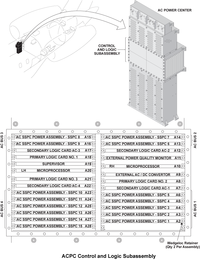
- Swap the Secondary Logic Card (SLC) associated with the AC bus affected by the condition.
- Set all AC FEEDS/BUS back to IN and test the system again. Is the fault still present?
- If YES, go to step 1 and select a fault message associated to the affected AC FEED/BUS and perform troubleshooting.
- If NO, replace defective SLC.
- Make sure that there is no short on the AC CABIN feeder or systems connected to it and repair/replace as required.
- Replace the thermal breaker that has opened.
- Do close out.
