


05/22/24
Message Overview:
| DDG Reference: | 33-51-01 |
| Pilot Action (QRH): | STATUS-4 |
| System Description: | 33-51-00 |
| Schematic Diagram: | 33-51-00 [ Global Express ] [ G5000 ] [ Global XRS ] |
| Wiring Diagram: | 33-51-01 [ Global Express ] [ G5000 ] [ Global XRS ] |
Message Description:
EMER LIGHTS cockpit switch is set to ON or when the EMER LIGHTS cockpit switch is set to ARM and AC ESS BUS is not powered.
This troubleshooting applies under abnormal condition only.
Possible Causes:
- Cockpit Switch (AP13-S1) set to ON
- Cockpit Switch set to ARM and AC ESS BUS is not powered
- Associated Wiring
Troubleshooting Tips:
Advisory Wire/Service Bulletin: None
Forum Articles/Infoservice/Newsletter: None
NOTES:
- The CAS "EMER LIGHTS ON" (STATUS) is posted when the EMER LIGHTS Cockpit Switch is set to ON or when the EMER LIGHTS cockpit switch is set to ARM and AC ESS BUS is unpowered. If the CAS "EMER LIGHTS ON" (STATUS) is not posted in the conditions described, check if any lights are not coming ON. An Emergency Lights Power Supply (ELPS) may be defective. Refer to the Troubleshooting Recommendations below to check the ELPS discrete status.
- The AMM Task "33−51−09−720−801 - Functional Test of the Emergency Lights Power−Supplies" can be used to help identify a defective ELPS.
Quick Links:
| Removal of Data Acquisition Units | AMM 31-42-01-000-801 [ Global Express ] [ G5000 ] [ Global XRS ] |
| Installation of Data Acquisition Units | AMM 31-42-01-400-801 [ Global Express ] [ G5000 ] [ Global XRS ] |
| Removal of Power supplies | AMM 33-51-09-000-801 [ Global Express ] [ G5000 ] [ Global XRS ] |
| Installation of Power supplies | AMM 33-51-09-400-801 [ Global Express ] [ G5000 ] [ Global XRS ] |
| Functional Test of the Emergency Lights Power−Supplies | AMM 33-51-09-400-801 [ Global Express ] [ G5000 ] [ Global XRS ] |
| Wire Repair | SPM 20-12-10 [ Global Express ] [ G5000 ] [ Global XRS ] |
Troubleshooting Recommendations:
- If the EMER LIGHTS switch is set to ON, set the switch to OFF. If the message is still posted, go to step 3.
- With the EMER LIGHTS switch set to ARM, is the AC ESS BUS FAIL EICAS message posted on the Primary EICAS display?
- If YES. Set the EMER LIGHTS switch to OFF. Does the EMER LTS ON EICAS message clears? If the EMER LTS ON message clears, refer to the AC ESS BUS FAIL section in SmartFix Plus ATA 24. If the EMER LTS ON message does not clear, go to step 3.
- NO. Go to step 3.
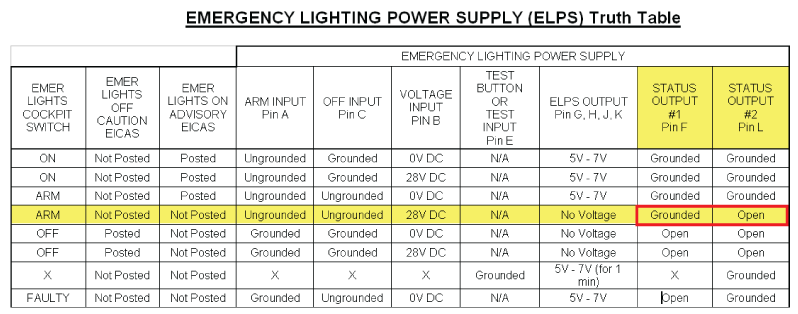
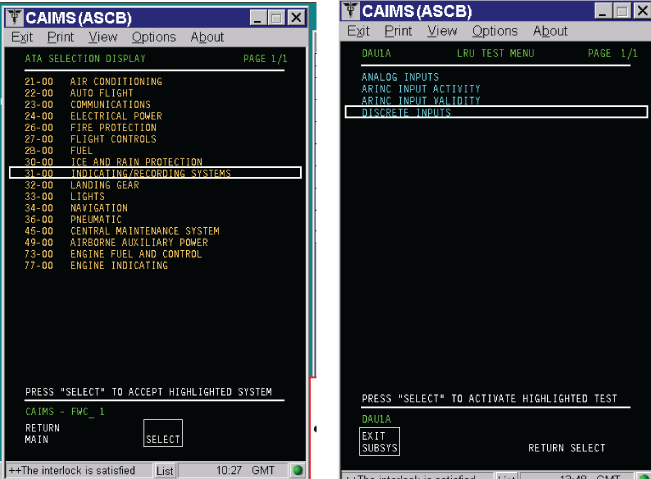
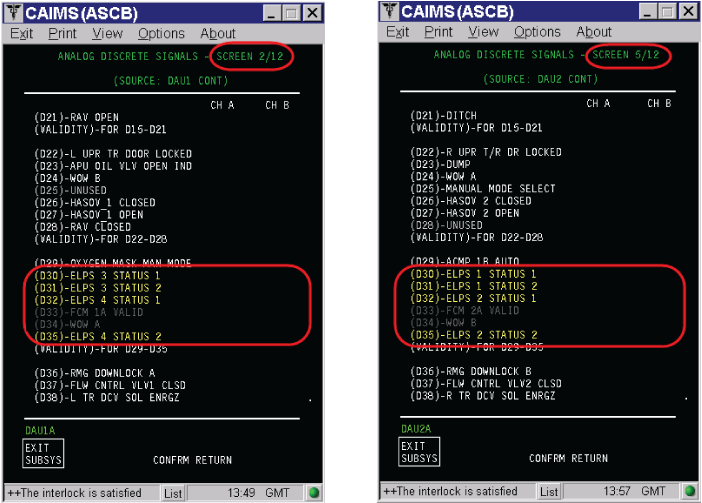
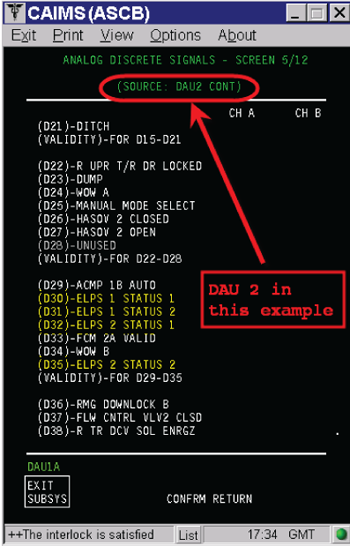
- Get access to CAIMS and interrogate the DAU 1 and DAU 2 - LRU test - Discrete inputs as follow. Record and compare the ELPS 1, 2, 3 & 4 ELPS Status 1 & 2 against the following ELPS truth table.
NOTE: With the EMER LIGHTS switch to ARM, ALL ELPS status #1 should be TRUE (Ground) and all ELPS status #2 should be FALSE (Open).- If ANY ELPS is not posting TRUE-FALSE (GROUND-OPEN), go to step 4
- If ALL ELPS are showing either TRUE-TRUE (GROUND-GROUND), FALSE-FALSE (OPEN-OPEN) or FALSE-TRUE (OPEN-GROUND), then go to step 7.
- If any of the ELSP is posting a wrong discrete input to the DAU, swap the suspected ELPS with another ELPS. Interrogate CAIMS - DAU - Discrete inputs. Did the suspected discrete status followed the suspected ELPS? If YES, replace the defective ELPS. If not, go to step 5.
- Swap the source DAU (1 or 2) with the other source DAU (1 or 2). Interrogate CAIMS - DAU - Discrete inputs. Did the suspected discrete status followed the suspected DAU? If YES, replace the defective DAU. If not, go to step 6.
- Carry out a wiring check between the suspected ELPS and its source DAU and between the suspected ELPS and the EMER LIGHTS switch. Repair wiring as necessary.
- Carry out a continuity check on the EMER LIGHTS switch, the EMER LIGHTS ground stud GS367 and between the EMER LIGHT switch and TM30.
- Do close out.


