06/29/21
Message Overview:
Message Name:
ACPC CCBP/AC ESS BUS FAILED
Message Code:
2451389ACP
Associated CAS:
| Reporting LRU: | AC Power Center (ACPC) |
| System Description: | 24-50-00 |
| Schematic Diagram: | 24-23-00 [ Global Express ] [ G5000 ] [ Global XRS ] |
| Wiring Diagram: | 24-52-01 [ Global Express ] [ G5000 ] [ Global XRS ] |
Message Description:
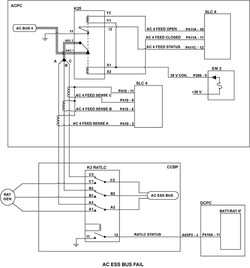
AC Power Center (ACPC) detects that the AC ESS BUS is unpowered while it is connected to an active power source.
Possible Causes:
- AC Power Center (ACPC) Contactor (K25)
- Secondary Logic Card (SLC) 4
- Ram Air Turbine Line Contactor (RATLC) (K3)
- AC Power Center (ACPC) (A54)
- Associated Wiring
Troubleshooting Tips:
Advisory Wire/Service Bulletin: None
Forum Articles/Infoservice/Newsletter: None
Flight Operation Notifications Manual (FONM): None
Quick Links:
| Removal of the AC Power Center (ACPC) | AMM 24-51-00-000-801 [ Global Express ] [ G5000 ] [ Global XRS ] |
| Installation of the AC Power Center (ACPC) | AMM 24-51-00-400-801 [ Global Express ] [ G5000 ] [ Global XRS ] |
| Removal of the AC Power Center (ACPC) Secondary Logic | AMM 24-51-13-000-801 [ Global Express ] [ G5000 ] [ Global XRS ] |
| Installation of the AC Power Center (ACPC) Secondary Logic | AMM 24-51-13-400-801 [ Global Express ] [ G5000 ] [ Global XRS ] |
| Removal of the AC Power Center (ACPC) H-Series Contactor | AMM 24-51-29-000-801 [ Global Express ] [ G5000 ] [ Global XRS ] |
| Installation of the AC Power Center (ACPC) H-Series Contactor | AMM 24-51-29-400-801 [ Global Express ] [ G5000 ] [ Global XRS ] |
| Removal of the AC Power Center (ACPC) Electronic Modules | AMM 24-51-81-000-801 [ Global Express ] [ G5000 ] [ Global XRS ] |
| Installation of the AC Power Center (ACPC) Electronic Modules | AMM 24-51-81-400-801 [ Global Express ] [ G5000 ] [ Global XRS ] |
| Removal of the Cockpit Circuit-Breaker Panel (CCBP) H-Series Contactors | AMM 24-52-05-000-801 [ Global Express ] [ G5000 ] [ Global XRS ] |
| Installation of the Cockpit Circuit-Breaker Panel (CCBP) H-Series Contactors | AMM 24-52-05-400-801 [ Global Express ] [ G5000 ] [ Global XRS ] |
| Access to System Diagnostics | AMM 45-45-00-970-804 [ Global Express ] [ G5000 ] [ Global XRS ] |
| Wire Repair - Maintenance Practices - ALL | SPM 20-12-10-02 [ Global Express ] [ G5000 ] [ Global XRS ] |
| AC Power Center Component Maintenance Manual | CMM 24-51-02 [ Global Express ] [ G5000 ] [ Global XRS ] |
Troubleshooting Recommendations:
- Apply power to the Aircraft. Is AC BUS 4 powered?
- If NO, use the AC BUS 4 FAIL troubleshooting page to find the cause and continue with next step.
- If YES, continue with next step.
- Access CAIMS from the PMAT. Select SYSTEM DIAG, ATA 24, AC POWER CENTER ACPC A, LRU TEST. Make a selection of AC SYNOPTIC DATA and go to page 4/5. Does "AC ESS FEEDER" show as powered?
- If YES, go to step 10.
- If NO, continue with next step.
- Access CAIMS from the PMAT. Select SYSTEM DIAG, ATA 24, AC POWER CENTER ACPC A, LRU TEST. Make a selection of AC SYNOPTIC DATA and go to page 5/5. Does "AC ESS BUS" show as Connected?
- If NO, go to step 5.
- If YES, continue with next step.
- Access the ACPC Logic sub-assembly. Interchange SLC 4 with SLC 3. Did the CAIMS message clear?
- If YES, replace SLC 4 and do close out.
- If NO, put the cards back in their original location and continue with next step.
- Access the ACPC Logic sub-assembly. Remove SLC 4 and access the ACPC Secondary Power sub-assembly. Disconnect EM 2 connector P206 and K25-12, K25-11 and perform a continuity check as follows:
From To Result K25-X1 Ground K25-X2 Ground K25-Y1 Ground K25-Y2 Ground K25-12 Ground - If there is continuity, go to step 9.
- If there is no continuity, continue with next step.
- Perform a continuity check as follows:
From To Result K25-11 Ground - If there is no continuity, go to step 9.
- If there is continuity, continue with next step.
- Perform a continuity check as follows:
From To Result K25-X1 P206-5 K25-X2 P411A-11 K25-Y1 K25-X1 K25-Y2 P411A-10 K25-112 P411C-12 - If there is no continuity, go to step 9.
- If there is continuity, continue with next step.
- Interchange contactor K25 with K21 and perform a system checks. Did the CAIMS fault message clear?
- If YES, replace contactor K25 and do close out.
- If NO, continue with next step.
- Replace ACPC.
- If system checks are good, do close out.
- If fault remains, continue with next step.
- Access the RATLC (K3) in the copilot side circuit breaker panel and perform a 115 VAC Voltage check as follows:
From To Result K3-A3 Ground K3-B3 Ground K3-C3 Ground - If one or more phase is missing 115 VAC, repair defective wiring as required and do close out.
- If there is 115 VAC, continue with next step.
- Replace RATLC (K3).
- Do close out.