07/01/19
Message Overview:
Fault Message:
SPDA3 FAILED(LEVEL C)-R MICROPR/CDU
Fault Code:
2463302SPD
Associated CAS:
| Reporting LRU: | Secondary Power Distribution Assembly (SPDA) 3 |
| System Description: | 24-60-00 |
| Schematic Diagram: | 24-62-01 [ Global Express ] [ G5000 ] [ Global XRS ] |
| Wiring Diagram: | 24-62-03 [ Global Express ] [ G5000 ] [ Global XRS ] |
Fault Description:
Secondary Power Distribution Assembly (SPDA) 3 right microprocessor and Electrical Management System Control and Display Unit (EMS CDU) 1 communication timeout or overflow. This is an internal failure.
Possible Causes:
- Secondary Power Distribution Assembly (SPDA) 3 (A15)
- Electrical Management System Control and Display Unit (EMS CDU) 1 (A94)
- Associated Wiring
Troubleshooting Tips:
Advisory Wire/Service Bulletin: None
Forum Articles/Infoservice/Newsletter: None
Quick Links:
| Removal of the Secondary-Power Distribution Assemblies | AMM 24-62-01-000-801 [ Global Express ] [ G5000 ] [ Global XRS ] |
| Installation of the Secondary-Power Distribution Assemblies | AMM 24-62-01-400-801 [ Global Express ] [ G5000 ] [ Global XRS ] |
| Removal of the Electrical Management System Control-and-Display Units (EMS CDU) |
AMM 24-70-01-000-801 [ Global Express ] [ G5000 ] [ Global XRS ] |
| Installation of the Electrical Management System Control-and-Display Units (EMS CDU) |
AMM 24-70-01-400-801 [ Global Express ] [ G5000 ] [ Global XRS ] |
Troubleshooting Recommendations:
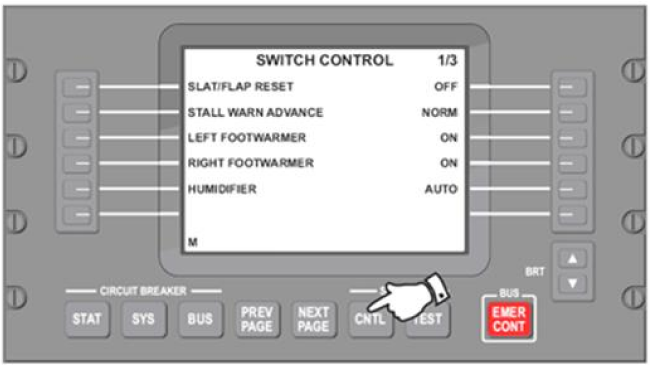
- On EMS CDU 1, enter Diagnostic mode.
- Select the SYSTEM - CNTL key.
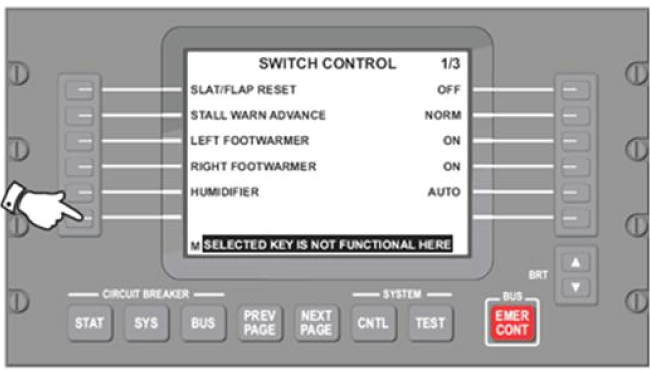
- Select the lower left side key.
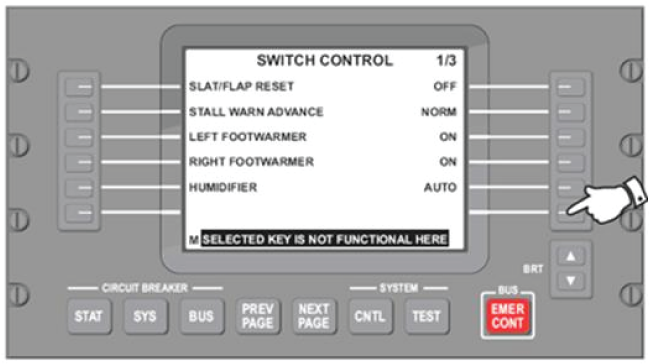
- Select the lower right side key.
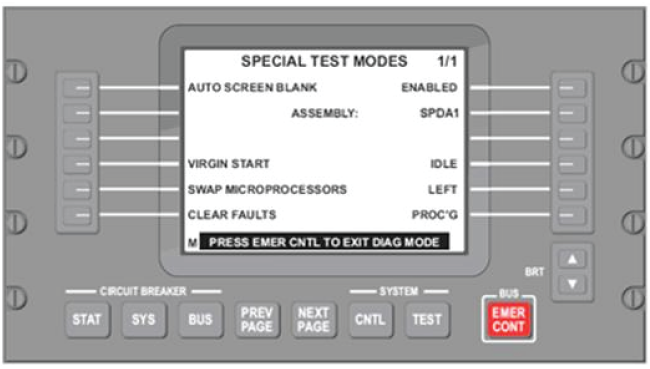
- On EMS CDU 1, Select SYSTEM - TEST key. You are now in the Signboard menu page.
- Select Assembly via the left side key.
- Select the right side key and increment to SPDA 3.
- Select Virgin Start via the left side key.
- Select the right side key to perform the virgin start.
- Cycle the A/C power. Is the fault still present?
- If YES, continue with next step.
- If NO, do close out.
- Replace SPDA 3.
- Do close out.