08/20/19
Message Overview:
Fault Message:
ARINC BUS MONITOR (CAIMS)
Fault Code:
3000141IN
Associated CAS:
| Reporting LRU: | Enhanced Vision System Heater Controller (EVSHC) |
| System Description: | 34-33-00 |
| Schematic Diagram: | 34-41-00 [ Global Express ] [ G5000 ] [ Global XRS ] |
| Wiring Diagram: | 34-33-03 [ Global Express ] [ G5000 ] [ Global XRS ] |
Fault Description:
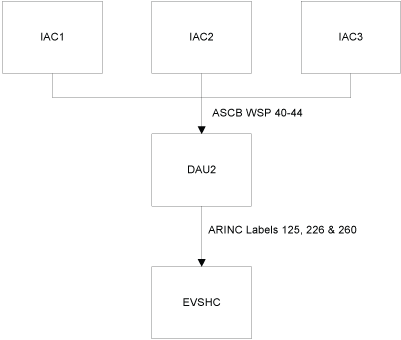
The Enhanced Vision System Heater Controller (EVSHC) does not receive either one of the CAIMS labels 125 (TIME), 226 (A/C SERIAL NUMBER) or 260 (DATE).
Possible Causes:
- Integrated Avionics Computer (IAC) 1 (A11)
- Integrated Avionics Computer (IAC) 2 (A10)
- Integrated Avionics Computer (IAC) 3 (A12)
- Data Acquisition Unit (DAU) 2 (A18)
- Enhanced Vision System Heater Controller (EVSHC) (A315)
Troubleshooting Tips:
Advisory Wire/Service Bulletin: None
Forum Articles/Infoservice/Newsletter: None
- Reboot using another IAC
- Reload the Aircraft Serial number using the PMAT
- Swap digital clocks (troubleshoot digital clocks system as require)
Quick Links:
| Removal of the Clocks | AMM 31-21-01-000-801 [ Global Express ] [ G5000 ] [ Global XRS ] |
| Installation of the Clock | AMM 31-21-01-400-801 [ Global Express ] [ G5000 ] [ Global XRS ] |
| Removal of the Integrated Avionics Computers (IAC) | AMM 31-41-01-000-801 [ Global Express ] [ G5000 ] [ Global XRS ] |
| Installation of the Integrated Avionics Computers (IAC) | AMM 31-41-01-400-801 [ Global Express ] [ G5000 ] [ Global XRS ] |
| Removal of the Data Acquisition Units (DAU) | AMM 31-42-01-000-801 [ Global Express ] [ G5000 ] [ Global XRS ] |
| Installation of the Data Acquisition Units (DAU) | AMM 31-42-01-400-801 [ Global Express ] [ G5000 ] [ Global XRS ] |
| Removal of the Enhanced Vision System (EVS) Heater Controller | AMM 34-33-09-000-801 [ Global Express ] [ G5000 ] [ Global XRS ] |
| Installation of the Enhanced Vision System (EVS) Heater Controller | AMM 34-33-09-400-801 [ Global Express ] [ G5000 ] [ Global XRS ] |
Troubleshooting Recommendations:
- Using the Bus Reader, make sure the Aircraft Serial number, date and time are present and valid on the ARINC Labels as follows:
Signal Name Source Aircraft Serial number DAU 2 Label 226 GMT DAU 2 Label 125 Date DAU 2 Label 260 - If all labels are present and valid, then replace EVSHC and do close out.
- If labels are not present and invalid, continue with next step.
- Using the Bus Reader, make sure the Aircraft Serial number, date and time are present and valid on the ARINC Labels as follows:
Signal Name Signal Name Aircraft Serial number IAC FWC WSP 40 Aircraft Serial number IAC FWC WSP 41 Calendar date & month IAC FWC WSP 42 Date and Leg IAC FWC WSP 43 Time GMT IAC FWC WSP 44 - If one of the above WSP is missing or invalid, then follow the above Hits and Tips and do close out.
- If all WSP are present and valid, continue with next step.
- Replace DAU 2.
- Do close out.