


09/12/19
Message Overview:
Fault Message:
RIGHT OUTBD WAI TEMP SENSOR /WRG
Fault Code:
3616426BMC
Associated CAS:
| Reporting LRU: | Bleed Management Controller (BMC) 2 |
| System Description: | 30-12-00 |
| Schematic Diagram: | 30-11-00 [ Global Express ] [ G5000 ] [ Global XRS ] |
| Wiring Diagram: | 30-11-02 [ Global Express ] [ G5000 ] [ Global XRS ] |
Fault Description:
A difference of greater than 9 °C has been detected between the two temperature sensing elements of the RIGHT OUTBD WING AI TEMP SENSOR. Inhibited during Take-off and Landing.
NOTE: On Bleed Management Controller (BMC) P/N GG546-1017-11 and older, the difference is 6 °C instead of 9 °C.
Possible Causes:
- Right Wing Outboard A/ICE Temperature Sensor (E40)
- Bleed Management Controller (BMC) 2 (A70)
- Data Acquisition Unit (DAU) 4 (A31)
- Associated Wiring
Troubleshooting Tips:
Advisory Wire/Service Bulletin:
- AW700-36-0365 - Bleed management controller - Data Gathering to reduce No Fault Found (NFF) rate
Forum Articles/Infoservice/Newsletter:
- Forum Article 2011-VOL 8 issue 23 - Bleed Management Controller (BMC) Top 10 No Fault Found (NFF) vs. Reliability Improvement Modification Program (RIMP) implementation
- Questionnaire for replacing the BMC. Follow instructions using this (Fill out form)
NOTE: The WAIT sensor is a PT500 type which gives 500 ohms at 0 °C with resistance increments of approximately 2 ohms per °C. - The WAITS values can be monitored into CAIMS at any time on the ground. Temperature for Inboard and Outboard sensors should reflect actual ambient temperature
- The value for Inboard sensor is only available for Channel A (Control) in the PMAT. Inboard WAIT from Channel B (Monitoring) can not be obtained
- Resistance of the INBD and OUTBD WAITS sensing elements should be as per the table below in regard to ambient temperature
Temperature (°C) Sensor Resistance (Ohms) -60 381.64 -50 401.505 -40 421.317 -30 441.074 -20 460.774 -10 480.417 500 10 519.517 20 538.974 30 558.372 40 577.71 50 596.988 60 616.208 70 635.369 80 654.471 90 673.515 100 692.5 110 711.427 120 730.296 130 749.107 140 767.861 150 786.557 160 805.195 170 823.776 180 842.299 190 860.765 200 879.174 210 897.526 220 915.821 230 934.059 240 952.239 250 970.363 260 988.43 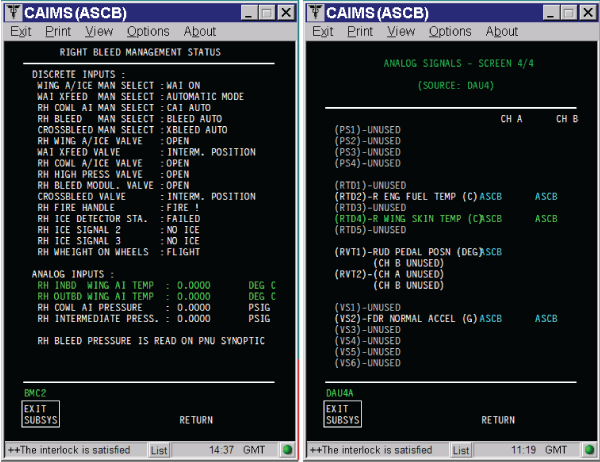
Quick Links:
| Removal of the Anti-Icing Temperature Sensors | AMM 30-11-05-000-801 [ Global Express ] [ G5000 ] [ Global XRS ] |
| Installation of the Anti-Icing Temperature Sensors | AMM 30-11-05-400-801 [ Global Express ] [ G5000 ] [ Global XRS ] |
| Removal of the Data Acquisition Units (DAU) | AMM 31-42-01-000-801 [ Global Express ] [ G5000 ] [ Global XRS ] |
| Installation of the Data Acquisition Units (DAU) | AMM 31-42-01-400-801 [ Global Express ] [ G5000 ] [ Global XRS ] |
| Removal of the Bleed Management Controller | AMM 36-11-33-000-801 [ Global Express ] [ G5000 ] [ Global XRS ] |
| Installation of the Bleed Management Controller | AMM 36-11-33-400-801 [ Global Express ] [ G5000 ] [ Global XRS ] |
| Wire Repair - Maintenance Practices - ALL | SPM 20-12-10-02 [ Global Express ] [ G5000 ] [ Global XRS ] |
Troubleshooting Recommendations:
- Make sure OUTBD WING AI TEMP SENSOR is installed properly.
- If installation fixes the fault, do close out.
- If fault remains, continue with next step.
- Perform wiring checks between Right Outbd WAITS and BMC 2.
- If wiring checks are not good, repair defective wiring as required and do close out.
- If wiring checks are good, continue with next step.
- Perform wiring checks between Right Outbd WAITS and DAU 4.
- If wiring checks are not good, repair defective wiring as required and do close out.
- If wiring checks are good, continue with next step.
- Swap DAU 4 with DAU 2.
- If system checks are good, replace DAU 4 and do close out.
- If fault remains, continue with next step.
- Swap BMC 2 with BMC 1.
- If system checks are good, replace BMC 2 and do close out.
- If fault remains, continue with next step.
- Replace Right OUTBD WING AI TEMP SENSOR.
- Do close out.