


06/22/21
Message Overview:
Message Name:
UNABLE TO POWER AIRCRAFT WITH EXTERNAL AC
| Message Code: | 244OBS001 |
| Effectivity: | All |
| System: | Electrical Power |
| System Description: | 24-40-00 |
| Schematic Diagram: | 24-41-00 [ Global Express ] [ G5000 ] [ Global XRS ] |
| Wiring Diagram: | 24-41-01 [ Global Express ] [ G5000 ] [ Global XRS ] |
Message Description:
With an external Ground Power Unit connected to the aircraft and energized, EXT AC cannot be energized.
Possible Causes:
- Ground Power Unit (GPU)
- AC Power Center (ACPC) (A54)
Troubleshooting Tips:
Advisory Wire/Service Bulletin: None
Forum Articles/Infoservice/Newsletter: None
Quick Links:
| Connect Electrical Power to the Aircraft | AMM 24-00-00-861-801 [ Global Express ] [ G5000 ] [ Global XRS ] |
| Remove the Electrical Power from the Aircraft | AMM 24-00-00-861-802 [ Global Express ] [ G5000 ] [ Global XRS ] |
| Electrical/Electronic Safety Precautions | AMM 24-00-00-910-801 [ Global Express ] [ G5000 ] [ Global XRS ] |
| Operational Test (Cycling) of Thermal Circuit Breakers | AMM 24-00-00-710-802 [ Global Express ] [ G5000 ] [ Global XRS ] |
| Connect and Energize External AC Power | AMM 24-41-00-861-801 [ Global Express ] [ G5000 ] [ Global XRS ] |
| Remove External AC Power | AMM 24-41-00-861-802 [ Global Express ] [ G5000 ] [ Global XRS ] |
| Operational Test of the AC External-Power Receptacle | AMM 24-41-01-710-801 [ Global Express ] [ G5000 ] [ Global XRS ] |
| Operational Test of the Line Current Transformer | AMM 24-41-05-710-801 [ Global Express ] [ G5000 ] [ Global XRS ] |
Troubleshooting Recommendations:
- Make sure the Ground Power Unit (GPU) is energized and supplying power.
- Access the ACPC thermal Circuit Breaker (CB) front panel.
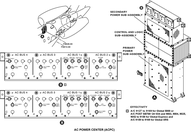
- Make sure EXT AC INTERLOCK (CB-A9) is set to IN.
- If the CB is set to IN, continue with next step.
- If the CB was set to OUT, set the CB back to IN and do close out.
- Cycle the CB. Is the fault resolved?
- If YES, do close out.
- If NO, continue with next step.
- Interchange the GPU with another GPU if available. Is the fault still present?
- If YES, continue with next step.
- If NO, replace defective GPU.
- Perform troubleshooting in observed fault "247OBS003 - ELECTRICAL SYSTEM TROUBLESHOOTING VIA EMS CDU SIGNBOARD"
- Do close out.
