06/29/21
Message Overview:
Message Name:
HYDRAULIC SYSTEM FILTER MANIFOLD DIFFERENTIAL PRESSURE INDICATORS FOUND EXTENDED
| Message Code: | 293OBS015 |
| Effectivity: | All |
| System: | Hydraulic System |
| System Description | 29-30-00 |
| Schematic Diagram | 29-12-00 [ Global Express ] [ G5000 ] [ Global XRS ] |
| Wiring Diagram | 29-00-03 [ Global Express ] [ G5000 ] [ Global XRS ] |
Message Description:
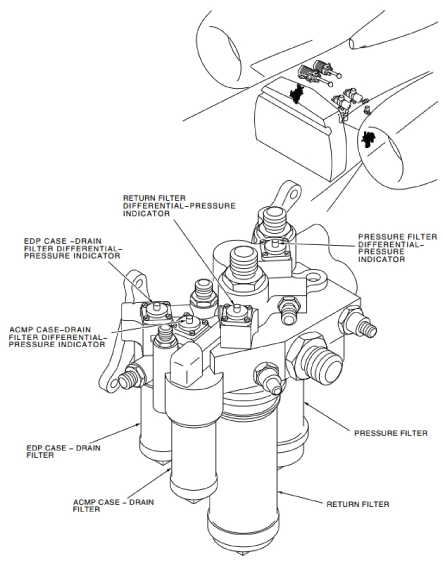
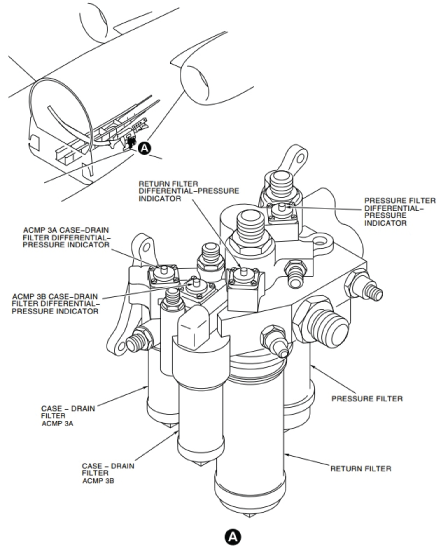
One or more Hydraulic System Filter manifold Differential Pressure Indicator (DPI) is found to be extended.
Possible Causes:
- Hydraulic Filter Differential Pressure Indicator 1
- Hydraulic Filter Differential Pressure Indicator 2
- Hydraulic Filter Differential Pressure Indicator 3
Troubleshooting Tips:
Advisory Wire/Service Bulletin: None
Forum Articles/Infoservice/Newsletter: None
Quick Links:
| Visual Check of the No. 1 and No. 2 Hydraulic Filter Differential-Pressure Indicators | AMM 29-12-00-210-802 [ Global Express ] [ G5000 ] [ Global XRS ] |
| Removal of the No. 1 and No. 2 Hydraulic-System Pressure-Filter Elements | AMM 29-12-13-000-801 [ Global Express ] [ G5000 ] [ Global XRS ] |
| Installation of No. 1 and No. 2 Hydraulic-System Pressure-Filter Elements | AMM 29-12-13-400-801 [ Global Express ] [ G5000 ] [ Global XRS ] |
| Visual Check of the No. 3 Hydraulic Filter Differential-Pressure Indicators | AMM 29-13-00-210-802 [ Global Express ] [ G5000 ] [ Global XRS ] |
| Removal of the No. 3 Hydraulic-System Return-Filter Element | AMM 29-13-13-000-801 [ Global Express ] [ G5000 ] [ Global XRS ] |
| Installation of the No. 3 Hydraulic-System Return-Filter Element | AMM 29-13-13-400-801 [ Global Express ] [ G5000 ] [ Global XRS ] |
Troubleshooting Recommendations:
- Make sure Hydraulic power is off and there is no pressure in the lines.
- If system checks are not good, apply condition as required and continue with next step.
- If system checks are good, continue with next step.
- Push on the extended DPI to attempt to reset it. Does the DPI reset (stay depressed in the housing)?
- If NO, replace the defective Filter manifold and do close out.
- If YES, continue with next step.
- Pressurize the affected hydraulic system. Did the DPI extend again?
- If NO, monitor and do close out.
- If YES, continue with next step.
- Remove the filter element and inspect it to determine what kind of particles are contaminating the system. Repair as required.
- Do close out.