


06/30/21
Message Overview:
Message Name:
ONE OR MORE EMERGENCY LIGHTS INOPERATIVE
| Message Code: | 335OBS003 |
| Effectivity: | All |
| System: | Emergency Lighting System |
| System Description: | 33-50-00 |
| Schematic Diagram: | 33-51-00 [ Global Express ] [ G5000 ] [ Global XRS ] |
| Wiring Diagram: | 33-51-01 [ Global Express ] [ G5000 ] [ Global XRS ] |
Message Description:
One or few emergency lights are inoperative when the emergency light switch is set to on.
Possible Causes:
- Cockpit EMER LIGHTS Switch (AP13-S1)
- Emergency Light Power Supply (ELPS) (A158)
- Emergency Light Power Supply (ELPS) (A159)
- Emergency Light Power Supply (ELPS) (A160)
- Emergency Light Power Supply (ELPS) (A161)
- Data Acquisition Unit (DAU) 1 (A17)
- Data Acquisition Unit (DAU) 2 (A18)
- Secondary Power Distribution Assembly (SPDA) 4 (A16)
- Associated Wiring
Troubleshooting Tips:
Advisory Wire/Service Bulletin: None
Forum Articles/Infoservice/Newsletter:
- Forum - Volume 16, Issue 22 (Oct 30, 2019) - Emergency Lighting Power Supplies Fuses Replacement Task Introduction
Quick Links:
| Removal of the Emergency Lighting Power Supplies (ELPS) | AMM 33-51-09-000-801 [ Global Express ] [ G5000 ] [ Global XRS ] |
| Installation of the Emergency Lighting Power Supplies (ELPS) | AMM 33-51-09-400-801 [ Global Express ] [ G5000 ] [ Global XRS ] |
| Replacement of the Internal Battery of the Emergency Lighting Power Supplies (ELPS) | AMM 33-51-09-960-801 [ Global Express ] [ G5000 ] [ Global XRS ] |
| Operational Test of the Emergency Lighting Power-Supplies | AMM 33-51-09-710-801 [ Global Express ] [ G5000 ] [ Global XRS ] |
| Functional Test of the Emergency Lights Power-Supplies | AMM 33-51-09-720-801 [ Global Express ] [ G5000 ] [ Global XRS ] |
| Replacement of the Internal fuses of the Emergency Lighting Power Supplies (ELPS) | AMM 33-51-09-960-802 [ Global Express ] [ G5000 ] [ Global XRS ] |
| Wire Repair - Maintenance Practices - ALL | SPM 20-12-10-02 [ Global Express ] [ G5000 ] [ Global XRS ] |
Troubleshooting Recommendations:
CAUTION: DO NOT OPERATE THE INTERNAL AND EXTERNAL LIGHTING FOR MORE THAN 10 MINUTES. CONTINUED OPERATION WILL DECREASE THE CHARGE OF THE BATTERIES OF THE EMERGENCY LIGHTING POWER-SUPPLIES.
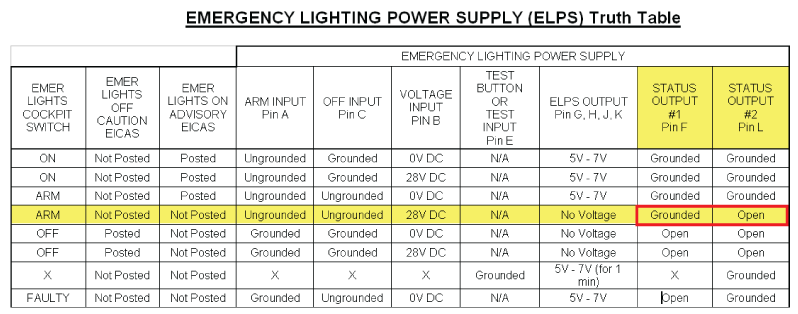
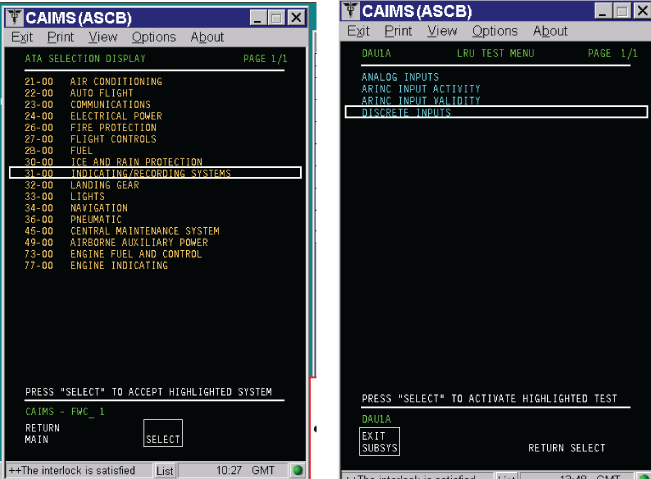
- Access to CAIMS and select SYSTEM DIAG. Interrogate DAU 1 and DAU 2 - LRU test - Discrete inputs as follows:Record and compare the ELPS 1, 2, 3 & 4 ELPS Status 1 & 2 against the following ELPS truth table.
NOTE: With the EMER LIGHTS switch to ARM, ALL ELPS status #1 should be TRUE (Ground) and all ELPS status #2 should be FALSE (Open).- If ANY ELPS is NOT posting TRUE-FALSE (GROUND-OPEN), continue with next step.
- If ALL ELPS are showing either TRUE-TRUE (GROUND-GROUND), FALSE-FALSE (OPEN-OPEN) or FALSE-TRUE (OPEN-GROUND), then go to step 5.
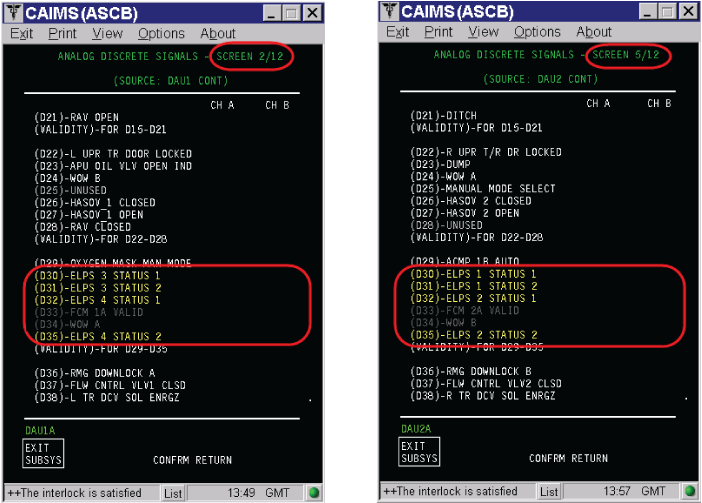
- If any of the ELSP is posting a wrong discrete input to the DAU, swap the suspected ELPS with another ELPS. Interrogate CAIMS - DAU - Discrete inputs. Did the wrong discrete status follow the suspected ELPS?
- If YES, replace the defective ELPS.
- If NO, continue with next step.
- Swap DAU 1 with DAU 2. Interrogate CAIMS - DAU - Discrete inputs. Did the wrong discrete status follow the suspected DAU?
- If YES, replace the defective DAU.
- If NO, continue with next step.
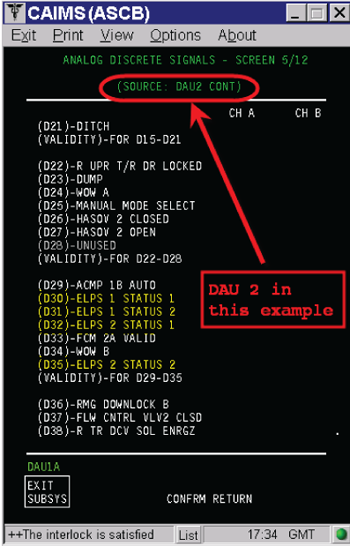
- Perform a wiring check between the suspected ELPS and its source DAU and between the suspected ELPS and the EMER LIGHTS switch.
- If wiring defects are found, repair defective wiring as required and do close out.
- If no defects are found, continue with next step.
- Perform a continuity check of the EMER LIGHTS switch on the cockpit Emergency Lights Control Panel using wiring diagram 33-51-03.
- If wiring defects are found, repair defective wiring as required and do close out.
- If no defects are found, continue with next step.
- Perform a continuity check between the Emergency Lights Control Panel aircraft side connector and ground stud GS367.
- If wiring defects are found, repair defective wiring as required and do close out.
- If no defects are found, continue with next step.
- Perform a continuity check between the Emergency Lights Control Panel aircraft side connector and the Terminal Module(s) (check wiring diagram for effectivity). Repair as required.
- Do close out.


