


03/28/25
Message Overview:
Message Name:
LGECU NLG DOWNLOCK/ WIRING
Message Code:
3250018DWY
Associated CAS:
| Reporting LRU: | Steering Control Unit (SCU) |
| System Description: | 32-51-00 - Nosewheel-steering Control System |
| Schematic Diagram: | 32-51-00 [ Global Express ] [ G5000 ] [ Global XRS ] |
| Wiring Diagram: | 32-51-02 [ Global Express ] [ G5000 ] [ Global XRS ] |
Message Description:
The Nose Gear Downlock Proximity Switch signal from the Landing Gear Electronic Control Unit (LGECU) Channel A is not communicating properly with the Steering Control Unit (SCU).
Possible Causes:
- Left Nose Gear Down Lock Proximity Sensor (MT23)
- Landing Gear Electronic Control Unit (LG ECU) (A52)
- Steering Control Unit (SCU) (A36)
- Associated Wiring
Troubleshooting Tips:
Advisory Wire/Service Bulletin:
- AW700-32-0280 - Nose Wheel Steering - Troubleshooting SCU GW415-8100-3
Full Throttle Blog/Forum Articles/Infoservice/Newsletter: None
Flight Operation Notifications Manual (FONM): None
NOTES:
- Although this fault code indicates an issue with the Downlock sensors, please note that the WOW input signal to the SCU can also cause this CAIMS message to generate.
Quick Links:
| Removal of the Landing-Gear Electronic Control-Unit (LG ECU) | AMM 32-31-09-000-801 [ Global Express ] [ G5000 ] [ Global XRS ] |
| Installation of the Landing-Gear Electronic Control-Unit (LG ECU) | AMM 32-31-09-400-801 [ Global Express ] [ G5000 ] [ Global XRS ] |
| Rigging of the Nosewheel-Steering Control System (Recommended Procedure) | AMM 32-51-00-820-801 [ Global Express ] [ G5000 ] [ Global XRS ] |
| Rigging Check of the Nosewheel-Steering Control System | AMM 32-51-00-220-801 [ Global Express ] [ G5000 ] [ Global XRS ] |
| Removal of the Steering Control Unit | AMM 32-51-01-000-801 [ Global Express ] [ G5000 ] [ Global XRS ] |
| Installation of the Steering Control Unit | AMM 32-51-01-400-801 [ Global Express ] [ G5000 ] [ Global XRS ] |
| Removal of the Nose-Gear Downlock Proximity-Sensors | AMM 32-61-05-000-805 [ Global Express ] [ G5000 ] [ Global XRS ] |
| Installation of the Nose-Gear Downlock Proximity-Sensors | AMM 32-61-05-400-805 [ Global Express ] [ G5000 ] [ Global XRS ] |
| Wire Repair - Maintenance Practices - ALL | SPM 20-12-10-02 [ Global Express ] [ G5000 ] [ Global XRS ] |
Troubleshooting Recommendations:
- In CAIMS selected "SYSTEM DIAG/32-00 LANDING GEAR/STEERING CONTROL UNIT/LRU TEST/SCU-3 DATA PAGES".
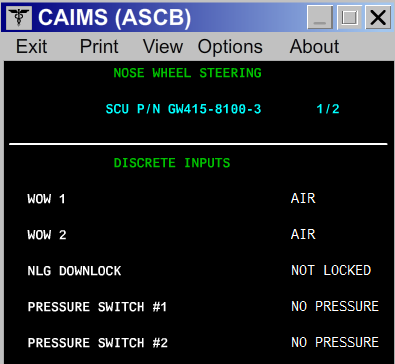
- If one of the WOW signals shows a wrong status, go to step 3.
- If the NLG DOWNLOCK status is not correct, go to step 7.
- if WOW 1, WOW 2 and NLG DOWNLOCK status are correct per current aircraft configuration, continue with next step.
- Use targets and anti-targets to simulate Weight on wheels and weight off wheels and monitor the data page sensor status.
- If all sensor status indicated the correct status, go to step 7.
- If one of the WOW inputs shows a wrong status at one point, continue with next step.
- In CAIMS selected “SYSTEM DIAG / 32-00 LANDING GEAR / LDG ELEC CTRL UNIT A / LRU TEST / LGECU A / WOW SENSOR DATA. Make sure all WOW signals are good per aircraft configuration.
- If one or more of the sensors shows a wrong status, go to step 6.
- If all sensors are working properly, continue with next step.
- Remove the LGECU and inspect the condition of all the connectors and pins.
- If defects are found, rectify as required and do close out.
- If no defects are found, continue with next step.
- Remove the SCU. Perform a wiring check of the WOW signals wiring between the LGECU and the SCU.
- If wiring checks are not good, repair defective wiring as required and do close out.
- If wiring checks are good, continue with next step.
- Perform a wiring check of the interface wiring between the LGECU and the affected WOW sensor.
- If wiring checks are not good, repair defective wiring as required and do close out.
- If wiring checks are good, continue with next step.
- In CAIMS selected “SYSTEM DIAG / 32-00 LANDING GEAR / LDG ELEC CTRL UNIT A / LRU TEST / LGECU A LDG GR DOWNLOCK SENSOR DATA “.
- Using an anti target, set the Left Nose Downlock sensor to a not down and lock state. CAIMS should show the Nose Gear Downlock sensors as follows:
SENSOR VARIABLE NAME STATUS NLG DOWNLOCK SENSOR A STATE NOT DOWNLOCKED NLG DOWNLOCK SENSOR A AGREE AGREE NLG DOWNLOCK SENSOR A FAULT NO FAULT - If the sensor status is not as per above, replace the proximity sensor.
- If the sensor status is as per above, continue with next step.
- Remove the anti target to set the Left Nose Downlock sensor to a down and lock state. CAIMS should shows the Nose Gear Downlock sensors as follows:
SENSOR VARIABLE NAME STATUS NLG DOWNLOCK SENSOR A STATE DOWNLOCKED NLG DOWNLOCK SENSOR A AGREE AGREE NLG DOWNLOCK SENSOR A FAULT NO FAULT - If the sensor status is not as per above, replace the proximity sensor.
- If the Proximity sensor status is good, continue with next step.
- perform a wiring check between the following pins:
From To Result A36P1-13 A52BP1-J15 - If wiring checks are not good, repair defective wiring as required and do close out.
- If wiring checks are good, continue with next step.
- Replace LGECU.
- Do close out.