


09/16/19
Message Overview:
Fault Message:
NO DATA- SPEED SNSR [CKT 1 & 2]/WRG
Fault Code:
4960143APU
Associated CAS:
| Reporting LRU: | Full-Authority Digital Engine-Controller (FADEC) |
| System Description: | 49-60-00 |
| Schematic Diagram: | 49-61-00 [ Global Express ] [ G5000 ] [ Global XRS ] |
| Wiring Diagram: | 49-12-00 [ Global Express ] [ G5000 ] [ Global XRS ] 49-61-01 [ Global Express ] [ G5000 ] [ Global XRS ] |
Fault Description:
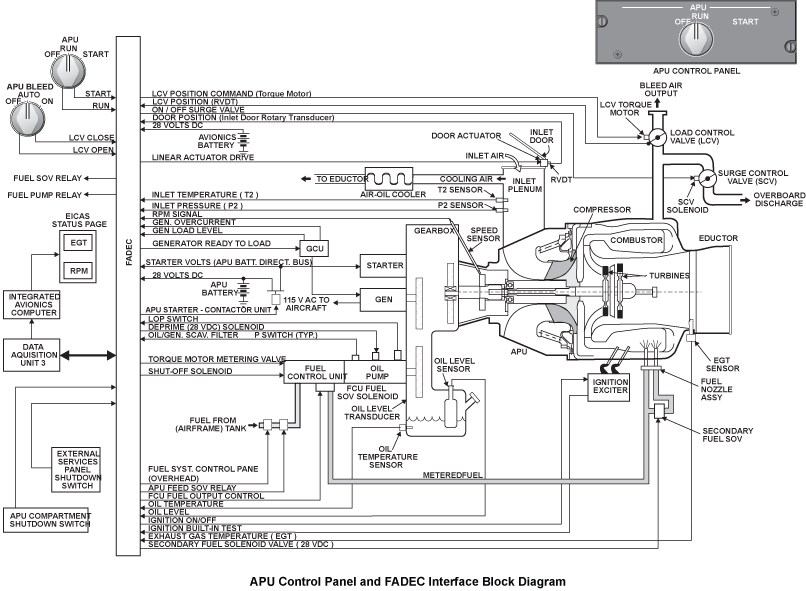
The Full-Authority Digital Engine-Controller (FADEC) stopped the Auxiliary Power Unit (APU) or recorded incorrect Speed Sensor inputs because of one or more of the conditions that follow:
- Speed Sensor 1 Built-In Test signal in the FADEC is set true (this shows a possible short or open in the Speed Sensor or Engine branched wiring harness)
- Speed Sensor 2 Built-In Test signal in the FADEC is set true (this shows a possible short or open in the Speed Sensor or Engine branched wiring harness)
- The FADEC did not receive correct Speed Sensor 1 and 2 inputs (in this condition, the FADEC will prevent a start or cause an APU to shutdown automatically)
| Fault | See * below | Description |
|---|---|---|
| FADEC FAILURE | ECU internal failure (CPU, watchdog timer, O/S circuit failure, loss of O/S protection, etc.) | |
| O/SPD | (Hardware/Software) overspeed circuits tripped (at 106%) | |
| LOSS OF SPEED | Both monopoles failed | |
| LOSS OF O/SPD | FADEC overspeed circuit/FCU fuel output solenoid failed | |
| OVERTEMP | * | EGT limit exceeded during i) start ii) on-speed operation |
| FIRE EMERG | * | Fire signal is received by the FADEC |
| REVERSE FLOW | * | T2 temp. limit (176.6°C/350°F) has been exceeded for 5 secs |
| HIGH OIL TEMP | * | Oil temp limit of >148.9°C exceeded for 10 seconds |
| LOW OIL PRESS | * | Oil pressure has fallen below lower limit of 30 psig for 15 seconds, with rpm > 95% |
| LOSS OF EGT DETECTION | * | Both EGT thermocouples have failed (NOTE: In Essential Mode, FADEC programs an EGT of 260°C to maintain the APU running) |
| NO FLAME | EGT rise has not been detected within 17 seconds of fuel solenoid being commanded open by FADEC or rpm >18% for 5 seconds | |
| NO ACCEL | Acceleration is < 0.05% of the prescheduled rate (normal acceleration is 2.5% per seconds) | |
| SLOW SPEED | Starter timer expired-APU rpm > 5% and less than starter cut out for 30 seconds | |
| UNDER SPEED | * | Speed has reached 100%, drops below 80% for 5 secs |
| NO CRANK | rpm does not rise above 5% within: i) 2 secs. when oil temp is warmer than minus 23°C ii) 50 secs. when oil temp is minus 23°C or lower |
|
| INLET DOOR | Inlet door position indicates closed 30 secs before starter engagement or 600 msecs. after starter engagement | |
| LOSS OF DC POWER | Loss of 28 VDC power for 200 milliseconds | |
| LOP SW FAIL | * | Oil pressure switch has failed open when rpm is < 7%. (NOTE: This switch is normally closed during prestart BITE) |
| FALLBACK | APU drop below 25% rpm after starter cutout | |
| APU GCU HIGH OIL TEMP | * | APU Generator oil temperature above 215°C |
| NOTE: An asterisk mark (*) in any row above means that the automatic protection shut down on that row is inhibited if the associated fault occurs in flight. The respective CAS message or an advisory message reading APU FAULT will be displayed in the CAS window and the APU will not shut down automatically in flight. However the pilot may select to shut down the APU manually by placing the APU control switch to OFF. | ||
Possible Causes:
- Speed Sensor (MT4)
- Auxiliary Power Unit (APU) Full-Authority Digital Engine-Controller (FADEC) (A108)
- Associated Wiring
Troubleshooting Tips:
Advisory Wire/Service Bulletin: None
Forum Articles/Infoservice/Newsletter: None
The monopole is a dual coil component that provides two independent speed signals. Loss of one coil will not affect the output of the remaining coil and the APU will continue to operate. Loss of both coils will SHUTDOWN the APU, as well as inhibit the next start attempt.
The FADEC overspeed protection, consists of two independent software circuits and a magnetic speed sensor (monopole) with two sensor coils. During APU operation, the FADEC monitors the engine speed and if the speed exceeds 106 percent, the FADEC will shut down the APU (on ground and in flight) by removing power from the fuel TM and fuel solenoid. The FADEC will then generate a Built-In Test (BIT) fault message. A dual-level threshold detection method is provided on each input for detection of a weak monopole signal. The redundant overspeed circuits operate from the low-threshold signal conditioner. Note that the fuel solenoid and the fuel control TM are in series and, therefore, either one closing will shut down the APU.
Quick Links:
| Removal of the Engine Branched Wiring-Harness | AMM 49-12-01-000-801 [ Global Express ] [ G5000 ] [ Global XRS ] |
| Installation of the Engine Branched Wiring-Harness | AMM 49-12-01-400-801 [ Global Express ] [ G5000 ] [ Global XRS ] |
| Removal of the Full-Authority Digital Engine-Controller (FADEC) | AMM 49-61-01-000-801 [ Global Express ] [ G5000 ] [ Global XRS ] |
| Installation of the Full-Authority Digital Engine-Controller (FADEC) | AMM 49-61-01-400-801 [ Global Express ] [ G5000 ] [ Global XRS ] |
| Removal of the Speed Sensor | AMM 49-61-17-000-801 [ Global Express ] [ G5000 ] [ Global XRS ] |
| Installation of the Speed Sensor | AMM 49-61-17-400-801 [ Global Express ] [ G5000 ] [ Global XRS ] |
| Wire Repair - Maintenance Practices - ALL | SPM 20-12-10-02 [ Global Express ] [ G5000 ] [ Global XRS ] |
Troubleshooting Recommendations:
- Access CAIMS and using active faults or stored faults, find the fault and verify the CAS message. You can use System Diagnostics to view each channel of the APU FADEC (each sensor) in real time and also access ground faults. Page 1 and 2 of the APU DATA STATUS shows the APU speed Channel 1 and 2.
- Disconnect the MT4P1 connector from the APU Speed Sensor (MT4) and inspect for contamination and damage. Re-connect If nothing found.
- If system checks are good, re-connect the APU speed sensor and do close out.
- If fault remains, continue with next step.
- Examine the engine branched wiring-harness for bare wiring, kinks, worn areas and other damage (WM 49-12).
- Check at APU FADEC connector A108AP1 and check each of the above four pins to ground. This is the speed sensor (dual channel) as follows:
From To Expected Result Result A108AP1-G11 A108AP1- H11 54 Ω to 84 Ω A108AP1-J11 A108AP1-K11 118 Ω to 176 Ω A108AP1-G11 Ground no continuity A108AP1-H11 Ground no continuity A108AP1-J11 Ground no continuity A108AP1-K11 Ground no continuity - If system checks are good, do close out.
- If fault remains continue with next step.
- Re-Rack APU FADEC.
- If system checks are good, do close out.
- If fault remains, continue with next step.
- Access CAIMS/System Diagnostics/ATA 49/ FADEC/LRU TEST/APU DATA STATUS page 1 and read EGT DATA. Back out and go to APU DATA STATUS page 2 and read EGT data. Compare the two and ensure they are the same or close to the same value. (Page 1 is channel 1, Page 2 is channel 2). Compare the rest of the data on these two pages to current conditions and ensure it is accurate. If possible read this data with and without the APU running to have as much data as possible.
- Swap Speed Sensor with a known good sensor for troubleshooting.
- If system checks are good, replace Speed Sensor and do close out.
- If fault remains continue with next step.
- Replace APU FADEC.
- Close out.