06/22/21
Message Overview:
Message Name:
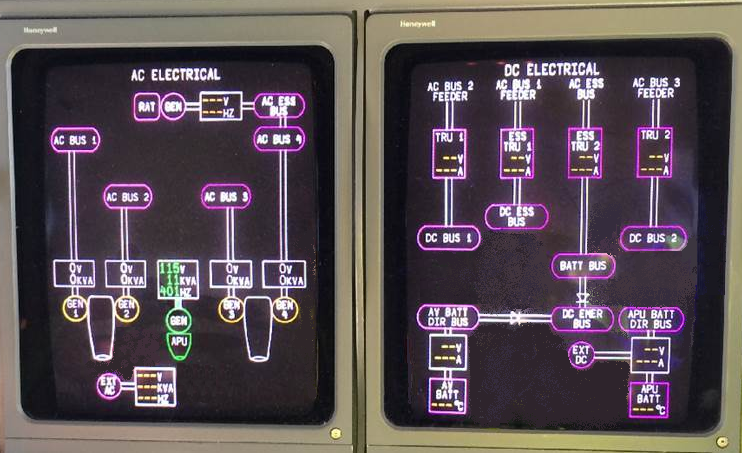
AC AND DC SYNOPTIC PAGES DATA MAGENTA WHEN PEM PRESSED
| Message Code: | 247OBS001 |
| Effectivity: | All |
| System: | Electrical Power |
| System Description: | 24-70-00 |
| Schematic Diagram: | None |
| Wiring Diagram: | None |
Message Description:
When the Pilot Event Marker (PEM) is pressed, the AC and DC Synoptic pages data becomes magenta.
Possible Causes:
- Electrical Management System Control Display Unit (EMS CDU) 1 (A94)
- Electrical Management System Control Display Unit (EMS CDU) 2 (A91)
- AC Power Center (ACPC) (A54)
- DC Power Center (DCPC) (A63)
Troubleshooting Tips:
Advisory Wire/Service Bulletin: None
Forum Articles/Infoservice/Newsletter: None
Quick Links:
| Access to Non-Volatile Memory (NVM) Management |
AMM 45-45-00-970-822 [ Global Express ] [ G5000 ] [ Global XRS ] |
Troubleshooting Recommendations:
- Use the PMAT to access the NVM Download Management tool.
- Select EMS CDU 1A. Select "Clear" in the NVM Function field. Press "OK".
- Repeat this step for the following units:
- EMS CDU 1B
- EMS CDU 2A
- EMS CDU 2B
- ACPC A
- ACPC B
- DCPC A
- DCPC B
- Reset aircraft power. Is the fault still present?
- If NO, do close out.
- If YES, continue with next step.
- Perform the ACPC cards isolation troubleshooting procedure.
- Do close out.