


06/30/21
Message Overview:
Message Name:
LH OR RH SECONDARY NAV LIGHT DOES NOT ILLUMINATE
| Message Code: | 334OBS007 |
| Effectivity: | All |
| System: | Navigation Lighting System |
| System Description: | 33-42-00 |
| Schematic Diagram: | 33-42-00 [ Global Express ] [ G5000 ] [ Global XRS ] |
| Wiring Diagram: | 33-42-01 [ Global Express ] [ G5000 ] [ Global XRS ] |
Message Description:
Wing Navigation Light or Lights (Red/Green Lights) do not come ON.
Possible Causes:
- Left Secondary Wing Navigation Light Bulb
- Right Secondary Wing Navigation Light Bulb
- Left Secondary Wing Navigation Light (DS9)
- Right Secondary Wing Navigation Light (DS11)
- Navigation Control and Indication Unit (A126)
- Thermal Switch (S42)
- Thermal Switch (S43)
- Associated Wiring
Troubleshooting Tips:
Advisory Wire/Service Bulletin: None
Forum Articles/Infoservice/Newsletter: None
Quick Links:
| Removal of the EXTERNAL LIGHTS Control Panel | AMM 33-40-01-000-801 [ Global Express ] [ G5000 ] [ Global XRS ] |
| Installation of the EXTERNAL LIGHTS Control Panel | AMM 33-40-01-400-801 [ Global Express ] [ G5000 ] [ Global XRS ] |
| Removal of the Secondary Wing Navigation-Lights | AMM 33-42-01-000-802 [ Global Express ] [ G5000 ] [ Global XRS ] |
| Installation of the Secondary Wing Navigation-Lights | AMM 33-42-01-400-802 [ Global Express ] [ G5000 ] [ Global XRS ] |
| Replacement of the Secondary Wing-Navigation Light-Bulb | AMM 33-42-01-960-802 [ Global Express ] [ G5000 ] [ Global XRS ] |
| Removal of the Wing Navigation-Light Thermal-Switch | AMM 33-42-03-000-801 [ Global Express ] [ G5000 ] [ Global XRS ] |
| Installation of the Wing Navigation-Light Thermal-Switch | AMM 33-42-03-400-801 [ Global Express ] [ G5000 ] [ Global XRS ] |
| Removal of the Failure Indicator Box | AMM 33-42-13-000-801 [ Global Express ] [ G5000 ] [ Global XRS ] |
| Installation of the Failure Indicator Box | AMM 33-42-13-400-801 [ Global Express ] [ G5000 ] [ Global XRS ] |
| Wire Repair - Maintenance Practices - ALL | SPM 20-12-10-02 [ Global Express ] [ G5000 ] [ Global XRS ] |
Troubleshooting Recommendations:
- Set NAV switch to ON.
- If all the navigation lights do not come on, perform the troubleshooting ALL NAV LIGHTS DO NOT ILLUMINATE and continue with next step.
- If any one of the navigation lights do not come on, continue with next step.
- Access Navigation Light Status data page on CAIMS and perform:
- Select System Diagnostics
- Select ATA 33
- Select the Navigation Light Status
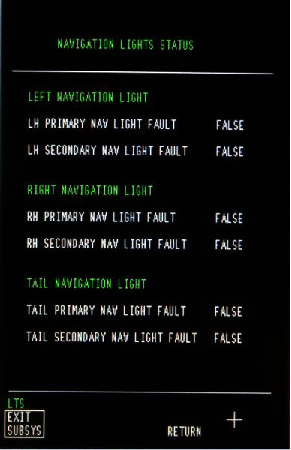
NOTE: Ensure that the power of the NAV light is selected ON for a minimum of 10 minutes prior to reading the values displayed on the CAIMS data page.
- Check the status of Secondary Navigation Light as follows: Is “TRUE” displayed next to Secondary light in data page?
- If NO, go to step 6.
- If YES, continue with next step.
- Replace the NAV light bulb.
- If system checks are good, do close out.
- If fault remains, continue with next step.
- Perform a continuity check as follows:
RH Secondary:From To Result A126P1-P A126P1-G LH Secondary:
From To Result A126P1-P A126P1-C - If there is no continuity, go to step 10.
- If there is continuity, continue with next step.
- Check the status of Secondary Navigation Light as follows: If 'False' is displayed next to "Secondary light" on the data page?
- Confirm that SB 700-33-023 or 700-1A11-33-008 is NOT incorporated on the aircraft
- Ensure that the power of the Navigation light is selected ON for a minimum of 10 minutes prior to reading the values displayed on the CAIMS data page
- Confirm that the Failure Indication Box is connected properly
- If all good, continue with next step
- Perform a continuity check as follows:
RH Secondary:From To Result A126P1-P A126P1-G LH Secondary:
From To Result A126P1-P A126P1-C - If there is no continuity, go to step 10.
- If there is continuity, continue with next step.
- Ensure that the NAV light bulb is secured into place.
- If damages are found, repair or replace as required and do close out.
- If damages are not found, continue with next step.
- Perform a continuity check as follows:
RH Secondary:From To Result A126P1-G DS11-1 A126P1-P GS218 LH Secondary:
From To Result A126P1-C DS9-1 A126P1-P GS218 - If there is no continuity, repair defective wiring as required and do close out.
- If there is continuity, continue with next step.
- Replace the Failure Indicator Box.
- Do close out.