


01/12/21
Message Overview:
Fault Message:
BRAKE CTRL UNIT [CH A]/ WRG FAULT
Fault Code:
27661291SX
Associated CAS:
| Reporting LRU: | Flight Control Unit (FCU) 1 |
| System Description: | 27-60-00 |
| Schematic Diagram: | 27-60-00 [ Global Express ] [ G5000 ] [ Global XRS ] |
| Wiring Diagram: | 32-43-01 [ Global Express ] [ G5000 ] [ Global XRS ] |
Fault Description:
Flight Control Unit (FCU) 1 does not receive or receive differential speed between the Outboard Wheel Speeds Sensors. The Wheel speeds are provided by the Brake Control Unit from the Opto-Coupler outputs.
Possible Causes:
- Flight Control Unit (FCU) 1 (A65)
- Brake Control Unit (BCU) (A71)
- Left Inboard Brake Control Valve (BCV) (MT153)
- Left Outboard Brake Control Valve (BCV) (MT53)
- Right Inboard Brake Control Valve (BCV) (MT169)
- Right Outboard Brake Control Valve (BCV) (MT56)
- Right Inboard Wheel Speed Transducer (WST) (P18)
- Right Outboard Wheel Speed Transducer (WST) (P19)
- Left Inboard Wheel Speed Transducer (WST) (P16)
- Left Outboard Wheel Speed Transducer (WST) (P17)
- Outboard Wheel Speed Sensor
- Associated Wiring
Troubleshooting Tips:
Advisory Wire/Service Bulletin: None
Forum Articles/Infoservice/Newsletter:
- Forum Newsletter Volume 16 issue 08 2019-04-17 - Reducing the No Fault rate of the Flight Control Unit (FCU)
NOTE: This fault may sometime be cleared by performing the flight control system reset procedure. If the message comes back more then once within 10 flight legs, troubleshooting is required.
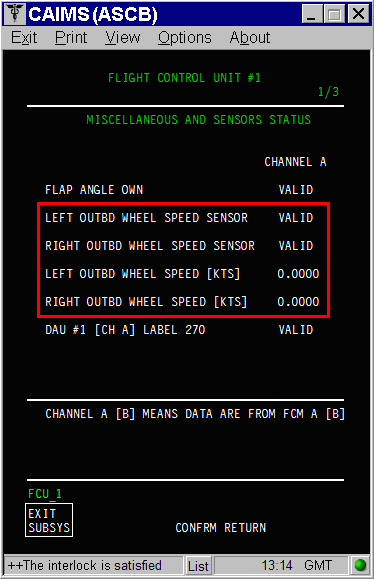
The Outboard Wheel Speeds Transducer can be monitored in CAIMS:
- SYSTEM DIAG
- 27-00 FLIGHT CONTROLS
- FLIGHT CONTROL UNIT #1
- LRU TEST
- DISPLAY MISC. & SENSORS STATUS
- CONFIRM
- Go to page 1 of 3.
Quick Links:
| Lifting of the Complete Aircraft with Jacks | AMM 07-10-01-581-801 [ Global Express ] [ G5000 ] [ Global XRS ] |
| Removal of the Flight-Control Units | AMM 27-61-05-000-801 [ Global Express ] [ G5000 ] [ Global XRS ] |
| Installation of the Flight-Control Units | AMM 27-61-05-400-801 [ Global Express ] [ G5000 ] [ Global XRS ] |
| Pressure Test of the Brake System | AMM 32-43-00-780-801 [ Global Express ] [ G5000 ] [ Global XRS ] |
| Removal of the Brake Control Unit | AMM 32-43-01-000-801 [ Global Express ] [ G5000 ] [ Global XRS ] |
| Installation of the Brake Control Unit | AMM 32-43-01-400-801 [ Global Express ] [ G5000 ] [ Global XRS ] |
| Access to System Diagnostics | AMM 45-45-00-970-804 [ Global Express ] [ G5000 ] [ Global XRS ] |
| Wire Repair - Maintenance Practices - ALL | SPM 20-12-10-02 [ Global Express ] [ G5000 ] [ Global XRS ] |
Troubleshooting Recommendations:
- If the Brake Control Unit reported a fault in CAIMS, troubleshoot Brake system first.
- Access CAIMS and confirm the wheel speeds transducers are valid and are reporting an accurate speed.
NOTE:- The wheel speed verification can be done by taxiing the A/C.
- Do not exceed 50 kts otherwise CAIMS will no longer be valid.
- Make sure the brakes are not getting warmer then other brakes on the status page in the Flight Compartment.
- Interchange FCU 1 with FCU 2 and reset FCU Latched faults. Is the fault still present on the same side?
- If YES, continue with next step.
- If NO, replace defective FCU.
- Perform wiring checks between FCU 1 and Brake Control Unit.
- If wiring defects are found, repair defective wiring as required and do close out.
- If no defects are found, continue with next step.
- Perform wiring checks between BCU and outboard wheel speed sensors.
- If wiring defects are found, repair defective wiring as required and do close out.
- If no defects are found, continue with next step.
- Jack the aircraft, pressurize hydraulic systems 2 and 3 and confirm the wheels can rotate freely.
- If the wheels can rotate freely, continue with next step.
- If one or more wheel does not rotate freely, troubleshoot associated brake system component.
NOTE: Steps 6 to 10 will help identify a defective or sticky valve scenario.
- Use CAIMS to view the Brake pressure data pages as follows:
- Select SYSTEM DIAG
- Select ATA 32
- Select BRAKE CONTROL UNIT
- Select LRU TEST
- Select SYSTEM DATA PAGES
- Select CONFRM
- Monitor the Brake Pressures
- Slowly press and release the brakes and make sure the pressure rise and drop is smooth and linear.
- If the pressure rise/drop is not smooth and linear on one of the brakes, troubleshoot the associated Brake Control Valve and/or pressure sensing.
- If the pressure rise/drop is smooth and linear on all brakes, continue with next step.
- Perform the Pressure Test of the Brake System (AMM 32-43-00-780-801).
- If the residual brake pressure after brake pedal release is more than 100 psig (689.48 kPa), interchange the associated Brake Control and Shut-Off valve to confirm faulty valve and replace if required.
- If test results are good, continue with next step.
- Interchange an outboard with an inboard wheel speed sensor, one at a time until the fault changes onto the FCU 2 with the CAIMS fault "BRAKE CTRL UNIT [CH B]/ WRG FAULT".
- If faulty sensor is identified, replace faulty outboard wheel speed sensor and do close out.
- If no change is observed, continue with next step.
- Replace the BCU.
- Do close out.