06/29/21
Message Overview:
Message Name:
UNSCHEDULED FUEL IN FORWARD TANK - 'FWD FAIL' / 'INHIBIT' ANNUNCIATION
| Message Code: | 282OBS007 |
| Effectivity: | All |
| System: | Fuel System |
| System Description: | 28-23-00 |
| Schematic Diagram: | 28-23-00 [ Global Express ] [ G5000 ] [ Global XRS ] |
| Wiring Diagram: | 28-23-01 [ Global Express ] [ G5000 ] [ Global XRS ] |
Message Description:
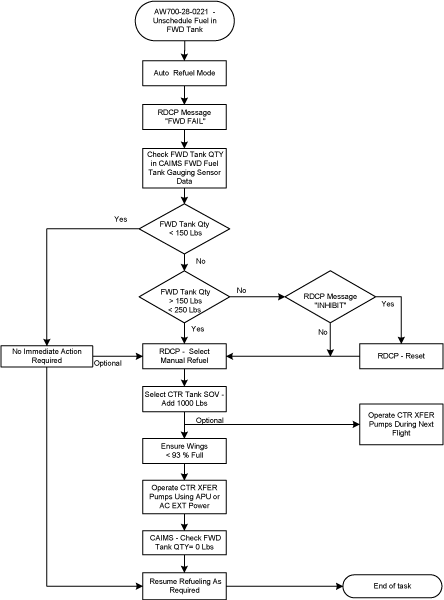
During normal system operation, there is a possibility for fuel to enter and accumulate in the Forward Tank during automatic refueling operation, when no fuel is scheduled for this tank. This cause the 'FWD FAIL/INHIBIT' message(s) displayed on Refuel/Defuel Control Panel (RDCP).
Possible Causes:
- Forward Refuel Shut-off Valve (SOV)
Troubleshooting Tips:
Advisory Wire/Service Bulletin:
- AW700-28-0221 - Fuel System- Unscheduled Fuel in Forward Tank
Forum Articles/Infoservice/Newsletter: None
Quick Links:
| Pressure Refueling | AMM 12-11-01-650-801 [ Global Express ] [ G5000 ] [ Global XRS ] |
| Access to System Diagnostics | AMM 45-45-00-970-804 [ Global Express ] [ G5000 ] [ Global XRS ] |
Troubleshooting Recommendations:
- Using CAIMS System Diagnostic, LRU Test Function, access the "FWD Fuel Tank Gauging Sensor Data" to check the forward tank fuel quantity.
- If forward tank quantity is less than 150 lbs, transfer the forward tank fuel into the center tank at the next opportunity (refer to flow chart).
- If forward tank quantity is more than 250 lbs, continue with next step.
- Transfer the forward tank fuel into the center tank.
- If the system checks are good, do close out.
- If fault remains, continue with next step.
- Perform "284OBS004 - FWD FAIL INDICATION ON THE REFUEL/DEFUEL CONTROL PANEL" annunciation troubleshooting.
- If the system checks are good, do close out.
- If fault remains, continue with next step.
- Perform "282OBS003 - INHIBIT" ANNUNCIATION ON RDCP IN AUTO MODE REFUELING" annunciation troubleshooting.
- Do close out.