07/05/19
Message Overview:
Fault Message:
LH MFS #2 RET SNSR/WRG FAULT
Fault Code:
27656282SX
Associated CAS:
| Reporting LRU: | Flight-Control Unit (FCU) 2 |
| System Description: | 27-60-00 |
| Schematic Diagram: | 27-60-00 [ Global Express ] [ G5000 ] [ Global XRS ] |
| Wiring Diagram: | 27-60-07 [ Global Express ] [ G5000 ] [ Global XRS ] |
Fault Description:
There is a problem with Left Multi-Function Spoiler (MFS) 2 Proximity Switch Sensor (PSS).
Possible Causes:
- Left Multi-Function Spoiler (MFS) Proximity Switch Sensor (PSS) 2 (MT115)
- Flight-Control Unit (FCU) 2 (A66)
- Associated Wiring
Troubleshooting Tips:
Advisory Wire/Service Bulletin: None
Forum Articles/Infoservice/Newsletter:
- Forum - Volume 5, Issue 08 - (Dist. Apr 22, 2008) GLOBAL SERIES - Spoiler Micro switch Installation.
This fault may sometime be cleared by performing the flight control system reset procedure. If the message comes back more then once within 10 flight legs, troubleshooting is required.
Getting access and inspecting to the proximity switch sensor and connector for corrosion may clear the condition on the a/c.
The proximity sensor can be found in CAIMS:
- SYSTEM DIAG.
- 27-00 FLIGHT CONTROLS.
- FLIGHT CONTROL UNIT #2.
- LRU TEST.
- DISPLAY SPOILER DATA.
- CONFIRM.
- Go to sheets 2/3 and make sure the channel B is active on CAIMS.
Quick Links:
| Removal of the Flight-Control Units | AMM 27-61-05-000-801 [ Global Express ] [ G5000 ] [ Global XRS ] |
| Installation of the Flight-Control Units | AMM 27-61-05-400-801 [ Global Express ] [ G5000 ] [ Global XRS ] |
| Removal of the Spoiler Proximity Switch Sensors | AMM 27-61-09-000-801 [ Global Express ] [ G5000 ] [ Global XRS ] |
| Installation of the Spoiler Proximity Switch Sensors | AMM 27-61-09-400-801 [ Global Express ] [ G5000 ] [ Global XRS ] |
| Access to System Diagnostics | AMM 45-45-00-970-804 [ Global Express ] [ G5000 ] [ Global XRS ] |
| Wire Repair - Maintenance Practices - ALL | SPM 20-12-10-02 [ Global Express ] [ G5000 ] [ Global XRS ] |
Troubleshooting Recommendations:
- Disconnect the left MFS 2 PSS (MT115) to make sure there is no corrosion on the pin/sockets and no corrosion on the a/c structure surrounding the PSS.
NOTE: Use contact cleaner.- If system checks are good, do close out.
- If fault remains, continue with next step.
- Make sure the PSS is adjusted properly. The clearance between the sensor and the plate must be 0.045 ±0.01 in (1.14 ±0.25 mm).
- If system checks are good, do close out.
- If fault remains, continue with next step.
- Swap FCU 2 with FCU 1.
- If system checks are good, replace FCU 2. Reset FCUs latched faults and do close out.
- If fault remains, continue with next step.
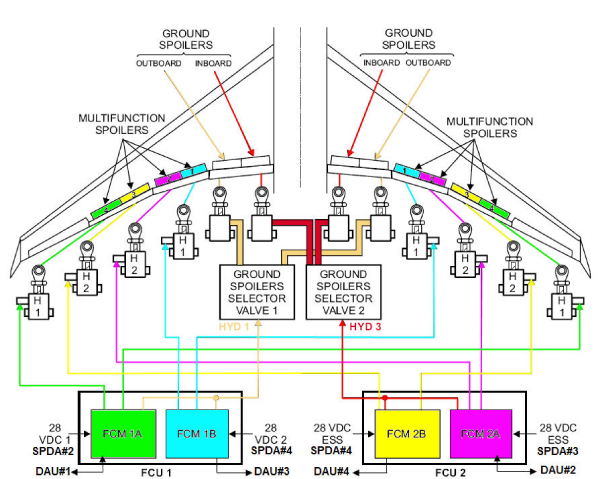
NOTE: To identify the flight control channel corresponding to the faulty MFS PSS, use the FCU layout.
- Perform wiring checks between FCU 2 and left MFS 2 PSS (MT115).
- If wiring checks are not good, repair defective wiring as required and do close out.
- If wiring checks are good, continue with next step.
- Replace left MFS 2 PSS (MT115).
- Do close out.